
Your Bubble App Is a Black Box — Here's How to Document It Before You Hire a Developer
Most Bubble.io apps have zero architecture documentation. When you hire a developer, raise funding, or negotiate an acquisition, that black box becomes your biggest liability. Here's what Bubble actually exports, what it doesn't, and how to get complete documentation in minutes.
19 min read
You built your product on Bubble.io. It works. Users pay for it. The business is growing. But ask yourself this: if you had to hand your entire application to a new developer tomorrow — every workflow, every API integration, every privacy rule, every scheduled job — what would you actually give them?
The answer, for the vast majority of Bubble apps, is: a login to the Bubble editor and a prayer. There are no architecture diagrams. No API specifications. No workflow documentation. No data dictionaries. The entire system lives inside a visual editor that cannot be searched, version-controlled, or exported as readable documentation. Your app is a black box — and it stays that way until the moment you urgently need it not to be.
Every Bubble App Is Undocumented by Default
This is not a criticism of Bubble or of the teams that build on it. It is a structural reality of how visual development works.
Code Is Documentation. Visual Apps Are Not.
When a developer builds with code, the codebase itself is searchable documentation. You can grep for every database query, trace every API call, read every function signature. Code reviews, pull requests, and commit histories create an automatic paper trail. A developer joining the team can read the source and understand the system.
Bubble applications have none of this. Business logic lives in visual workflow blocks that cannot be searched across the application. A single workflow might span three screens of nested conditions — and the only way to read it is to open the editor and click through it manually. There is no "grep" for Bubble. There is no version diff. There is no way to get a bird's-eye view of what the application actually does without opening every workflow, every data type, every API connector, one at a time.
The Documentation Debt Compounds
When you launched your MVP, documentation was irrelevant. Speed mattered. But every feature added since then — every new workflow, every API integration, every privacy rule — increased the gap between what the app does and what anyone can explain about it without opening the editor. After roughly a year or two of active development, we have observed apps containing roughly 15 to 30 data types, 50 to 150 workflows, 5 to 15 API integrations, and dozens of privacy rules that collectively represent the business logic. All of it undocumented.

What Bubble Actually Lets You Export
Bubble's own documentation is clear about what you can and cannot take with you. The answer is less than most founders expect.
What You Get: Database Records
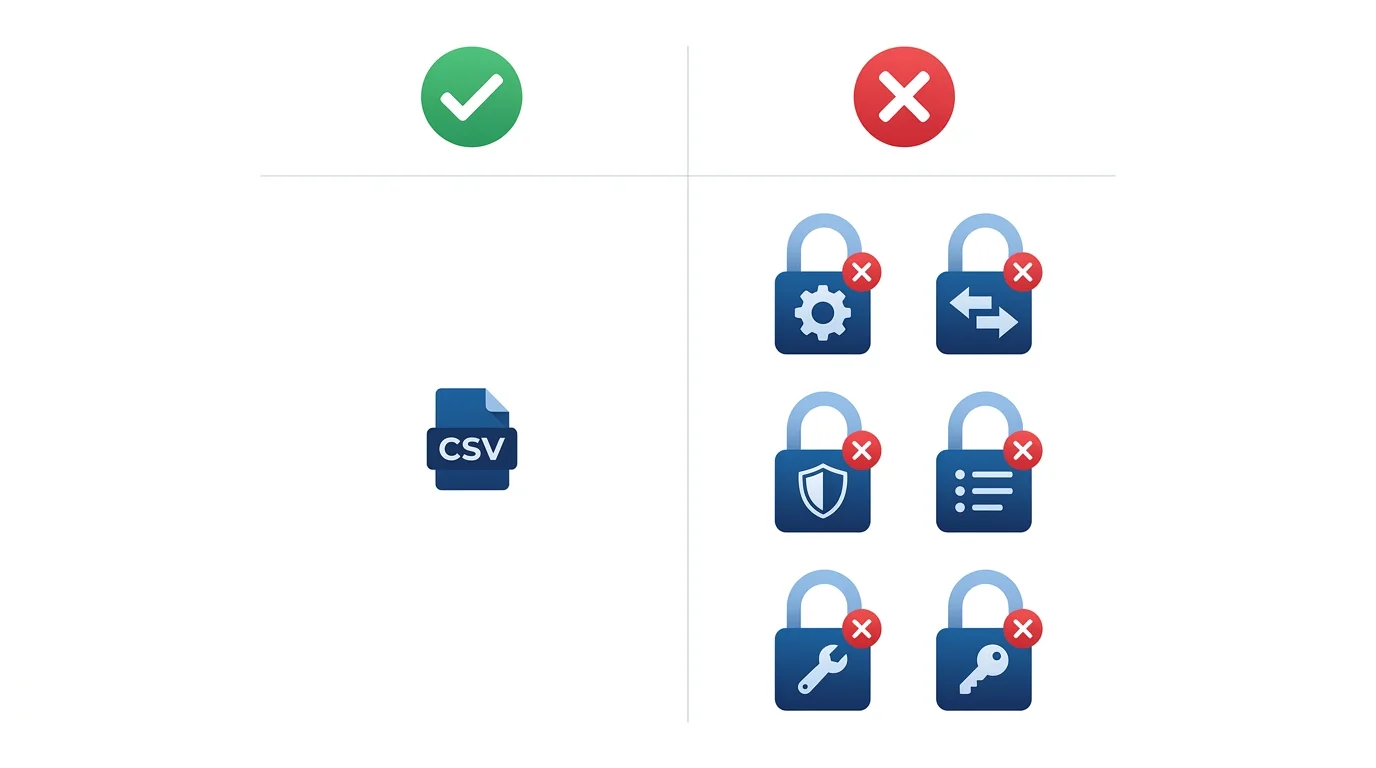
Bubble supports exporting database records in three formats: CSV, JSON, and NDJSON. The process is manual — navigate to Data, select a data type, configure a view, click Export, and Bubble emails you a download link. One table at a time. No bulk export of the entire database in one operation.
Even this limited export has known issues. Bubble's own documentation notes that date interval fields export as descriptive text ("2 days") instead of the stored millisecond value (172,800,000), breaking round-trip imports. And the export feature shares the same scheduler as API workflows — during high-traffic periods, exports queue behind scheduled tasks with no guaranteed delivery time.
What You Do Not Get: Everything Else
Bubble's official documentation on application ownership states it plainly:
"Bubble apps can only be run on the Bubble platform; there's no way of exporting your application as code." — Bubble.io Application and Data Ownership page
The .bubble application export file — available from the editor — is a proprietary format that can only be re-imported into Bubble. It is not human-readable. It is not portable to any other platform. It exists for version rollback within Bubble, not for external use.
| Architecture Layer | Bubble Native Export | Exportable? |
|---|---|---|
| Database records | CSV / JSON / NDJSON (per table) | ✅ Yes |
| Data structure (types, fields, relationships) | Not included in data export | ❌ No |
| Option Sets (enums, constants) | Part of app definition, not data layer | ❌ No |
| API Connector configurations | No export mechanism exists | ❌ No |
| Backend workflows (scheduled, triggered) | Proprietary format, Bubble-only | ❌ No |
| Privacy rules | Part of app logic, not data layer | ❌ No |
| App settings and environment variables | No export mechanism exists | ❌ No |
| User passwords | Proprietary hashing, not disclosed | ❌ No |
The six layers Bubble does not export — data structure, Option Sets, API connectors, backend workflows, privacy rules, and app settings — are exactly where your business logic lives. CSV files give you your data. They tell you nothing about your system.
Three Moments When Documentation Becomes Non-Negotiable
Most Bubble founders do not think about documentation until one of these three moments arrives. By then, the lack of it becomes expensive.
Moment 1: You Hire Your First Developer
Your Bubble app got you to product-market fit. Now you need to add features faster than Bubble allows, or you need custom functionality Bubble cannot provide. You hire a developer — internal or agency — and the first question they ask is: "Can you show me the architecture?"
What they need: a data model showing every type and relationship, documentation of every API integration (endpoints, auth methods, request shapes), a list of every backend workflow with triggers and conditions, and the privacy rules that govern data access. What you can give them: editor access and a walkthrough call. The difference between these two is typically 40 to 120 hours of manual discovery — paid for by you, at their hourly rate, before a single line of new code is written.
Moment 2: Investor Due Diligence
Seed-stage and Series A investors in 2026 increasingly ask for technical due diligence — even for no-code products. They want to understand your architecture's complexity, assess migration risk, and evaluate whether the technical foundation can scale. When the diligence team asks "Can you provide your data architecture diagram and API surface documentation?", a Bubble founder has no answer.
This is not hypothetical. The sentiment is widespread in no-code operator communities — if you cannot produce your own architecture, you do not really own your app — and investors are increasingly applying the same logic during diligence. A complete architecture blueprint — showing data models, workflow logic, and integration points — demonstrates technical maturity even when the code is visual.
Moment 3: Acquisition or Exit
When a buyer evaluates your company, their technical team conducts due diligence on the product. For code-based products, this means reviewing the repository, running the test suite, and assessing code quality. For Bubble products, the buyer needs to understand exactly what they are acquiring — how complex the system is, what it would cost to migrate to code if needed, and what business logic is embedded in the workflows.
Without documentation, the buyer's team must spend days manually clicking through the Bubble editor — or they discount the valuation to account for the unknown. We have seen agencies quote migration cost estimates roughly in the $1,500 to $15,000 band, with complex apps quoted higher. An acquirer who cannot assess that complexity accurately will assume the worst case.

The Real Cost of Not Having Documentation
The cost is not abstract. It shows up in specific line items that compound over time.
Manual Audit Economics
A thorough manual audit of a medium-complexity Bubble app takes 40 to 120 hours. We have seen agencies quote roughly $100 to $200 per hour, putting the discovery phase in the $4,000 to $24,000 band — just to understand what the app does, before any development work begins. Migration agencies that include a discovery phase commonly charge separately for it. Most teams, understandably, try to skip or abbreviate it. The resulting timeline overruns cost far more than the audit would have.
The Handoff Tax
Every time you bring a new developer, freelancer, or agency onto the project, they pay the same discovery tax. Without documentation, each new person must click through the editor, reverse-engineer the logic, and build their own mental model. The Bubble community forums and migration retrospectives consistently surface a few patterns:
- Data extraction friction: Operators who have moved millions of records out of Bubble routinely describe the data export process as painful and the platform's data lock-in as a structural frustration, not a workflow inconvenience.
- Option Sets are not just records: Practitioners migrating to relational databases consistently flag that Option Sets must be mapped into proper enum or lookup tables — database migration is more than importing CSV files.
- No first-party export tool on the horizon: Public statements from the Bubble team have, for several years, signaled that a code or full-architecture export tool is not in their near-term roadmap, leaving documentation up to the operator.
The Portability Comparison
Not every no-code platform creates this documentation gap. The contrast is instructive:
| Platform | Architecture Portability | Documentation Model |
|---|---|---|
| Bubble.io | Data records only (CSV) | Your app IS Bubble — logic is inseparable from platform |
| FlutterFlow | Full Dart/Flutter code export | Platform generates portable code you own |
| Xano | Structured JSON export, Git-compatible | Backend logic exportable and version-controllable |
| WeWeb | Static site export, external DB connections | Data lives in systems you control (Supabase, Xano) |
The fundamental distinction: on other platforms, your app uses the platform. On Bubble, your app is the platform. That difference defines the documentation problem.
What Complete Bubble Documentation Looks Like
Whether you document manually or use automated tools, the goal is the same: a complete blueprint covering every layer of your application's architecture. Here is what "complete" actually means.
The Four Architecture Categories
A fully documented Bubble app covers four distinct categories — not just the database:
- Data Structure: Custom data types, every field and its type, relationships between types, Option Sets. Output: ERD diagram showing all connections, DDL script ready for PostgreSQL or MySQL, table specification with field-level detail, data dictionary explaining business meaning
- API Connectors: Every external integration — endpoint URLs, authentication methods, custom headers, query parameters, JSON body structures. Output: API specification document per integration
- Backend Workflows: Server-side logic including scheduled jobs (hourly, daily, weekly), database triggers, custom events, and conditional parameters. Output: workflow documentation with trigger conditions, action sequences, and screenshots
- App Settings: Domain configuration, language settings, environment variables, global application settings. Output: enum/constants definition, configuration inventory
Nine Document Types
Complete documentation produces nine standardized outputs that serve different audiences:
| Document | Primary Audience | What It Enables |
|---|---|---|
| ERD Diagram | Database architects, backend devs | Schema design for target database |
| DDL Script | Database engineers | Direct schema creation in PostgreSQL/MySQL |
| Table Specification | Full-stack developers | Field-level implementation reference |
| Data Dictionary | Product managers, new devs | Business context for every field |
| API Specification | Backend developers | Integration rebuild without reverse-engineering |
| Backend Workflow Docs | Backend developers | Business logic translation to code |
| Enum/Constants Definition | Full-stack developers | Option Set migration to enum tables |
| Full Markdown Export | AI coding tools (Cursor, Claude) | Structured input for code generation |
| Workflow Screenshots | QA, product managers | Visual verification of logic capture |

The full markdown exports are specifically formatted for AI code generation. Teams feeding structured documentation — ERD, API specs, and workflow documentation — into AI assistants like Cursor or Claude can shorten implementation cycles compared to building from scratch with only a Bubble walkthrough, with the gap concentrating on schema scaffolding, API integration stubs, and background-job handlers, where structured input maps almost directly to generated code.
Manual Audit vs. Automated Extraction
You have two paths to documentation. The choice depends on your budget, timeline, and tolerance for gaps.
The Manual Path
Hire a developer or agency to click through every screen in the Bubble editor and document what they find. A thorough manual audit of a medium-complexity app takes 40 to 120 hours. The output quality depends entirely on the auditor's thoroughness — and human attention has limits. Scheduled backend workflows with no visible UI get missed. Nested privacy rule conditions get simplified. API connector configurations get noted as "Stripe integration" without capturing the specific endpoint URLs, headers, and body shapes a developer needs to rebuild them.
The math: at the rates we have seen agencies quote (roughly $150 per hour), a 60-hour audit lands near $9,000; at the upper end of the band (around $200 per hour) it lands near $12,000. This is before any development work begins.
The Automated Path
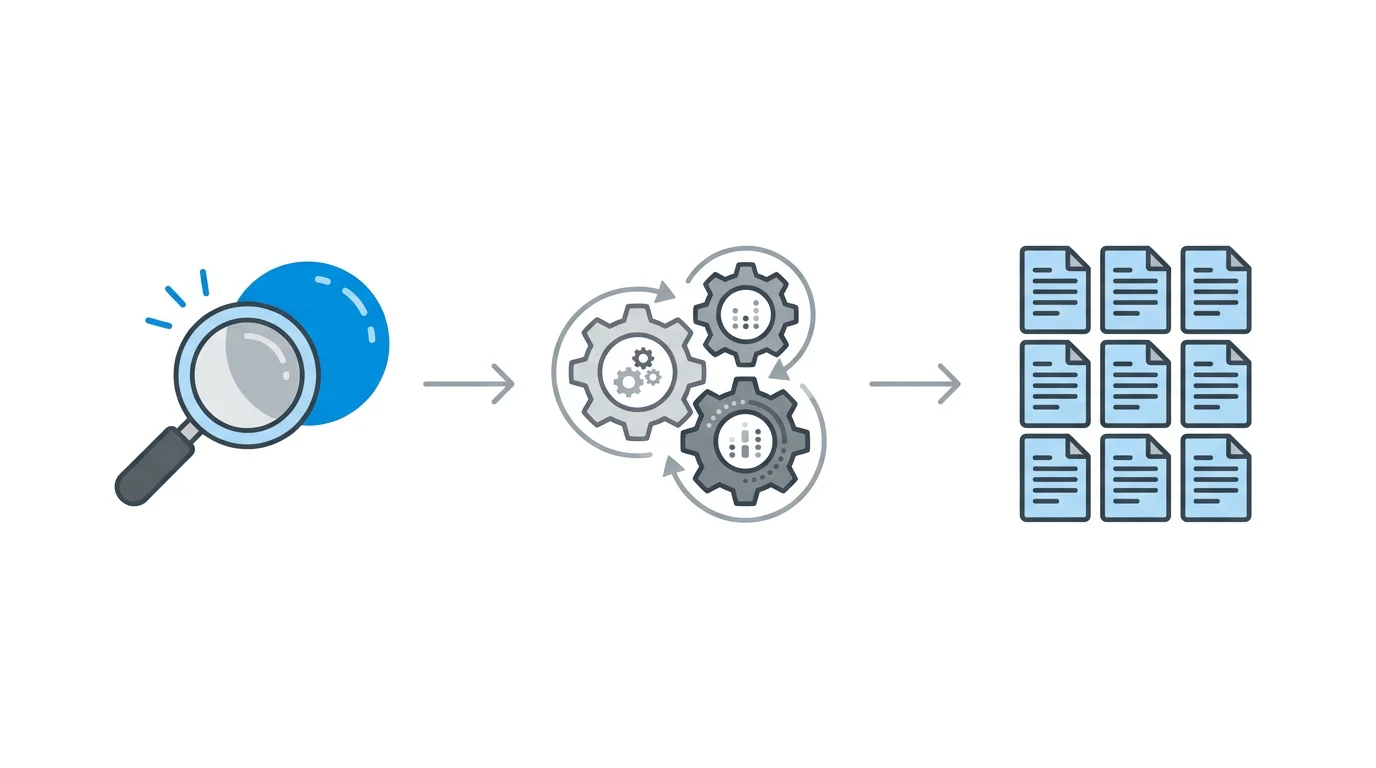
Relis connects to your Bubble app with viewer-only access and extracts the four architecture categories automatically. The extraction uses Playwright to navigate the Bubble editor programmatically — reading data types, fields, workflows, API connectors, and settings — and generates the nine document types, typically completing in under 10 minutes for medium-complexity apps.
The extraction process runs a three-stage verification: initial DOM extraction, re-extraction for completeness, and improvement rate measurement. The result is a complete architecture blueprint that covers the layers manual audits routinely miss — including scheduled backend workflows, conditional parameters in API connectors, and Option Sets that do not appear in data exports.
The Comparison
| Factor | Manual Audit | Automated Extraction |
|---|---|---|
| Time to complete | Roughly 40 to 120 hours (observed) | Under 10 minutes |
| Cost (medium app) | Roughly $4K to $24K (observed agency quotes) | Fraction of manual cost |
| Scheduled workflows | Often missed (no visible UI) | Captured automatically |
| API connector details | Depends on auditor thoroughness | Full endpoint, auth, header, body capture |
| Option Sets | Frequently omitted | Extracted as enum/constants definitions |
| Consistency | Varies by person | Standardized format every time |
| Access required | Editor-level or higher | Viewer-only |
Even if you are not planning to migrate, having your architecture documented protects you. If your lead developer leaves, if an investor asks for technical DD, if you want to bring on a freelancer for a specific feature — the documentation pays for itself the first time you need it. You do not need to be leaving Bubble to benefit from knowing what you built.
Frequently Asked Questions
Q. I am not planning to leave Bubble. Do I still need documentation?
Yes. Documentation is not just for migration — it is for onboarding new team members, answering investor questions, and reducing your dependency on the one person who knows how the app works. If that person leaves, your undocumented app becomes a liability immediately.
Q. Can I export my Bubble app's workflows as code?
No. Bubble's official documentation confirms that "there's no way of exporting your application as code." The .bubble export file is a proprietary format that can only be re-imported into Bubble. Workflows, API configurations, and privacy rules cannot be exported in any readable format.
Q. How much does a manual architecture audit typically cost?
For a medium-complexity Bubble app (20 data types, 10+ backend workflows, 5+ API integrations), we have seen thorough manual audits run roughly 40 to 120 hours at agency rates of about $100 to $200 per hour — landing in the $4,000 to $24,000 band before any development begins.
Q. What do investors actually ask about the technical architecture?
Common questions include: data model complexity, third-party integration dependencies, migration cost estimate to custom code, backend workflow documentation, and whether the architecture can scale. Having a complete architecture blueprint demonstrates technical maturity regardless of whether the app is built with code or no-code.
Q. Does Relis need admin access to my Bubble app?
No. Relis connects with viewer-only access. It reads the architecture from the Bubble editor without modifying anything — no write permissions, no data changes, no risk to your production application.
Own Your Architecture, Not Just Your Data
- Bubble exports data, not architecture: CSV files give you your records. They tell you nothing about your workflows, API integrations, privacy rules, or app settings — the layers where your business logic lives.
- Documentation is not optional at three critical moments: When you hire a developer, face investor due diligence, or enter acquisition conversations, the lack of architecture documentation costs thousands in manual audits or discounted valuations.
- Manual audits are thorough but expensive: Observed agency quotes for a medium-complexity app land in the $4K to $24K band — most teams skip the audit and pay the price in developer onboarding time and migration overruns.
- Automated extraction closes the gap: Complete architecture documentation across all four categories and nine document types, generated in minutes instead of weeks, at a fraction of the cost.
- You do not need to be migrating to benefit: Documentation is insurance. It protects you against key-person dependency, speeds up onboarding, satisfies investor questions, and preserves optionality whether you stay on Bubble or leave.
Your Bubble app is a black box because the platform was designed for speed, not portability. That trade-off made sense when you were building your MVP. It stops making sense the moment someone outside the editor needs to understand what you built. Fix the documentation now — while it is a choice, not an emergency.
Document Your Bubble App in Minutes
Extract your complete architecture — data schemas, API specs, backend workflows, app settings — across 4 categories and 9 document types. Viewer-only access. No risk to your production app.
Scan My App — FreeSee Your Bubble Architecture — Automatically
Stop reverse-engineering by hand. Relis extracts your complete database schema, API connections, and backend workflows in under 10 minutes.
See Your Bubble Architecture — Automatically
Stop reverse-engineering by hand. Relis extracts your complete database schema, API connections, and backend workflows in under 10 minutes.