
Bubble to Code in 2026: The Step-by-Step Migration Roadmap
The complete roadmap for migrating from Bubble.io to custom code in 2026. Covers all four architecture layers you must document — data, APIs, backend workflows, and settings — plus timelines, costs, and the audit step most teams skip.
21 min read
You built on Bubble.io to move fast. It worked — your MVP shipped, users signed up, and the product proved itself. But now page loads take three to five seconds, workload unit bills keep climbing, and every new feature takes longer than the last.
The decision to migrate from Bubble to custom code is hard. But once you make it, the path forward matters more than the decision itself. Most migration guides skip straight to "pick a tech stack." This one starts where it should — with the four architecture layers your Bubble app depends on that you cannot export, and what happens when you try to migrate without documenting them.
Why 2026 Is the Tipping Point
Bubble remains an excellent platform for validating ideas quickly. But 2026 has introduced a convergence of pressures that make staying on Bubble more expensive than leaving.
The Cost Squeeze
Workload unit pricing has changed the economics fundamentally. Teams routinely report material overage charges in a single billing cycle — often into the hundreds of dollars — with auto-charges that arrive without warning. Once your combined costs — Bubble subscription, plugin fees, freelancer patches, and performance workarounds — climb into the mid four-figure range per month, the financial case for migration becomes straightforward.
The AI Inflection
In 2024, rebuilding a Bubble app in code meant months of manual development. In 2026, AI coding tools like Cursor, GitHub Copilot, and Claude can scaffold entire applications — but only from structured documentation. Feed an AI tool a complete API specification and it will generate working endpoint code. Give it a vague description and it will hallucinate. The bottleneck has shifted from writing code to having the right documentation to write code from.
The Compliance Wall
Enterprise clients and investors increasingly require SOC 2 compliance, HIPAA readiness, or the ability to pass a code audit. When your backend logic lives in a visual editor that cannot be exported, audited, or version-controlled, these requirements become blockers.
- Cost: Workload-unit-driven bills that have grown into the low-thousands-per-month range with no realistic optimization path left
- Performance: Page loads consistently above several seconds and API timeouts under realistic peak load
- Compliance: Investor due diligence, SOC 2, or HIPAA requirements Bubble cannot satisfy
The Four Architecture Layers Bubble Locks Away
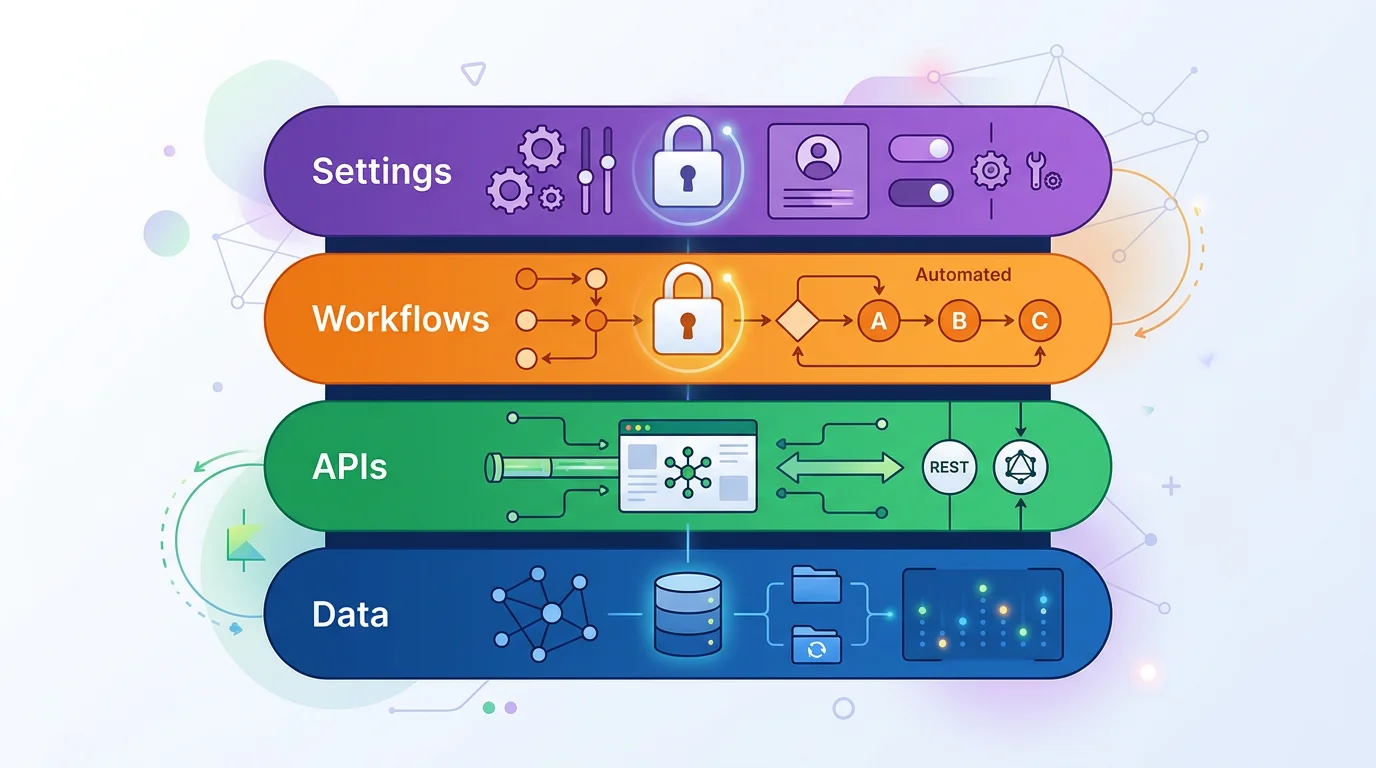
Every migration guide tells you to "audit your Bubble app" as the first step. None of them explain what that actually means. Your Bubble application is not just a database with a frontend. It is four distinct architecture layers, and Bubble only lets you export one of them.
Layer 1: Data Structure
This is the layer most teams think about first — your custom data types, their fields, field types, and how they relate to each other. Bubble lets you export your data records as CSV files via the Data API. But CSV files do not capture your schema — the field types, constraints, list relationships, or Option Sets that define your data model. When you migrate, you need an ERD (entity-relationship diagram) that maps every connection, a DDL script that recreates your schema in PostgreSQL or MySQL, and a data dictionary that explains what each field actually means in business terms.
Layer 2: API Connectors
If your Bubble app integrates with Stripe, SendGrid, Twilio, or any external service, those integrations live in the API Connector panel. Each one contains an endpoint URL, an authentication method, custom headers, query parameters, and JSON body structures. None of this is exportable. During migration, your developers need these exact specifications to rebuild each integration — the auth token format, the header names, the request body shape. Without them, developers reverse-engineer each integration by triggering API calls and inspecting network logs, a process that takes days per integration.
Layer 3: Backend Workflows
This is where most migrations go wrong. Backend workflows are server-side logic that runs without any visible UI — scheduled jobs that fire every hour, database triggers that send emails when a record changes, recurring events that clean up expired data at 3 AM. A medium-complexity Bubble app typically has 5 to 15 of these, and they are completely invisible unless you open the backend workflow editor and click through each one manually.
Each workflow contains triggers, conditions, and action sequences — often with nested conditional logic that implements core business rules. When these go undocumented, developers discover them in week 12 of a project when something breaks because an expected background process is not running in the new system.
Layer 4: App Settings
Domain configurations, language settings, environment variables, SEO metadata, and global application settings live in Bubble's settings panel. These seem minor until migration day — when your custom domain does not resolve, your OAuth redirect URIs point to the old Bubble URL, and your environment-specific API keys are nowhere to be found because nobody documented which settings existed.
| Architecture Layer | Bubble Export? | What You Need for Migration |
|---|---|---|
| Data Structure | Records only (CSV) | ERD diagram, DDL script, data dictionary, table spec |
| API Connectors | No | API specification with endpoints, auth, headers, body shapes |
| Backend Workflows | No | Workflow documentation with triggers, conditions, action sequences |
| App Settings | No | Environment configs, domain settings, enum/constants definitions |
The three layers Bubble does not export — APIs, workflows, and settings — are exactly where your business logic lives. They are the hardest to document manually and the most expensive to discover late.
Why Manual Audits Miss Half Your App
A thorough manual audit of a medium-complexity Bubble app takes 40 to 120 hours. A developer opens the Bubble editor, clicks through every data type, every workflow, every API connection, and documents what they find in spreadsheets or Notion pages. The problems are predictable.
The Visibility Problem
When migrating between traditional codebases — say, Rails to Node.js — developers can grep the source code for every database query, trace every API call, and map every business rule. Bubble applications are not text. They are visual configurations stored in a proprietary format. The only way to understand a Bubble app is to click through the editor manually, and human attention has limits.
What Gets Missed
| Architecture Layer | What Gets Missed | Impact on Migration Timeline |
|---|---|---|
| Data Structure | List fields creating implicit many-to-many relationships | +1 to 2 weeks for schema redesign |
| API Connectors | Auth token refresh logic, conditional headers | +1 to 2 weeks per integration |
| Backend Workflows | Scheduled jobs with no visible UI, nested conditions | +2 to 4 weeks per undiscovered workflow |
| App Settings | Environment-specific variables, OAuth redirect URIs | +1 week of cutover debugging |
In Bubble, privacy rules are not just access control — they function as query filters. A rule that says "Users can only see their own records" changes the behavior of every search on that data type. During migration, this must be replicated as middleware, database queries, or row-level security policies — not just UI restrictions.
Automated Architecture Extraction
The alternative to a manual audit is automated extraction. Relis connects to your Bubble app with viewer-only access and extracts all four architecture layers automatically — data types with field relationships, API connector configurations, backend workflow logic, and app settings — generating 9 standardized document types in under 10 minutes. The output includes ERD diagrams for schema design, DDL scripts ready for PostgreSQL or MySQL, API specifications for endpoint rebuilding, backend workflow documentation for business logic translation, data dictionaries for field mapping, enum/constants definitions for settings, and full markdown exports formatted for AI coding tools.
Whether you audit manually or use automated extraction, the goal is the same: a complete blueprint covering all four layers before any code is written.
The Migration Roadmap: 7 Steps
With your architecture documented across all four layers, migration becomes a structured project instead of an excavation.

Step 1: Extract Your Architecture
Document all four layers before writing a single line of code. Your output should include: an ERD diagram showing every data type and relationship, DDL scripts for your target database, API specifications for every external integration, backend workflow documentation covering every trigger and action sequence, and a data dictionary defining what each field means in business terms. This package becomes the single source of truth for every decision that follows.
Step 2: Choose Your Target Stack
With architecture documentation in hand, stack selection becomes data-driven. You know exactly how many data types need relational mapping, how many API endpoints need rebuilding, how complex your backend workflows are, and what scheduled jobs need a task runner. See the next section for stack recommendations.
Step 3: Design Your Database Schema
Map Bubble's data model to a proper relational schema. Bubble uses a document-style store that looks relational but is not — lists stored as arrays of references, circular relationships between types, and denormalized structures all need transformation. Your extracted ERD and DDL scripts provide the target schema. The gap between current Bubble structure and target schema defines your migration scripts.
Step 4: Rebuild API Integrations
Using your API specification documents, rebuild each external integration in your new codebase. This is where having exact endpoint URLs, authentication methods, header configurations, and request body shapes saves weeks of reverse-engineering. Each Bubble API Connector entry maps to a service client or API route in your new stack.
Step 5: Translate Backend Logic
Convert your backend workflow documentation into API endpoints, background jobs, and database triggers. Each Bubble workflow becomes a clear specification — trigger condition, action sequence, error handling — that a developer or AI coding assistant can implement directly. Scheduled workflows become cron jobs or task queue entries. Database triggers become event handlers or webhooks.
Step 6: Build the Frontend
Build your UI against documented API contracts and data models. Frontend developers work from the architecture blueprint rather than reverse-engineering the Bubble visual editor. Element visibility conditions from Bubble — which often encode authorization checks and state machine logic — need to become server-side validations, not just CSS toggles.
Step 7: Test, Cut Over, Launch
Migrate production data to staging. Test against real records, not synthetic data. Pay attention to edge cases: orphaned records, null fields accumulated over years, file URLs pointing to Bubble's CDN. For apps under 5,000 users, a weekend cutover with 24 to 48 hours of planned downtime is standard. Keep Bubble in read-only mode for at least two weeks post-launch as a safety net.
The markdown exports from architecture extraction are specifically formatted for AI coding tools. Feed your ERD, API specs, and workflow docs into Cursor or Claude to scaffold your new codebase. Teams using structured architecture documentation with AI assistants commonly report rebuilding core features a multiple of times faster than manual development from scratch — the gap concentrates on schema scaffolding, API integration stubs, and background-job handlers, where structured input maps almost directly to generated code.
Choosing Your Target Stack
The dominant migration target in 2026 is Next.js + PostgreSQL, with variations depending on your architecture complexity.

| App Profile | Recommended Stack | Why It Fits |
|---|---|---|
| SaaS MVP scaling up | Next.js + Supabase | Built-in auth, row-level security maps to Bubble privacy rules, fast parity |
| API-heavy platform | Next.js + FastAPI + PostgreSQL | Python ecosystem for complex API integrations, separate API layer |
| High-traffic marketplace | Next.js + Node.js + PostgreSQL + Redis | Full infrastructure control, background job processing for workflow translation |
| Internal tools | Next.js + Prisma + PostgreSQL | Type-safe ORM, developer ergonomics, rapid iteration |
Why Supabase Maps Well to Bubble
Supabase deserves special mention because its features map conceptually to Bubble's built-in capabilities. Its visual database editor feels familiar. Built-in auth replaces Bubble's authentication system. And row-level security policies map directly to Bubble's privacy rules — the same business logic that acts as query filters can be translated into Postgres RLS policies. For teams that want the fastest path to parity, Supabase removes an entire category of rebuild work.
Background Job Infrastructure
If your Bubble app relies on scheduled backend workflows — and most do — your target stack needs a job processing system. BullMQ with Redis, or a managed service like Inngest or Trigger.dev, handles the scheduled tasks, recurring events, and database triggers that Bubble's backend workflow engine provided. This is not optional infrastructure — it is a direct replacement for a core Bubble capability.
Timelines, Costs, and ROI
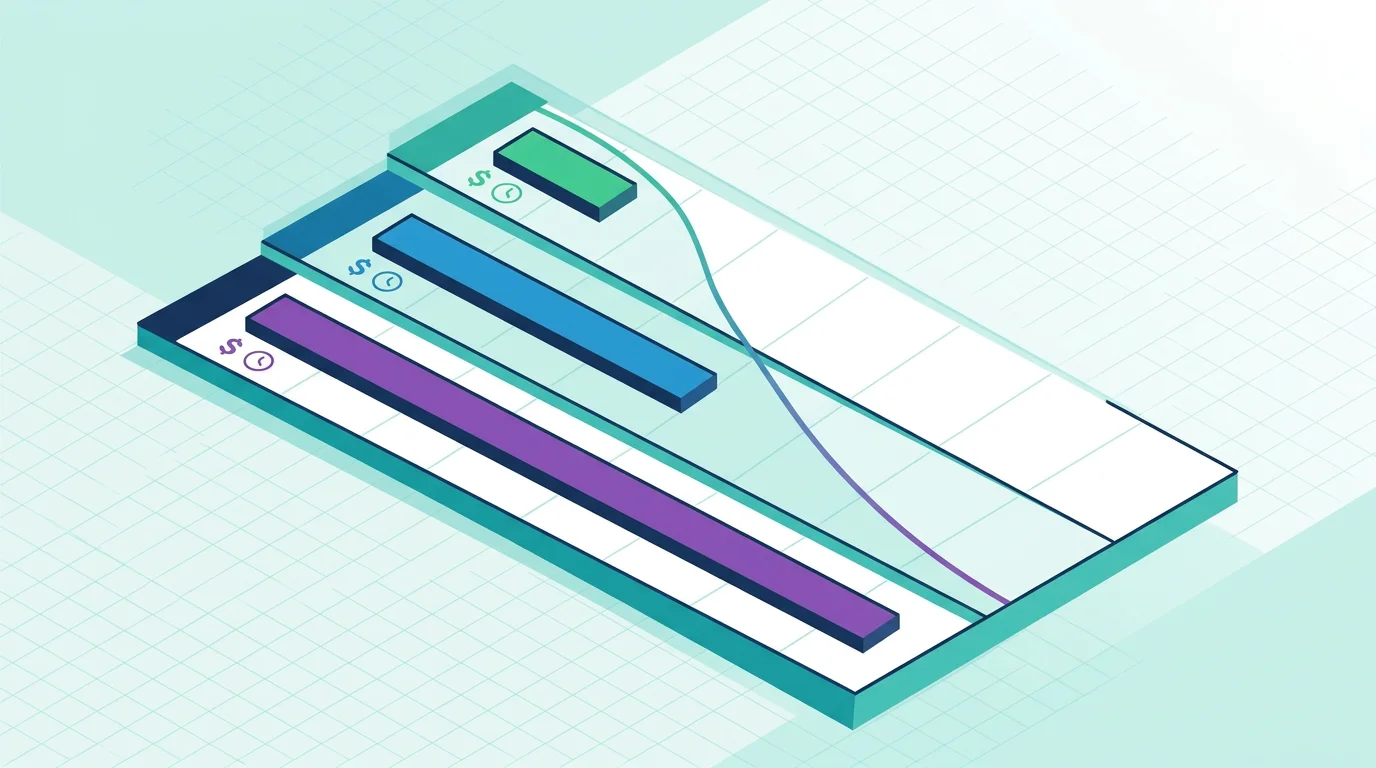
Migration is an investment. Here is what it actually costs, based on production migrations completed in 2025 and 2026.
| Complexity | Architecture Profile | Timeline | Agency Cost |
|---|---|---|---|
| Simple | ~10 data types, 2-3 API connectors, few backend workflows | 6-8 weeks | $10K-$15K |
| Medium | ~20 data types, 5-8 API connectors, 10+ backend workflows | 10-14 weeks | $15K-$30K |
| Complex | 30+ data types, 10+ API connectors, 15+ backend workflows with scheduling | 14-20 weeks | $30K-$40K+ |
The ROI Math (Illustrative)
To make the formula concrete, consider an illustrative team on Bubble's Team plan, plus paid plugins and freelancer patches that together push the all-in cost into the low four figures per month. Mid-sized migrations of comparable apps commonly land in the $25,000 to $35,000 band, with post-migration hosting plus light maintenance running in the low hundreds of dollars per month. At those levels, payback windows of roughly a year — give or take — are typical, after which savings compound every year.
But the financial case understates the real value. Sub-second page loads, full version control, the ability to pass a code audit, and hiring from a global developer talent pool instead of Bubble-specific freelancers — these gains do not appear on a spreadsheet but often matter more than the cost savings.
The Hidden Cost: Feature Freeze
During migration, your Bubble app should be frozen or minimally maintained. For apps with active users, this means three to five months with no new features. Budget for this — it affects user retention and competitive positioning even though it does not appear on any invoice.
Mistakes That Derail Migrations
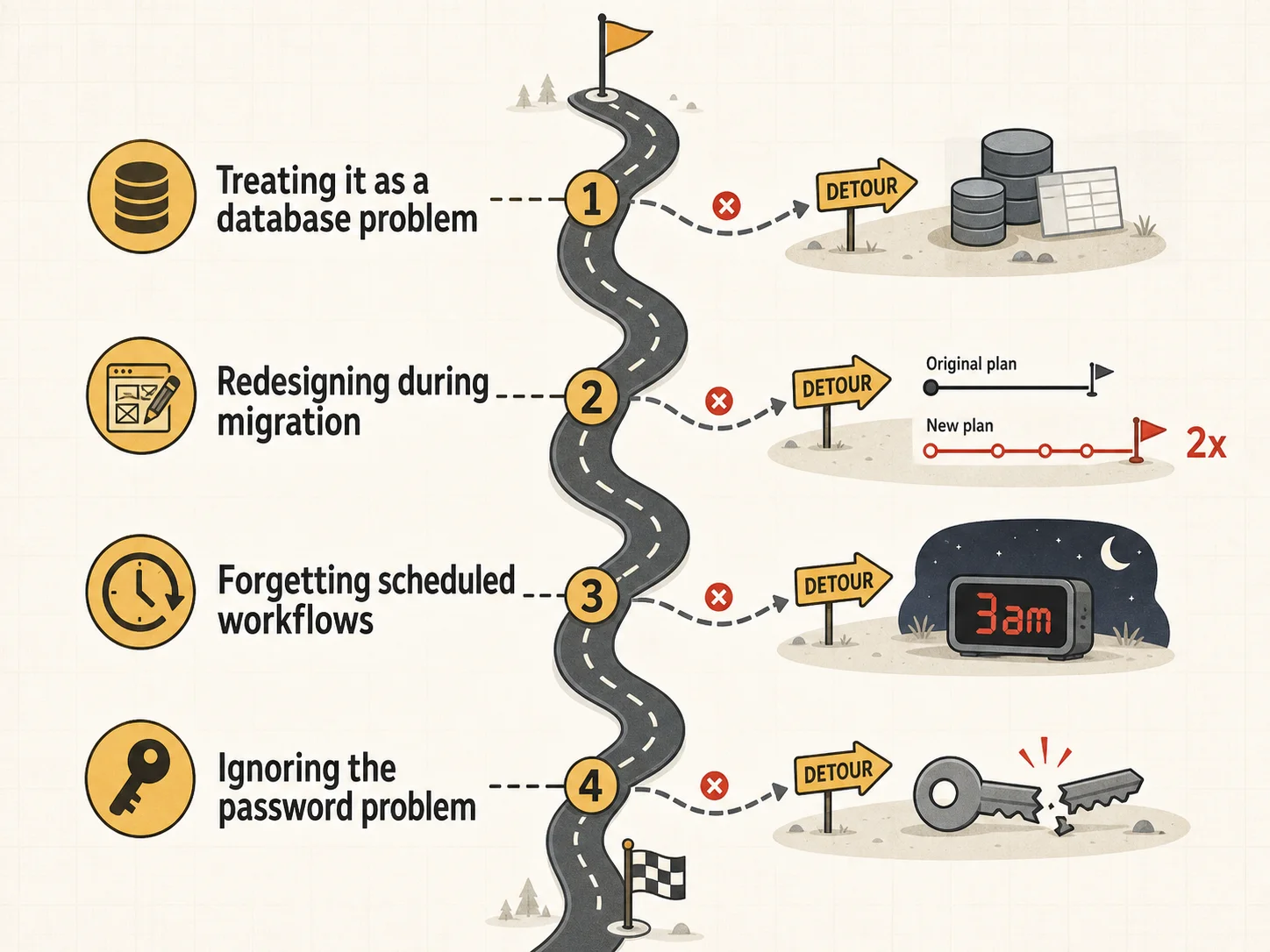
Migrations fail in predictable ways. These patterns show up in nearly every post-mortem.
Mistake 1: Treating It as a Database Problem
The most common mistake is scoping the migration around data types only — extracting your schema, designing the new database, and assuming the rest will sort itself out. Your data structure is one of four layers. API integrations, backend workflows, and app settings collectively contain more business logic than your schema does. Teams that audit only the database layer routinely discover the other three mid-build, triggering rework cascades that double the timeline.
Mistake 2: Redesigning During Migration
The temptation to improve features while rebuilding is the number one timeline killer. Teams that try to migrate and redesign simultaneously double their timeline. The correct approach: achieve feature parity first across all four layers, then iterate. Your users already validated the current feature set — preserve it, then improve.
Mistake 3: Forgetting Scheduled Workflows
Backend workflows that run on schedules — every minute, every hour, every day at 3 AM — have no visible UI. They do not appear in any page or element list. They process data, send emails, sync records, and clean up expired entries in the background. If your migration does not include a background job system that replicates these, you will discover them only when something breaks in production.
Mistake 4: Ignoring the Password Problem
Bubble does not export password hashes. Every user needs to set a new password on first login after migration. Plan for this with a magic link or one-time-password flow. Teams that discover this during cutover weekend face a crisis.
Stripe, SendGrid, Twilio, and every third-party service with webhooks are still pointing to your Bubble app after migration. Update every webhook URL, every OAuth redirect URI, and every DNS record before cutover. Your API connector documentation should list every external service endpoint — this is your checklist.
Frequently Asked Questions
Q. How long does a typical Bubble to code migration take?
Simple apps (10 data types, few API connectors, minimal backend workflows) take 6 to 8 weeks. Medium apps with complex workflows and multiple API integrations take 10 to 14 weeks. Complex apps with scheduled backend workflows, heavy API usage, and multi-role permissions take 14 to 20 weeks. Having complete architecture documentation across all four layers before starting reduces these timelines by 20 to 30 percent.
Q. What documentation do I need before starting a migration?
At minimum: an ERD diagram and DDL scripts for your data structure, API specifications for every external integration, backend workflow documentation covering all triggers, conditions, and action sequences (especially scheduled ones), and a list of app settings including environment variables and domain configurations. Missing any of these layers guarantees scope discovery during development.
Q. Can I migrate incrementally instead of all at once?
Yes. Some teams replace the backend first while keeping Bubble's frontend, then swap the frontend later. This reduces risk but requires maintaining two systems simultaneously. For most teams under 10,000 users, a focused full migration is faster and cleaner.
Q. What happens to my users' passwords during migration?
Bubble does not export password hashes for security reasons. You need to implement a password reset flow — typically magic link or OTP — for all users on their first login after migration. Plan and communicate this to users before cutover.
Q. How do I handle Bubble backend workflows that run on schedules?
Scheduled backend workflows need to be translated into cron jobs, task queue entries (BullMQ, Inngest, Trigger.dev), or database triggers in your new stack. Document each workflow's schedule, trigger condition, and action sequence first. Without this documentation, these invisible processes will be discovered only when users report missing functionality.
Q. Can AI tools help speed up the migration?
Significantly — but only with structured input. AI coding assistants generate working code from detailed specifications (ERDs, API contracts, workflow documentation). They hallucinate from vague descriptions. The combination of complete architecture documentation and AI code generation is what makes 2026 migrations dramatically faster than manual rewrites.
Start With the Blueprint
- Document all four layers first: Data structure, API connectors, backend workflows, and app settings. Missing any one of these guarantees scope discovery during development — the most expensive kind of surprise.
- Achieve parity, then iterate: Resist the urge to redesign during migration. Ship feature parity across all four layers first, then improve with the full power of custom code.
- Budget for the invisible costs: Feature freeze, webhook updates, password migration flows, and post-launch stabilization are real costs every budget should include.
- Let AI accelerate the rebuild: Feed your architecture documentation — ERD, API specs, workflow docs, settings — into AI coding tools. Structured specs in, working code out.
The difference between a migration that takes 8 weeks and one that takes 8 months is not talent or budget — it is knowing what you built before you start rebuilding it.
Extract Your Complete Architecture in Minutes
Get all four layers documented — data schemas, API specs, backend workflow logic, and app settings — in 9 standardized document types, before your dev team writes a single line of code.
Scan My App — FreeSee Your Bubble Architecture — Automatically
Stop reverse-engineering by hand. Relis extracts your complete database schema, API connections, and backend workflows in under 10 minutes.
See Your Bubble Architecture — Automatically
Stop reverse-engineering by hand. Relis extracts your complete database schema, API connections, and backend workflows in under 10 minutes.