Codex + Bubble Documentation: A Migration Workflow Guide
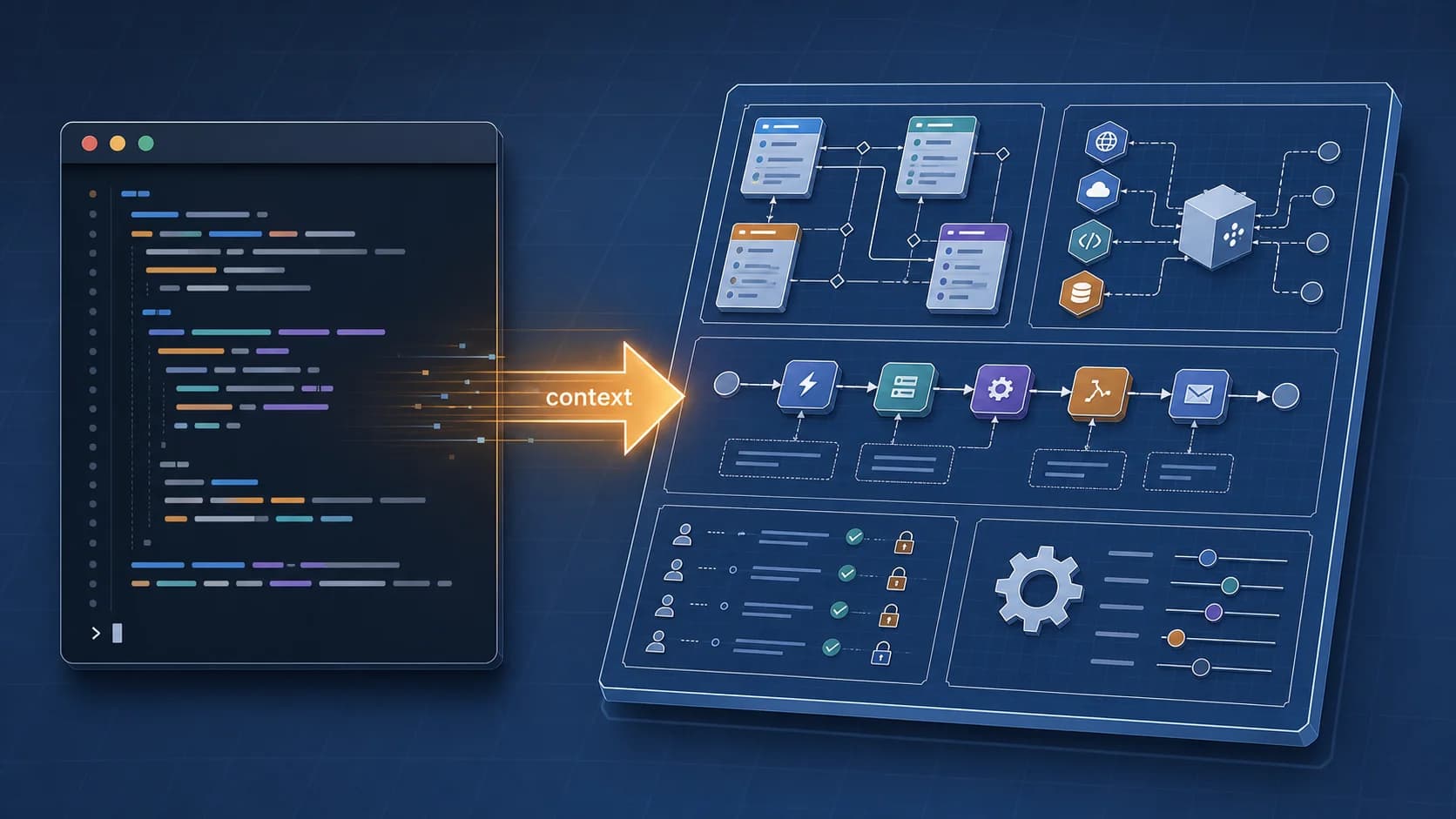
A complete walkthrough of migrating a Bubble.io SaaS app to Next.js using codex CLI — but only after Relis extracts the architecture. Watch a Prisma schema, a Stripe webhook handler, and an authorization middleware get generated from a Bubble app in under fifteen minutes, with side-by-side compares of the original Bubble logic and the resulting code.
24 min read
Search any AI-coding community for "migrate a Bubble app with codex" and you will find a familiar genre — describe the app to the assistant in plain English, watch it generate a generic CRUD scaffold, declare victory, end the thread. The output looks great in a snippet and breaks the moment you ask it to behave like the original Bubble app. The reason is structural: AI accelerates development, not discovery, and discovery is where every real Bubble app hides its complexity.
This walkthrough does the missing first step. We take a small SaaS built in Bubble — a cafe-management app called Brewbook with six data types, three external integrations, three backend workflows, and a privacy ruleset that doubles as business logic. We run a single Relis extract that produces nine architecture documents. We hand those documents to codex CLI (OpenAI's terminal-resident coding assistant — see methodology below). We watch codex produce a Prisma schema that matches the real schema, a Stripe webhook handler that mirrors the original backend workflow action-for-action, and an authorization middleware whose rules trace cleanly back to the Bubble Privacy tab. The total elapsed time is under fifteen minutes. The rest of this article is the walkthrough in print, with code, figures, and the side-by-side compares that make the transformation legible.
What You See Is Not What You Migrate
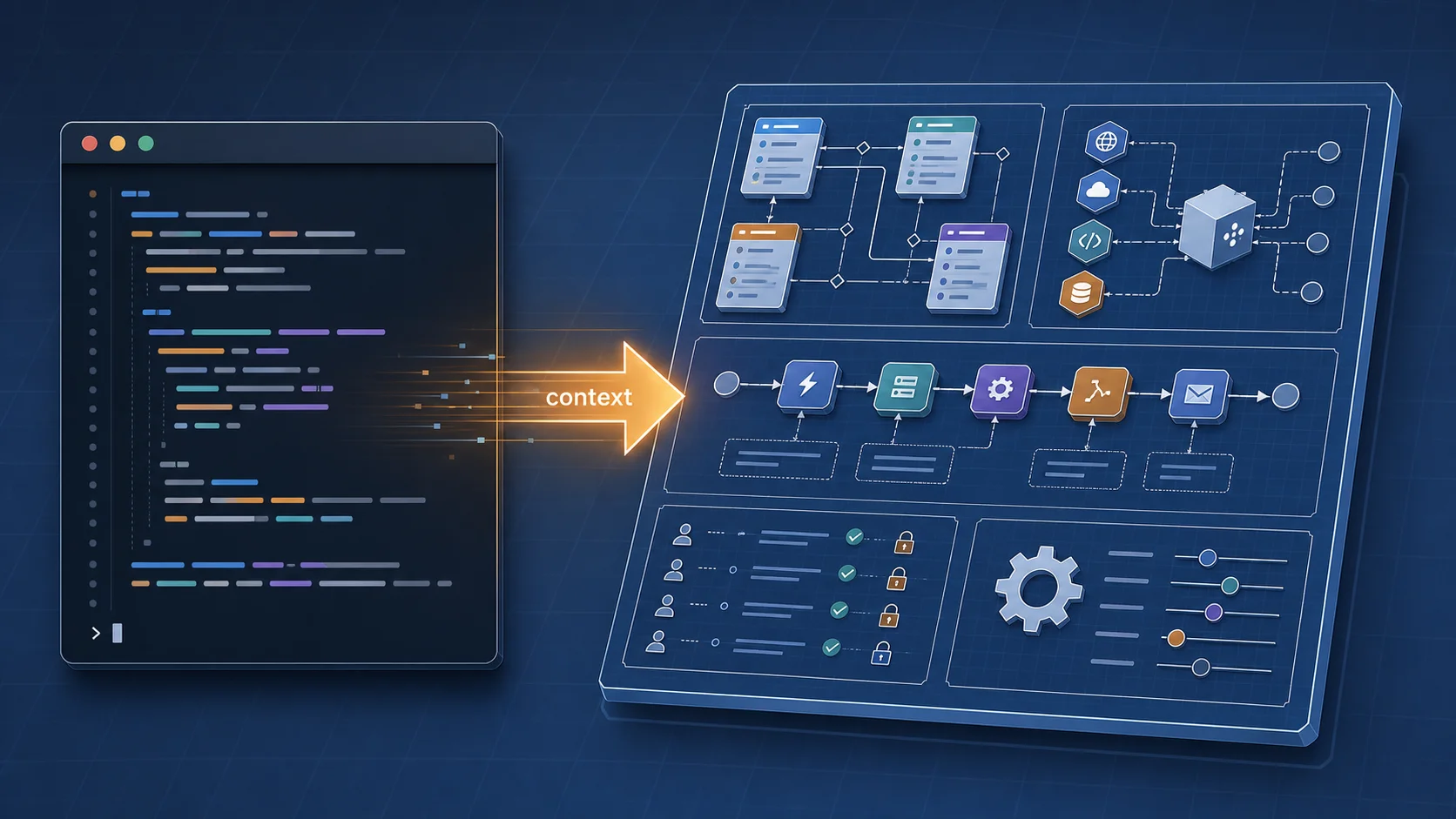
The Brewbook app looks like a hundred other Bubble SaaS apps. There is a reservation form on the home page, a calendar view of upcoming bookings, an inventory dashboard, a Stripe-powered checkout for the premium plan. A user clicking through the live preview would not be surprised by anything. A migration team estimating the rebuild from this preview will be very surprised, very late, by what is underneath. A Bubble app's front end is the smallest fraction of what you are actually migrating — the part that fits in a screenshot is the part codex handles fine without help.
Migration estimates that come out of the demo phase tend to be off by a factor of two. Sometimes three. The reason is not optimism — it is that the demo phase looks at the part of the app a camera can see. The data model, the backend workflows, the API connectors, and the privacy rules are all invisible from a screen recording, and all four of them carry significant migration cost. By the time a team realizes how much of the work was hidden, the timeline is already on its second slip. The walkthrough below skips the optimism phase entirely and starts where the architecture lives.
If your codex prompt is "I have a cafe SaaS in Bubble," you are paying the demo-phase tax. The model will fabricate a plausible-sounding scaffold that compiles, runs, and matches nothing about the original app. No prompt-engineering trick fixes a missing spec — the only fix is feeding codex the architecture itself, in structured form.
What AI Cannot Guess from a Demo
Hand codex the prompt "I have a Bubble cafe SaaS with users, cafes, reservations, and inventory" and you will get a four-table schema that compiles, runs, and matches absolutely nothing in the original app. The User table will have email and password and maybe a created_at. The original Bubble User type has eleven fields, three of which carry actual business logic — a role enum that drives every privacy rule, a list relation back to Cafe that controls cross-tenant visibility, and a JSON preferences blob populated by the settings page. The model cannot see any of these from the description because the description does not contain them.
The same problem repeats one layer down. The Reservation type has a status field that is an option set with five values — Bubble's option sets are runtime enums, not strings, and migrating them as VARCHAR loses every type guarantee the original app had. The Cafe type has a calculated occupancy field that depends on three other fields, which AI will happily turn into a stored column unless someone tells it to make it computed. The Order type has a relation to a User and a relation to a Cafe and a list of Inventory items, with cascade delete behavior that depends on which side of the relationship is being deleted — a detail that lives in three different Bubble actions and never in any natural-language description anyone has ever written.
The pattern holds across every layer. Backend workflows have trigger types and action sequences that no preview reveals. API connectors have authentication headers and webhook signature verification that no front-end click exposes. Privacy rules are written one line at a time in a tab most owners forget exists. The only way to get this information out of a Bubble app is to extract it — either by hand, over a few weeks, or automatically, in a few minutes.
From Extract to Input: Nine Documents in Ten Minutes
The Brewbook Bubble app is connected to Relis. The connection is read-only — Relis logs into the Bubble editor, walks every relevant tab, and exports what it finds. A single click on Run Extraction kicks off four parallel jobs covering the four architecture layers every migration has to handle: data structure, API connectors, backend workflows, and app settings. Eight to twelve minutes later — long enough to refill a coffee, short enough that you don't feel like you scheduled a meeting for it — the extraction completes and produces nine structured documents.
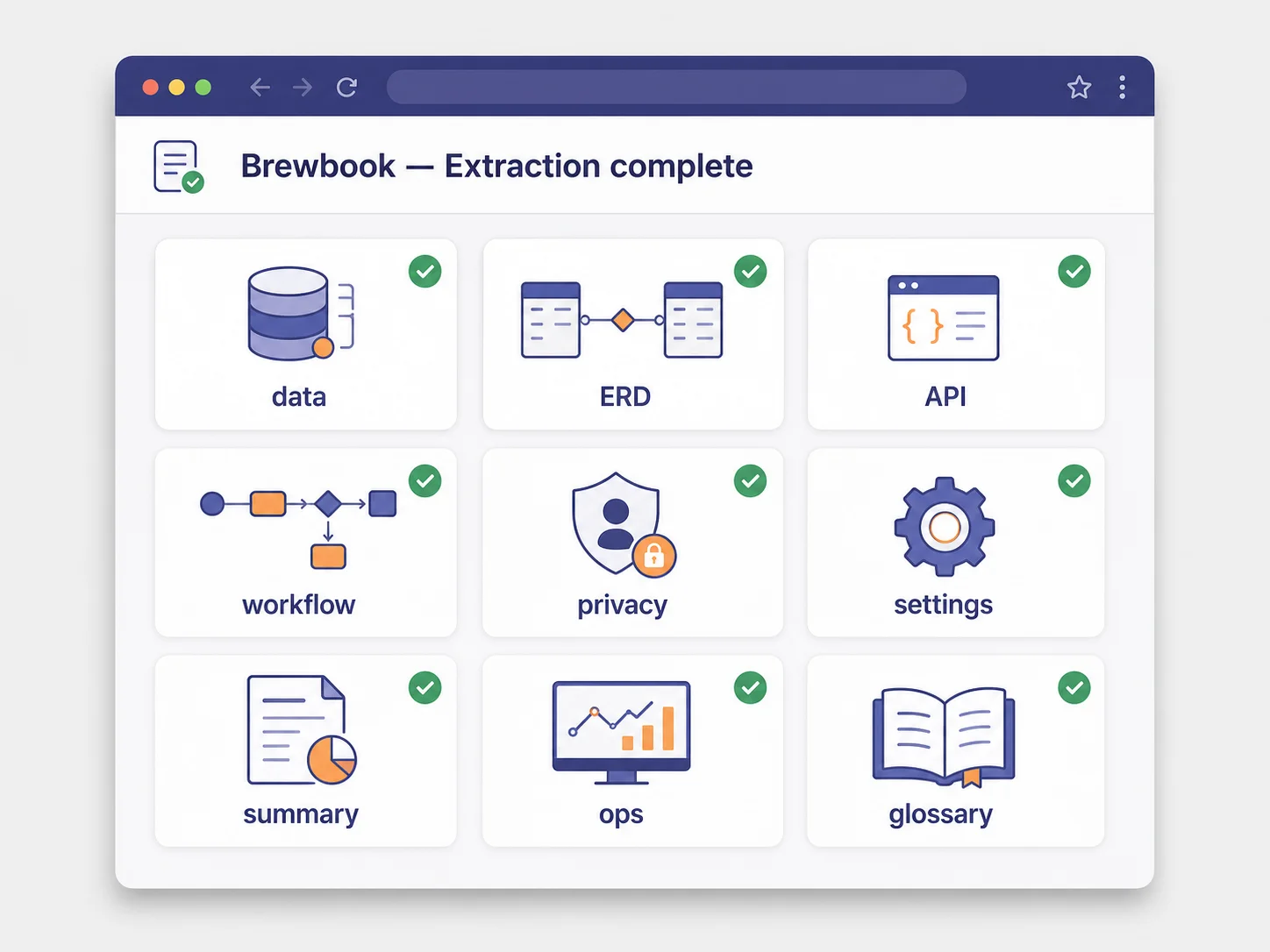
The nine documents are not nine versions of the same thing. They are nine cuts of the architecture, each formatted for a different downstream use. The data structure document is the one codex needs to write a schema. The backend workflow document is the one codex needs to write a route handler. The privacy rule document is the one codex needs to write a middleware. Feeding the right document to the right prompt is the whole game — feeding all nine at once works but eats context budget; feeding the wrong one produces a confidently wrong answer. The walkthrough that follows uses three documents for three jobs, exactly the way you would in a real migration.
| Relis document | codex prompt asks for | Generated artifact |
|---|---|---|
| 01-data-structure.md | Prisma schema with the type mappings spelled out | schema.prisma — six models, two enums, indexed FKs |
| 04-backend-workflows.md (+ 03-api-connectors.md) | Next.js API route mirroring the four-action checkout workflow | app/api/webhooks/stripe/route.ts — verified, queued, idempotent-ready |
| 05-privacy-rules.md | Authorization helpers and Prisma middleware | lib/middleware/authorization.ts — typed errors, compound rules preserved |
A Prisma Schema in Two Minutes
codex opens on a freshly scaffolded Next.js 15 project. Prisma is installed. A Postgres connection string sits in the env file. There is no schema, no migration, no model definition — empty prisma/schema.prisma with the generator and datasource blocks and nothing else. The Relis archive has been unzipped into a folder called relis-context at the project root. Total setup time before the prompt: about ninety seconds, almost all of it spent dragging files into a folder.
The prompt itself is short. The data structure document is attached as a context file. The instructions are mechanical:
codex exec \
  --context relis-context/01-data-structure.md \
  "Generate a Prisma schema for this Bubble app's data model.

   Type mappings:
   - Bubble text          → String
   - Bubble number        → Float (currency → Decimal(10, 2))
   - Bubble date          → DateTime @db.Timestamptz
   - Bubble list of Type  → relation (many-to-many via implicit join)
   - Bubble option set    → enum

   Conventions:
   - cuid() ids
   - snake_case @@map for table names
   - camelCase fields
   - @relation backrefs on every relation
   - Indices on every foreign key column
   "
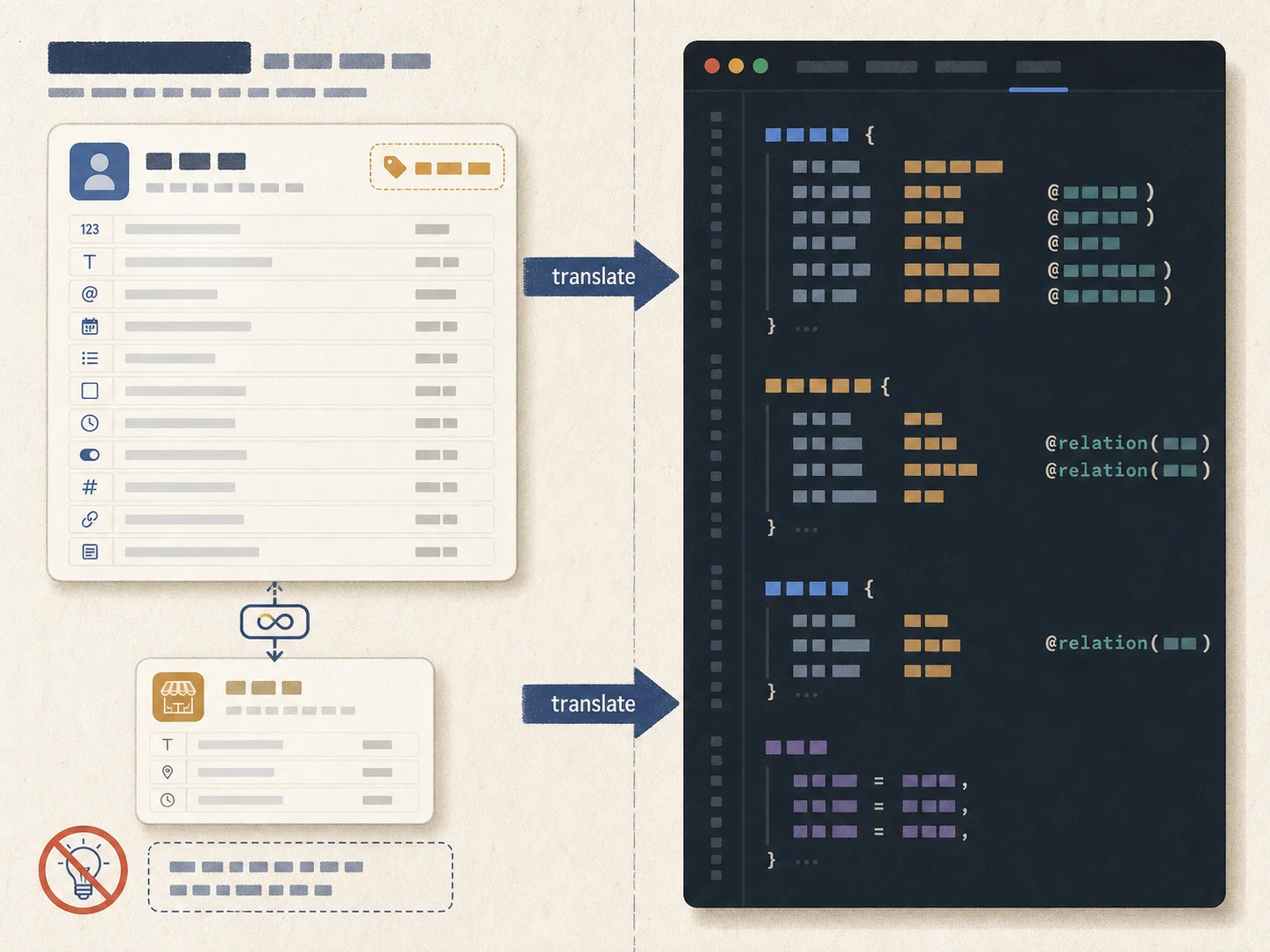
Two minutes later, with the diff applied, the schema looks like this in part:
// schema.prisma (generated, abbreviated)

enum Role {
  Owner
  Manager
  Member
}

enum ReservationStatus {
  Pending
  Confirmed
  Cancelled
  NoShow
  Completed
}

model User {
  id           String        @id @default(cuid())
  email        String        @unique
  role         Role          @default(Member)
  myCafes      Cafe[]        @relation("CafeMembers")
  preferences  Json          @default("{}")
  reservations Reservation[]
  createdAt    DateTime      @default(now())

  @@map("users")
  @@index([email])
}

model Cafe {
  id           String        @id @default(cuid())
  name         String
  members      User[]        @relation("CafeMembers")
  reservations Reservation[]
  inventory    Inventory[]
  orders       Order[]

  @@map("cafes")
}

model Reservation {
  id        String            @id @default(cuid())
  userId    String
  user      User              @relation(fields: [userId], references: [id])
  cafeId    String
  cafe      Cafe              @relation(fields: [cafeId], references: [id])
  status    ReservationStatus @default(Pending)
  startsAt  DateTime          @db.Timestamptz
  partySize Int

  @@map("reservations")
  @@index([userId])
  @@index([cafeId])
  @@index([startsAt])
}
The shape of the original Bubble model survives. The role option set is a Postgres enum. The myCafes list relation is a many-to-many through an implicit join table. Every foreign key has an index. npx prisma migrate dev --name init succeeds on the first try. This is what AI looks like when the input is right — not magic, not creative, just translation.
A Backend Workflow Becomes a Route Handler
The harder job is the backend workflow. In Bubble, the post-checkout invoice flow is an API workflow triggered by a Stripe webhook. It runs four actions in sequence: create an Order row from the checkout session, update the Cafe's running revenue total, send an invoice email through SendGrid, and schedule a reminder email seven days out. In the Bubble editor, this is a vertical stack of action nodes with parameter pickers; in Next.js, it has to become a webhook route, a queue producer, and a queue consumer, with signature verification on top.
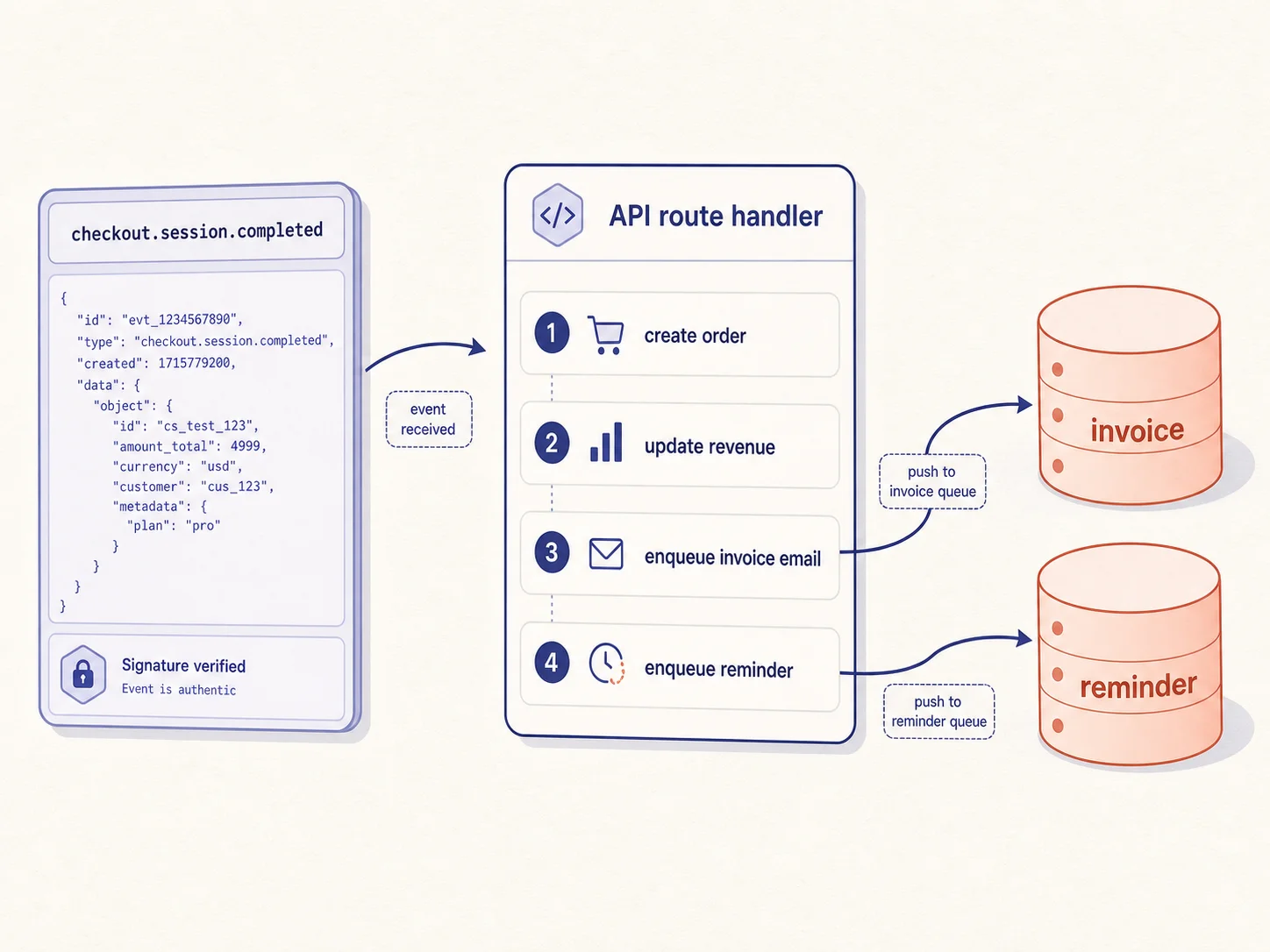
The prompt this time attaches both the backend workflow document and the API connector document, because the workflow references the Stripe webhook payload structure that lives in the connector spec:
codex exec \
  --context relis-context/04-backend-workflows.md \
  --context relis-context/03-api-connectors.md \
  "Implement the 'Create Invoice After Checkout' workflow as a
   Next.js 15 API route at app/api/webhooks/stripe/route.ts.

   - Verify the Stripe signature using STRIPE_WEBHOOK_SECRET.
   - Handle checkout.session.completed events only.
   - Run the four-action sequence from the workflow doc:
       1. Create an Order row.
       2. Update the Cafe's totalRevenue.
       3. Enqueue the SendGrid invoice email via BullMQ.
       4. Enqueue the seven-day reminder via BullMQ with delay.
   - Match the field-level precision in the workflow doc.
   - Return 200 on success, 400 on signature failure, 500 on database failure.
   "
The output:
// app/api/webhooks/stripe/route.ts (generated, abbreviated)
import { NextRequest, NextResponse } from "next/server";
import Stripe from "stripe";
import { prisma } from "@/lib/prisma";
import { invoiceEmailQueue, reminderEmailQueue } from "@/lib/queues";

const stripe = new Stripe(process.env.STRIPE_SECRET_KEY!);
const webhookSecret = process.env.STRIPE_WEBHOOK_SECRET!;

export async function POST(req: NextRequest) {
  const body = await req.text();
  const signature = req.headers.get("stripe-signature");
  if (!signature) {
    return NextResponse.json({ error: "missing signature" }, { status: 400 });
  }

  let event: Stripe.Event;
  try {
    event = stripe.webhooks.constructEvent(body, signature, webhookSecret);
  } catch {
    return NextResponse.json({ error: "invalid signature" }, { status: 400 });
  }

  if (event.type !== "checkout.session.completed") {
    return NextResponse.json({ received: true });
  }

  const session = event.data.object as Stripe.Checkout.Session;
  const cafeId = session.metadata?.cafeId;
  const userId = session.metadata?.userId;
  if (!cafeId || !userId) {
    return NextResponse.json({ error: "missing metadata" }, { status: 400 });
  }

  try {
    // Step 1: create Order row
    const order = await prisma.order.create({
      data: {
        userId,
        cafeId,
        amount: (session.amount_total ?? 0) / 100,
        stripeSessionId: session.id,
      },
    });

    // Step 2: increment Cafe.totalRevenue
    await prisma.cafe.update({
      where: { id: cafeId },
      data: { totalRevenue: { increment: order.amount } },
    });

    // Step 3: enqueue invoice email (immediate)
    await invoiceEmailQueue.add("invoice", { orderId: order.id });

    // Step 4: enqueue reminder email (delay 7 days)
    await reminderEmailQueue.add(
      "reminder",
      { orderId: order.id },
      { delay: 7 * 24 * 60 * 60 * 1000 },
    );

    return NextResponse.json({ ok: true });
  } catch (err) {
    console.error("webhook handler failed", err);
    return NextResponse.json({ error: "handler failed" }, { status: 500 });
  }
}
- Signature verification appears unprompted. codex adds it because the API connector document specifies that webhook authenticity is verified by the
Stripe-Signatureheader — not because anyone asked for security in the prompt. - The action sequence preserves order. Step one of the Bubble workflow becomes step one of the route. Steps two through four follow in the same order, with each Bubble action mapped to a recognizable line of code.
- Email sends are enqueued, not awaited. The workflow document marks step three and step four as "fire-and-forget after database commit." codex reads that and translates it into the queue pattern instead of blocking the webhook response on a network call.
Privacy Rules Become Middleware
The privacy rule layer is the part codex butchers most reliably when working from a description. Privacy rules in Bubble look deceptively simple — one line of natural language per rule, written in a UI most app owners forget exists. Their behavior is anything but simple. They control which rows users can search, which they can read, which they can modify, and which they can delete. They run before any business logic, which means they sometimes act as the business logic. Translating them into code requires either Postgres Row-Level Security policies or application-level middleware, depending on whether the rules need to compose with relational queries or only check at the edge.
Brewbook has eight privacy rules. Two of them are simple ownership checks. Six are compound — combinations of role, cafe membership, and resource state. The compound ones are where codex goes wrong without help. Given the rule document, however, codex reads the compounds at the level they were written and produces middleware that preserves the conjunction structure:
codex exec \
  --context relis-context/05-privacy-rules.md \
  "Translate the privacy rules in this document into:

   1) Prisma middleware that filters reads on Reservation and Inventory
      based on the authenticated User's role and cafe membership.
   2) An auth helper that throws if a write is attempted on Inventory
      when the user's role is not Owner.

   Pull the User session from next-auth (auth() from app/auth.ts).
   Throw a typed PermissionDeniedError on violations.
   "
The output:
// lib/middleware/authorization.ts (generated, abbreviated)
import { Prisma } from "@prisma/client";
import { auth } from "@/app/auth";

export class PermissionDeniedError extends Error {
  constructor(rule: string) {
    super(`Permission denied: ${rule}`);
    this.name = "PermissionDeniedError";
  }
}

// Privacy rule: "Inventory: Modify only if Current User's Role is Owner"
export async function ensureCanModifyInventory() {
  const session = await auth();
  if (!session?.user) {
    throw new PermissionDeniedError("authenticated user required");
  }
  if (session.user.role !== "Owner") {
    throw new PermissionDeniedError("inventory modify requires Owner role");
  }
  return session.user;
}

// Privacy rule: "Reservation: Search only if Current User's Cafes
//                contains This Reservation's Cafe"
export const reservationReadFilter: Prisma.Middleware = async (
  params,
  next,
) => {
  if (params.model !== "Reservation") return next(params);
  if (params.action !== "findMany" && params.action !== "findFirst") {
    return next(params);
  }

  const session = await auth();
  if (!session?.user) {
    throw new PermissionDeniedError("authenticated user required");
  }

  // Inject membership filter — user can only see reservations
  // for cafes they belong to.
  params.args = params.args ?? {};
  params.args.where = {
    AND: [
      params.args.where ?? {},
      {
        cafe: {
          members: { some: { id: session.user.id } },
        },
      },
    ],
  };

  return next(params);
};
The compound that catches AI in vague mode — "Owner OR a manager scoped to that cafe" — is preserved because the rule document spells out the compound at the level it actually exists. Without that document, codex would write a single role check, miss the manager-scoped-to-cafe branch, and create a quietly broken authorization model that fails closed in development and fails open in production.
If your generated authorization middleware preserves the OR/AND structure of the original Bubble rule, your prompt is working. If it collapses to a single role check, the rule document was either missing from context or summarized too aggressively before the prompt. Re-attach the raw 05-privacy-rules.md and re-run.
Compare the Output, Side by Side
The fairest test of the workflow is to put the original Bubble logic and the generated code next to each other and ask whether one is a faithful rewrite of the other. The answer, layer by layer, is yes — with the caveat that some details (rate limiting, idempotency keys, pagination strategy) are not present in the Bubble original and codex flagged them as TODOs in the generated code rather than inventing answers.
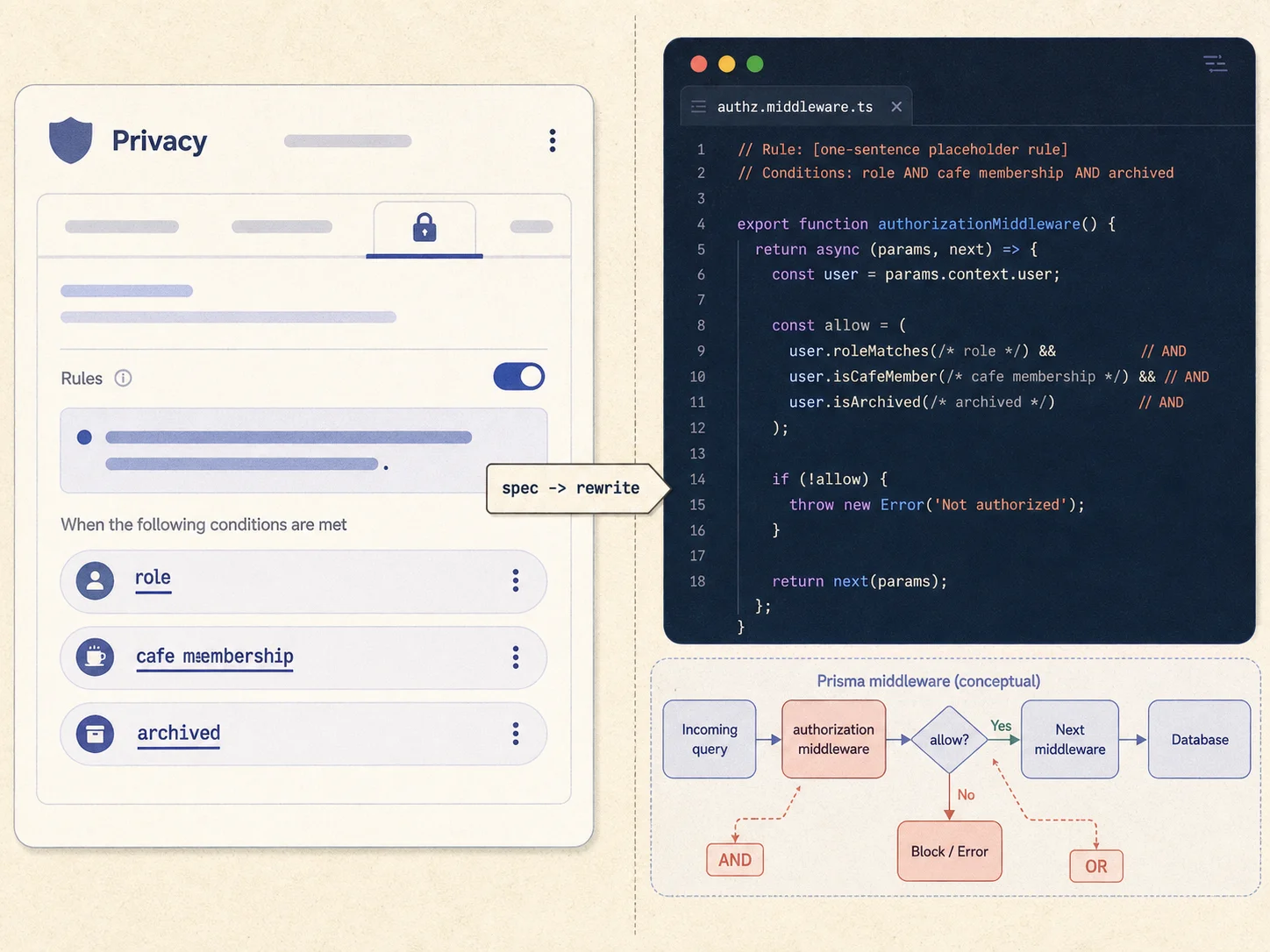
The data type compare is mechanical: eleven Bubble fields on User, eleven Prisma columns on User, with the option set surfacing as the Role enum and the list relation surfacing as a many-to-many. The workflow compare is closer to translation: four Bubble action nodes become four numbered code blocks in the route handler, with the order preserved and the fire-and-forget steps correctly enqueued. The privacy rule compare is the most striking — one sentence of natural language per rule on the Bubble side, ten to twelve lines of typed middleware on the codex side, with comments on the generated code naming the original rule by its Bubble label so a reviewer can audit the translation in linear time.
This is the productivity claim made concrete. The eighty percent that used to take three weeks of CRUD scaffolding, route handler boilerplate, and middleware plumbing took fifteen minutes of context-attached prompts. The remaining twenty percent — the rate limits, the idempotency, the pagination, the integration testing — is exactly the work that should occupy a senior engineer's time, and exactly the work that does not benefit from being typed by hand from scratch.
Frequently Asked Questions
Q. Will this approach work on a Bubble app I haven't built myself?
Yes — that's the entire point. The walkthrough uses a synthetic app called Brewbook so the figures can show every layer without exposing customer data, but Relis extracts the same nine documents from any Bubble app you can authorize, and codex reads those documents the same way regardless of the app's domain. The architecture vocabulary (data types, workflows, connectors, privacy rules) is universal across Bubble apps.
Q. Why is the demo so short? My migration estimate is several months.
The fifteen minutes covers code generation for three slices of the architecture — schema, one webhook handler, one middleware. A real migration also includes data backfill, plugin replacement, frontend rebuild, integration testing, and production cutover, none of which AI shortens significantly. The walkthrough demonstrates where AI does help, not a claim that the entire migration is fifteen minutes.
Q. Can I use Claude Code or Aider instead of codex CLI?
The same Relis documents work in any AI coding tool that accepts file attachments and generates code. codex is convenient because it streams diffs straight from the terminal, but Claude Code in a project, Aider on a repo, or even a chat-style assistant with the same attachments produces comparable output. The bottleneck is input quality, not tool choice.
Q. What does codex get wrong even with the Relis docs?
Three categories. First, performance — index strategy beyond foreign-key indices, query plan tuning, and connection pooling are not addressed by the documents and need a human review. Second, race conditions — the generated webhook handler is not idempotent by default and will double-process if Stripe retries. Third, edge cases in compound privacy rules — codex occasionally simplifies a three-condition AND to two conditions, which a reviewer needs to catch.
Q. How big a Bubble app does this approach scale to?
The Brewbook example has six data types and three workflows, which is small. The same workflow scales to apps with fifty data types and twenty workflows — extraction time grows roughly linearly with content, and codex handles longer documents fine within current context windows. For very large apps, splitting the data structure document by domain (users plus cafes plus reservations as one prompt, inventory plus suppliers plus orders as another) keeps each generation focused and reviewable.
Q. Where does this leave the migration agency I was about to hire?
Probably in better shape, not worse. Agencies that already work with structured architecture documentation can quote more accurately and deliver faster when their input is a Relis bundle. Agencies that prefer to bill for discovery time will not love the workflow. Either way, the documentation is the artifact you keep — it's portable across vendors and survives the migration as living spec.
Documentation First, Codex Second
- codex is bottlenecked by input, not by capability. The same model that hallucinates a User table from "I have a Bubble app" produces a precise eleven-field translation when the data structure document is attached. Tool choice matters less than what you hand the tool.
- The fifteen-minute number is real but narrow. Schema, one route handler, one middleware — that's what fits in fifteen minutes. Discovery, integration testing, and production cutover are unchanged. AI compresses the development phase, not the project.
- The compound privacy rules are the canary. If your generated authorization middleware preserves the OR/AND structure of the original rule, your prompt is working. If it collapses to a single role check, your prompt was too vague.
- Backend workflows translate cleaner than people expect. Action sequences map to numbered code blocks in a route handler. Fire-and-forget steps map to queue producers. Webhook signature verification appears unprompted when the API connector document says it's required.
- The documentation is the asset, not the code. The nine Relis documents survive the migration. They become the spec for your integration tests, the reference for your second engineer onboarding, and the input for the next AI tool you adopt. The generated code is downstream — it can be regenerated. The documents cannot.
If you're staring at your own Bubble app wondering whether AI can really cut weeks off the migration: the honest answer is yes, but only if the model knows what it's translating. Run the extract first. Hand codex the docs. Watch the schema match the schema. The first time you see your real eleven-field User type appear in a Prisma model in two minutes instead of two weeks, the workflow stops being a blog post and starts being how you migrate.
Try the Workflow on Your Own Bubble App
Connect your Bubble project, run the extract, hand the nine documents to codex CLI. Schema, route handlers, middleware — generated from your real architecture, not from a description.
Scan My App — FreeSee Your Bubble Architecture — Automatically
Stop reverse-engineering by hand. Relis extracts your complete database schema, API connections, and backend workflows in under 10 minutes.
See Your Bubble Architecture — Automatically
Stop reverse-engineering by hand. Relis extracts your complete database schema, API connections, and backend workflows in under 10 minutes.