Rebuilding Bubble's Frontend in React: The UI Migration Guide
Bubble's visual frontend — responsive layouts, conditional visibility, repeating groups, custom states, and dynamic page content — must be rebuilt in React or Next.js component by component. This guide maps every Bubble UI concept to its React equivalent and covers the patterns that trip up even experienced developers.
14 min read
Backend migration gets the technical attention. Frontend migration gets the timeline. The backend of a Bubble app — data migration, background jobs, authorization — is complex but well-defined. The frontend is the opposite: conceptually simple (it is "just" UI) but enormous in scope. Every page, every element, every conditional, every animation, every responsive breakpoint must be rebuilt in React components. This is why frontend migration consistently consumes 40 to 50 percent of total project budget regardless of backend complexity.
This guide maps every Bubble frontend concept to its React/Next.js equivalent — so your development team translates visual editor concepts to component code without reinventing patterns that have established solutions.
Why Frontend Migration Is 40–50% of Total Cost
Bubble's visual editor compresses UI development time dramatically. Dragging a repeating group onto a page and binding it to a data source takes 30 seconds. Building the React equivalent — a component with data fetching, loading states, error handling, pagination, and responsive styling — takes 2 to 4 hours. Multiply this by every element on every page, and the scope becomes clear.
The Element Count Reality
A medium-complexity Bubble app typically has 15 to 30 pages with 20 to 50 elements per page. That is 300 to 1,500 UI elements — each requiring a React component or HTML element with styling, data binding, and event handling. The conversion is not technically difficult for any single element. It is massive in volume.
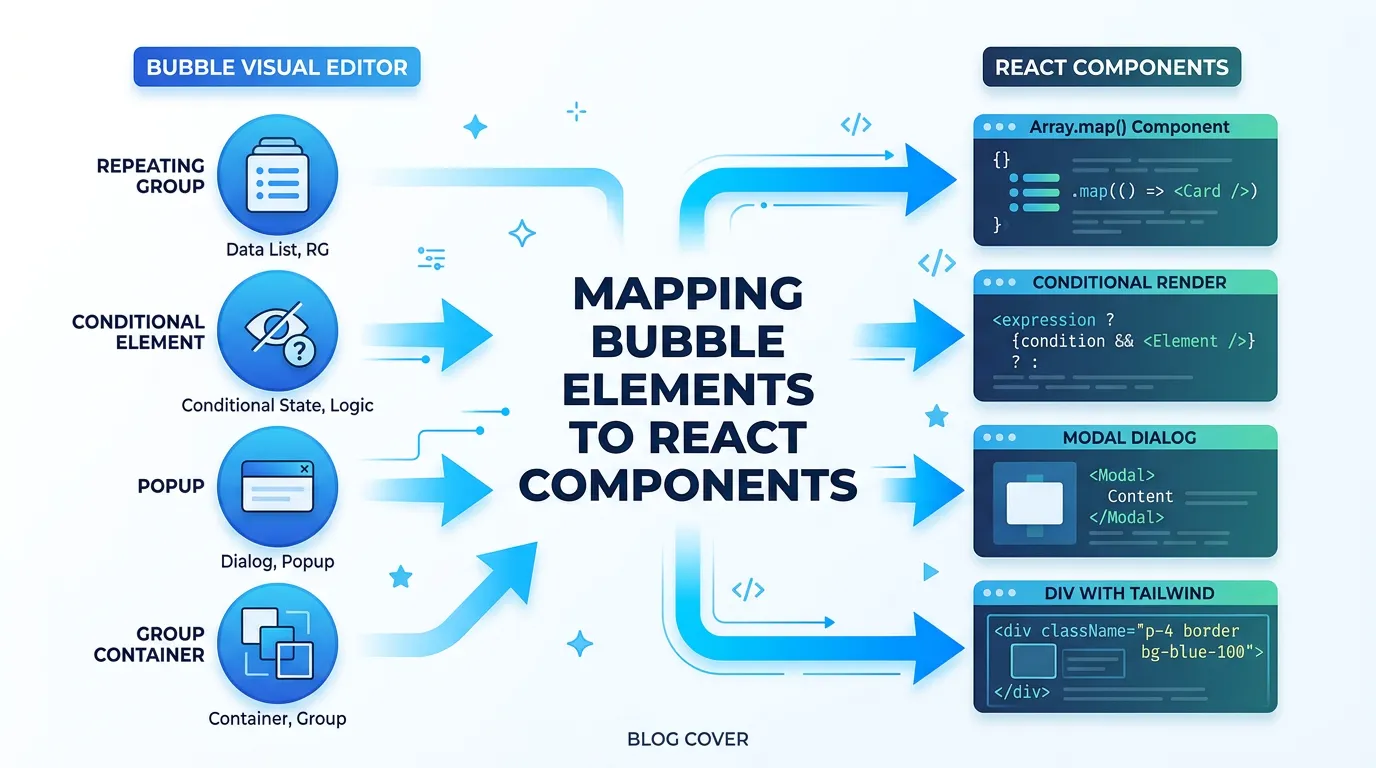
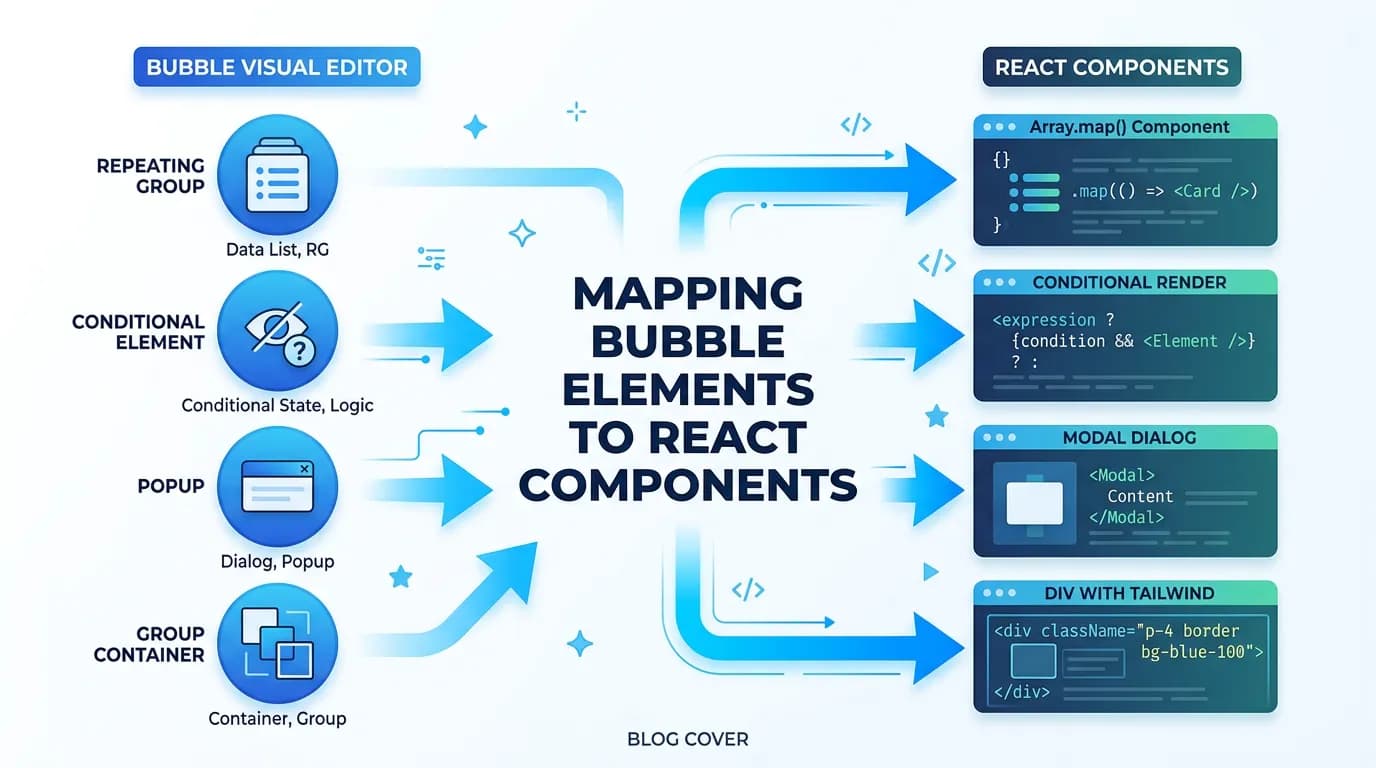
Bubble UI Concepts to React Equivalents
| Bubble Concept | React Equivalent | Key Difference |
|---|---|---|
| Page | Next.js Route (page.tsx) | File-based routing vs. visual page list |
| Reusable Element | React Component | Props replace dynamic data sources |
| Repeating Group | Array.map() with component | Explicit data fetching + pagination |
| Popup | Modal component (Dialog) | State-controlled open/close |
| Group (container) | div with Tailwind classes | Flexbox/Grid replaces Bubble layout |
| Conditional visibility | Conditional rendering (&&, ternary) | Must be explicit in JSX |
| Custom state | useState hook | Component-scoped, not page-scoped |
| URL parameter | useSearchParams / dynamic route | Next.js params are typed |
| Data source binding | useQuery / server component fetch | Explicit API call replaces auto-binding |
| Workflow (page-level) | Event handler function | onClick, onSubmit, onChange |
| Responsive settings | Tailwind responsive prefixes (sm:, md:, lg:) | Mobile-first vs. desktop-first |
| Option Set dropdown | Select component with enum values | Values from enum or API |
Repeating Groups to Data-Driven Components
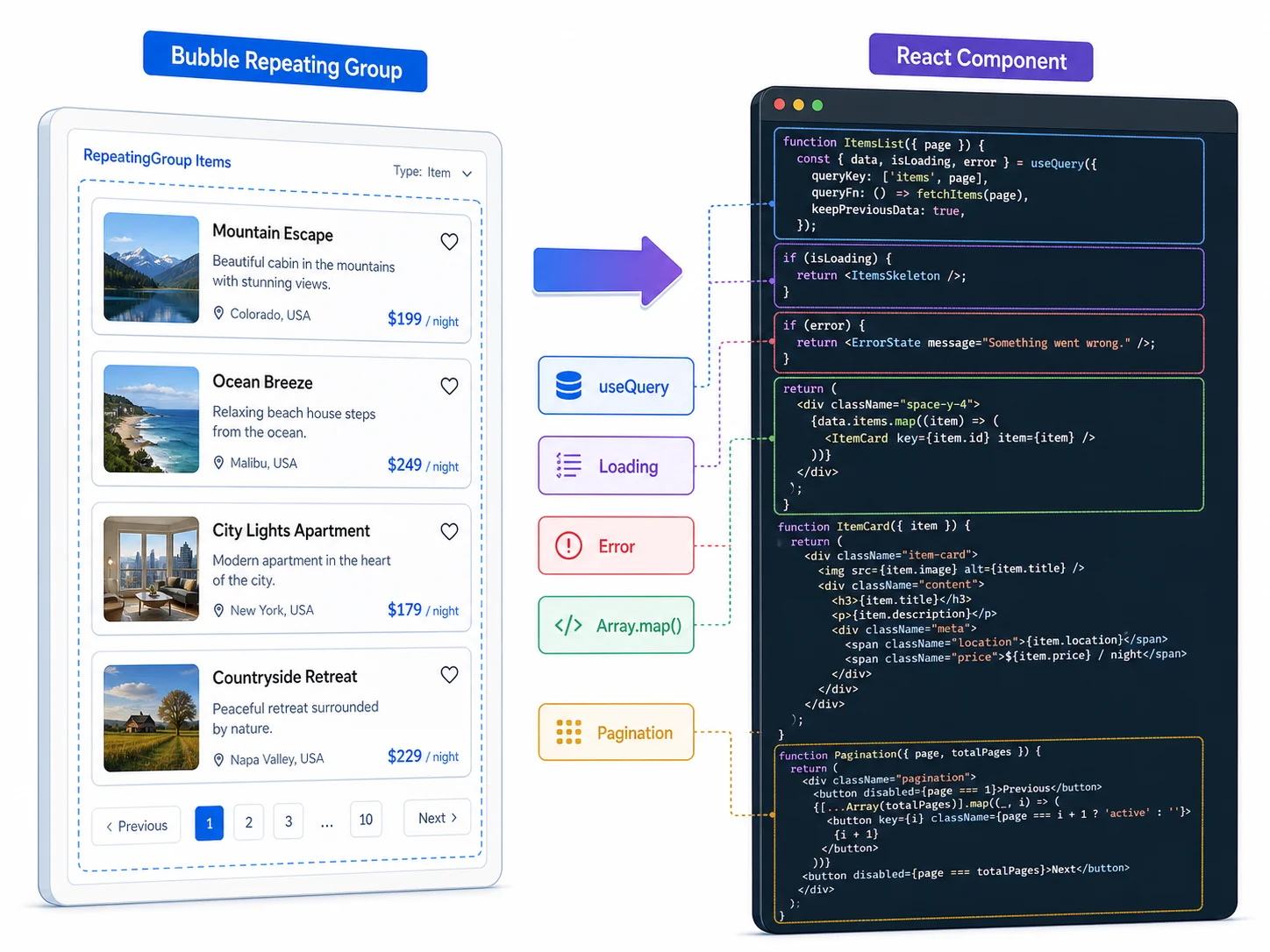
Repeating groups are Bubble's most powerful UI element — and the most work to translate. A Bubble repeating group does five things automatically: fetches data from the database, paginates results, applies privacy rule filtering, renders each item with a template, and updates live when data changes. In React, you must implement each behavior explicitly.
The Translation Pattern
Each repeating group becomes: a data fetching hook (useQuery with your API endpoint), a loading state (skeleton or spinner while data loads), an error state (error message if the fetch fails), a map function that renders each item with a component, and pagination controls (load more button, page numbers, or infinite scroll). Optional: real-time updates via WebSocket subscription for live data.
Performance Considerations
Bubble loads repeating group data on page render. In React, you choose when and how to fetch: on mount (useEffect), on server (Server Component), or on demand (lazy loading). For SEO-critical pages, use Next.js Server Components to fetch data on the server. For dashboard pages behind login, client-side fetching with loading states is sufficient.
Use a component library (shadcn/ui, Radix, Headless UI) for common patterns: modals, dropdowns, tabs, accordions, tooltips, and data tables. These provide accessible, tested implementations that you style with Tailwind — saving 1 to 2 weeks compared to building every UI primitive from scratch.
Conditional Visibility to React State Management
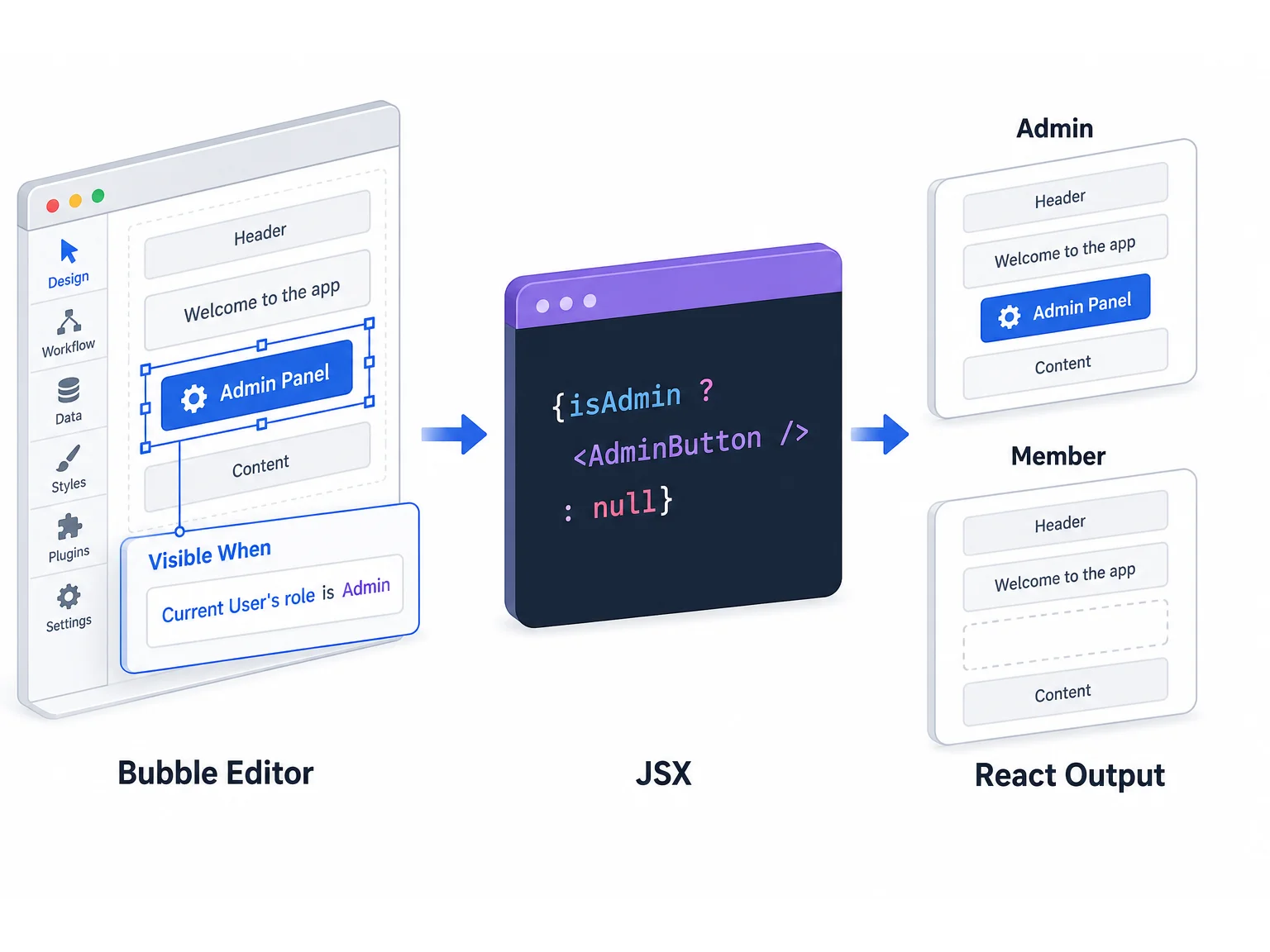
In Bubble, you make an element visible or hidden based on conditions — "This element is visible when Current User's Role is Admin." In React, this becomes conditional rendering — the element is either in the DOM or not, based on a JavaScript expression.
Simple Conditions
Bubble: "Visible when Current User's Role is Admin" → React: {'{user.role === "admin" && . The pattern is direct. The challenge is scale — a page with 30 conditional elements has 30 conditional rendering expressions that must each reference the correct state.
Complex Conditions
Bubble conditions can chain multiple checks with AND/OR logic. "Visible when Current User's Role is Admin AND This Page's Thing's Status is Active." In React, extract complex conditions into named boolean variables for readability, then use those variables in the JSX. This keeps the rendering logic readable as conditions compound.
The Hidden Business Logic Problem
In Bubble, conditional visibility often encodes business logic — an edit button that is only visible to the creator is an authorization check disguised as a UI rule. During migration, decide: should this authorization be enforced in the UI only (conditional rendering), or should it be enforced in the API as well (middleware check)? The answer is almost always both — UI for user experience, API for security.
Hiding a button in React does not prevent an API call. A user who knows the endpoint URL can trigger any action that is not protected at the API layer, regardless of whether the button is visible. Every Bubble conditional that enforces access — "button visible only to Admins," "form visible only to record owner" — must have a corresponding server-side check in your API middleware. UI conditionals are for user experience; API middleware is for security.
Responsive Design: Bubble Layouts to Tailwind CSS
Bubble's responsive engine uses a desktop-first approach with breakpoint-based visibility and sizing overrides. Tailwind CSS uses a mobile-first approach with responsive prefixes. This inversion catches developers who try to translate Bubble layouts directly.
The Mobile-First Inversion
In Bubble: design for desktop, then hide/resize for mobile. In Tailwind: design for mobile, then expand for desktop. Start with the mobile layout, then add md: and lg: prefixes for tablet and desktop overrides. This produces better mobile experiences and matches modern CSS best practices.
Layout Translation
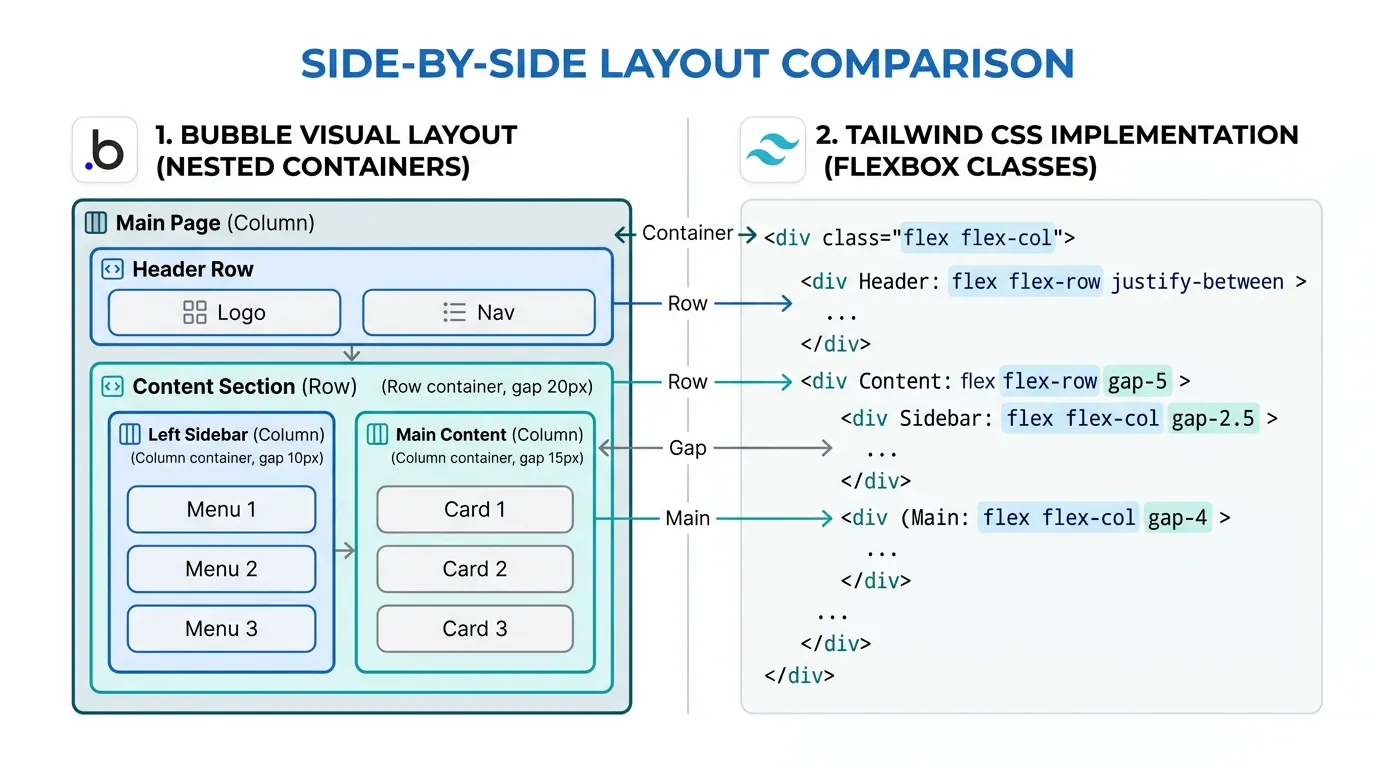
Bubble's row/column containers map to Tailwind's Flexbox classes. A horizontal row container becomes flex flex-row. A vertical column becomes flex flex-col. Fixed-width elements use w-[Npx]. Percentage widths use w-1/2, w-1/3, etc. Gap between elements uses gap-N.
Custom States, URL Parameters, and Page Navigation
Custom States → React Hooks
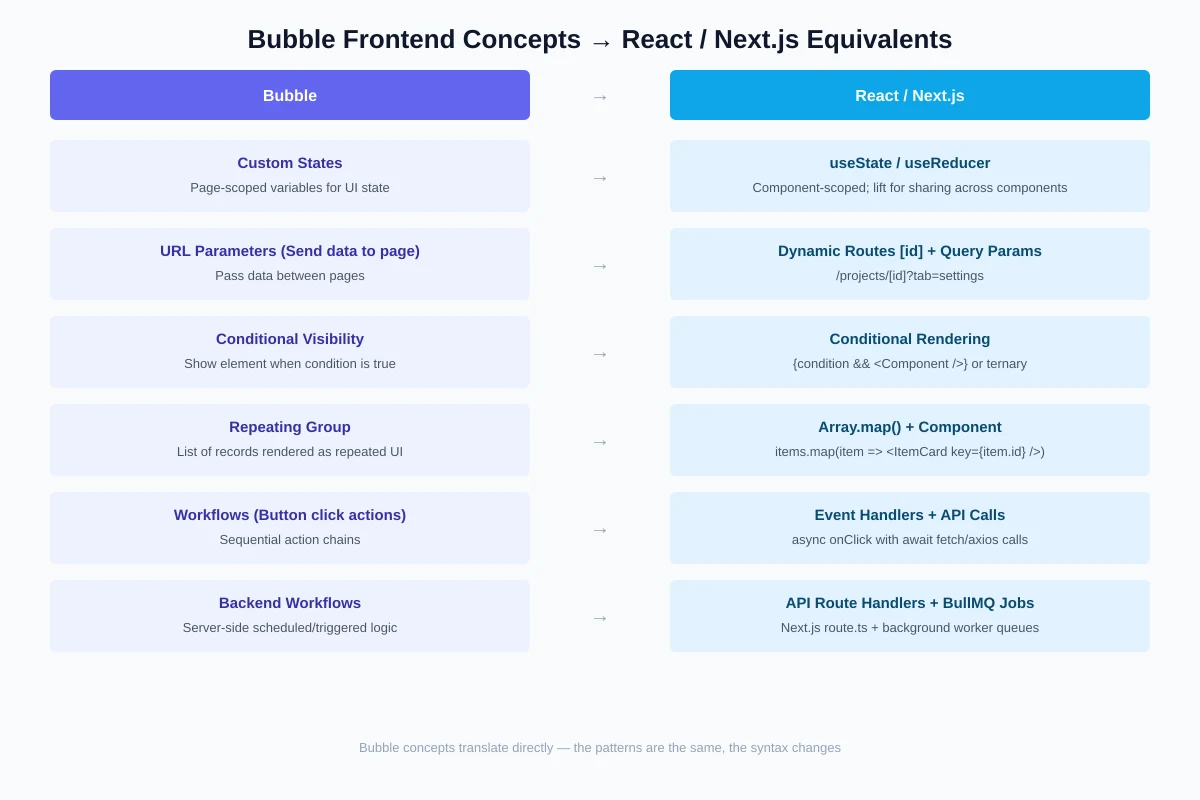
Bubble custom states are page-scoped variables. React's useState hook provides component-scoped state. For state shared across components on the same page, lift state to the page component and pass via props, or use a context provider. For app-wide state (current user, theme), use React Context or a state management library (Zustand, Jotai).
URL Parameters → Next.js Dynamic Routes
Bubble passes data between pages via URL parameters ("Send data to page" action). In Next.js, use dynamic route segments (/projects/[id]) for resource identification and query parameters (?tab=settings) for UI state. Dynamic routes are cleaner and more SEO-friendly than Bubble's parameter approach.
Page Navigation → Next.js Link
Bubble's "Go to page" action becomes Next.js's Link component or router.push(). Client-side navigation in Next.js is faster than Bubble because it prefetches linked pages — the destination page starts loading when the user hovers over the link, before they click.
Before starting frontend migration, screenshot every page in your Bubble app at desktop and mobile breakpoints. Annotate each screenshot with: the data source for each element, the conditions for each conditional element, and the workflow for each button/form. This visual specification is more useful than code documentation because frontend is inherently visual — your developers need to see what they are building, not just read about it.
Frequently Asked Questions
Q. How long does frontend migration take compared to backend?
Frontend typically takes 40 to 50 percent of total migration time. For a 12-week migration, expect 5 to 6 weeks on frontend. This is because every page must be rebuilt, while backend is primarily schema + API endpoints + background jobs — fewer total items but each is more complex.
Q. Should I use a CSS framework or custom CSS?
Use Tailwind CSS. It is the industry standard for React/Next.js projects, produces small CSS bundles, and has responsive design built in. Pair with shadcn/ui for pre-built components. Custom CSS is only justified if your design system has unique requirements that no framework can accommodate.
Q. Can AI tools help with frontend migration?
Yes — frontend is where AI produces the best results. Give AI a screenshot of a Bubble page plus the data schema, and it generates React components with Tailwind styling at 70 to 80 percent accuracy. Human refinement handles the remaining 20 to 30 percent: responsive behavior, edge cases, and exact visual fidelity.
Q. Do I need to achieve pixel-perfect parity with Bubble?
No. Users care about functional parity (same features, same data) more than visual parity (identical pixels). Use the migration as an opportunity to apply modern design patterns — consistent spacing, proper typography scale, accessible contrast ratios. A cleaner design that works the same way is better than a pixel-perfect copy of a cluttered Bubble layout.
Q. How do I handle Bubble plugins that render UI elements?
Each Bubble UI plugin (rich text editor, calendar, chart) must be replaced with an equivalent React library: Tiptap for rich text, FullCalendar for calendars, Recharts for charts. The plugin replacement guide maps each plugin to its React equivalent with estimated rebuild time.
Q. Should frontend and backend migration happen in parallel?
Partially. The database schema and API endpoints must be built first — frontend needs data to display. But frontend development can start as soon as the API contract is defined (even before endpoints are fully implemented) using mock data. Parallel execution with an API-first approach saves 2 to 4 weeks on a 12-week project.
Rebuild the Interface, Preserve the Experience
- Frontend typically takes a large share of migration cost: In our experience, rebuilding every page, element, conditional, and interaction often consumes roughly 40 to 50 percent of total project budget. Bubble's visual editor compresses development time that React expands back to its natural scope.
- Every Bubble concept has a React equivalent: Repeating groups → Array.map with components. Conditionals → conditional rendering. Custom states → useState. Responsive settings → Tailwind prefixes. The translation is systematic, not inventive.
- Use component libraries and AI: shadcn/ui, Radix, and Headless UI save weeks on common UI patterns. AI generates 70 to 80 percent accurate components from screenshots. Invest human time in edge cases and responsive behavior, not in building buttons from scratch.
- Functional parity over visual parity: Users care that features work the same way, not that pixels are identical. Use migration as an opportunity to apply modern design patterns that improve the experience.
- Screenshot everything first: Visual specifications are more useful than code documentation for frontend work. Annotated screenshots of every page at every breakpoint give your developers the reference they need.
The frontend is the part of your app your users actually see. Rebuild it carefully, test it against Bubble side-by-side, and launch with confidence that the experience your users trained on has been faithfully preserved — in a faster, more maintainable form.
Document Your Frontend Architecture
Relis extracts data schemas and API specs that your frontend components bind to — the data layer your React components need. Start your frontend migration knowing exactly what data each page displays.
Scan My App — FreeSee Your Bubble Architecture — Automatically
Stop reverse-engineering by hand. Relis extracts your complete database schema, API connections, and backend workflows in under 10 minutes.
See Your Bubble Architecture — Automatically
Stop reverse-engineering by hand. Relis extracts your complete database schema, API connections, and backend workflows in under 10 minutes.