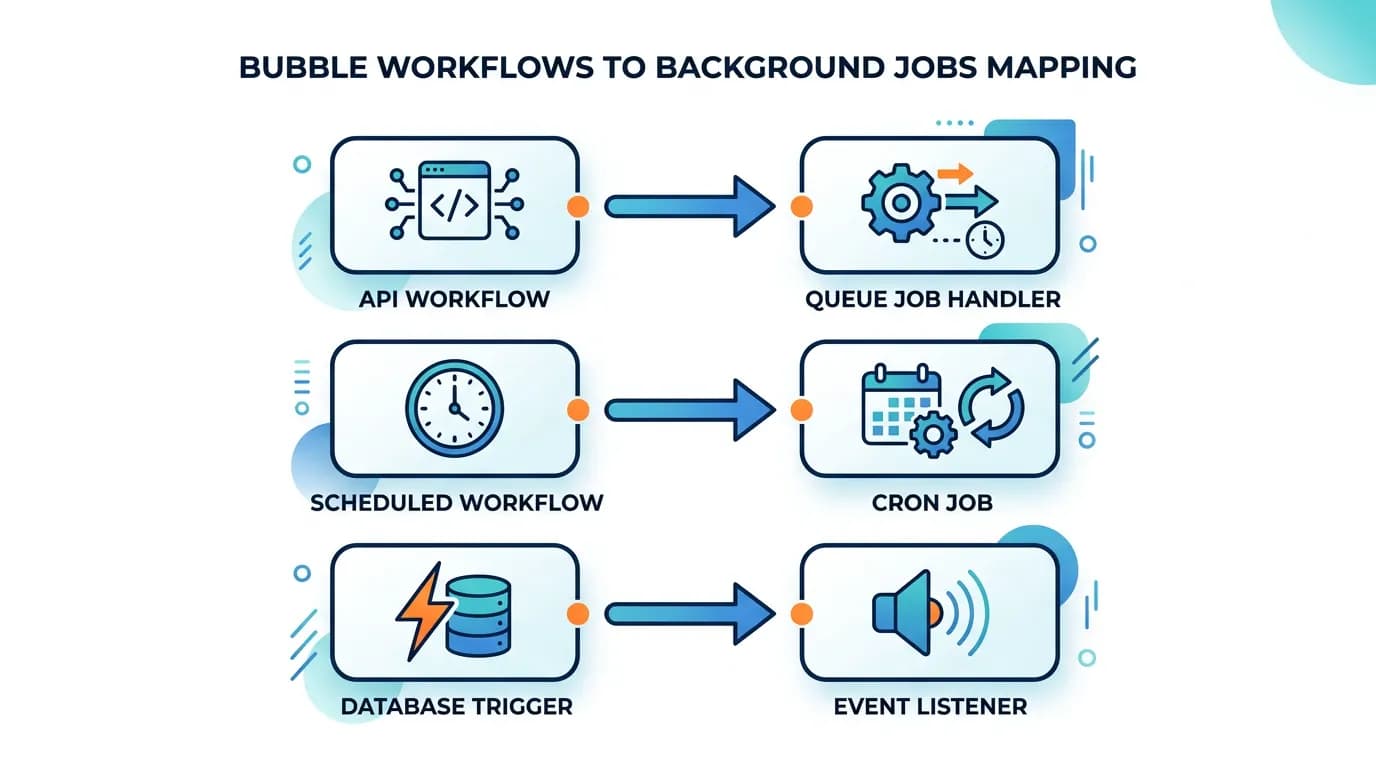
Migrating Bubble Backend Workflows to Background Jobs: A Developer's Guide
Bubble backend workflows — scheduled jobs, database triggers, and custom API workflows — need a complete redesign for custom code. This guide covers how to translate each workflow type to BullMQ, Inngest, Trigger.dev, or pg_cron with trigger mapping, error handling, and monitoring.
18 min read
Backend workflows are the number one discovery failure in Bubble migrations. They run server-side, have no visible UI, and execute logic that users depend on without ever seeing — subscription renewals at midnight, welcome emails triggered by signups, data cleanup jobs that run every hour, and notification dispatchers that fire when a record changes. When a migrated app launches without these workflows, the failures are silent until a user reports that their subscription did not renew, their welcome email never arrived, or stale data is piling up.
This guide covers the complete translation process: identifying every backend workflow in your Bubble app, classifying it by type, choosing the right background job infrastructure, and rebuilding each workflow with proper error handling and monitoring. If you read one migration guide before touching backend logic, make it this one.
Why Backend Workflows Are the Number One Migration Risk
Three characteristics make backend workflows the highest-risk migration component.
Invisibility
Backend workflows do not appear on any page. They are not referenced in any element. A developer auditing a Bubble app by clicking through pages will never encounter them. They exist only in Bubble's backend workflow editor — a separate section of the editor that many developers do not know exists. In our experience medium-complexity apps commonly carry on the order of a couple of dozen backend workflows, and complex apps materially more.
Critical Business Logic
Backend workflows handle the operations that keep a business running: payment processing, email notifications, data synchronization, report generation, and subscription lifecycle management. These are not nice-to-have features — they are revenue-critical processes that must run correctly from day one.
Stateful Complexity
Many backend workflows are stateful — they modify data that subsequent workflows depend on. A nightly reconciliation workflow updates account balances that a morning report workflow reads. An onboarding workflow creates records that a notification workflow watches for. Break the chain and downstream processes silently fail.
The Three Backend Workflow Types in Bubble
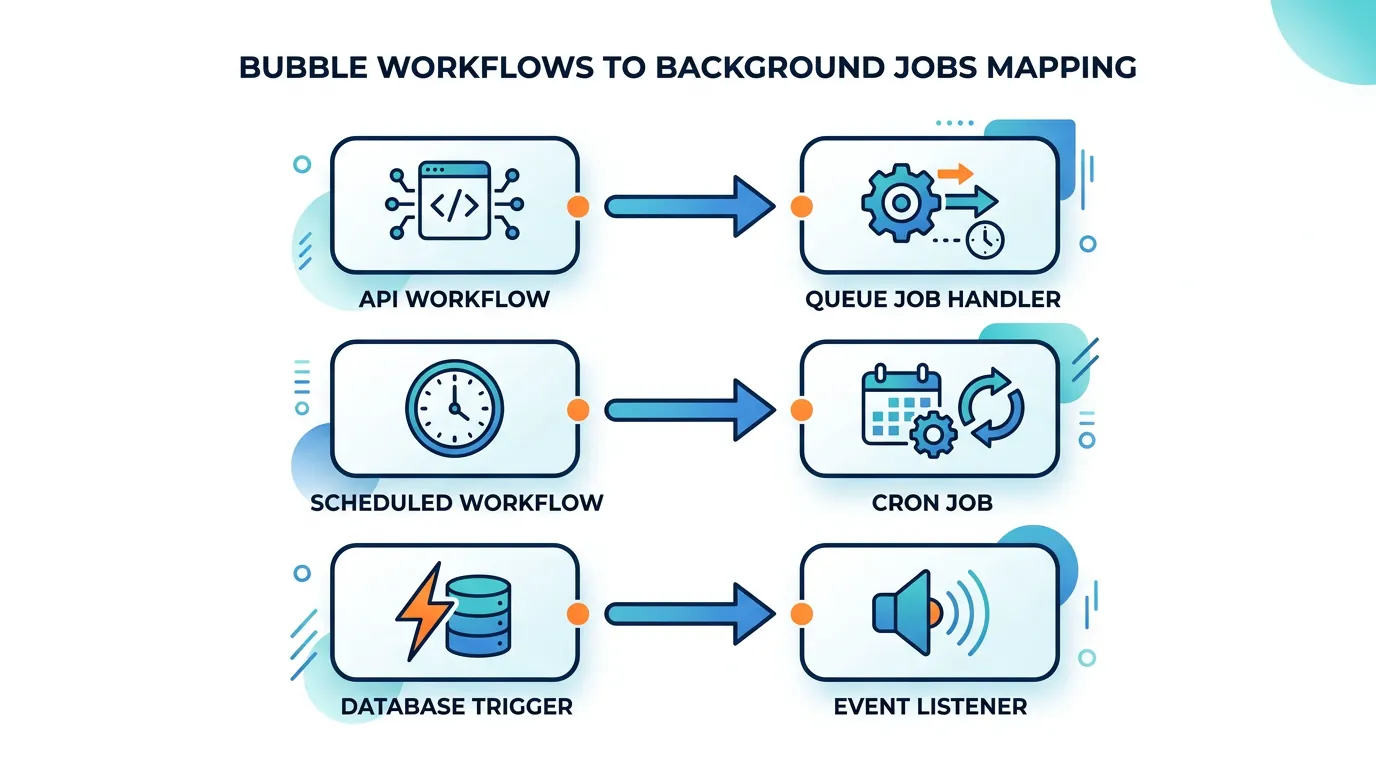
Bubble has three distinct backend workflow types. Each maps to a different pattern in custom code.
| Bubble Type | Trigger | Code Equivalent | Example |
|---|---|---|---|
| API Workflow | Explicit API call or frontend trigger | Queue job handler (BullMQ, Inngest) | Process payment, send email batch, generate report |
| Scheduled/Recurring | Time-based (every hour, daily at 3 AM) | Cron job (pg_cron, node-cron, Inngest scheduled) | Nightly data cleanup, weekly digest email, hourly sync |
| Database Trigger | Record created, modified, or deleted | Database trigger function or event listener | Send welcome email on user creation, notify on status change |
Documenting Your Workflows
For each workflow, document: the workflow name, the trigger type and condition, the complete action sequence (every step, in order), any conditional logic within the sequence, the data types and fields it reads or writes, and any external services it calls. This documentation becomes the specification your developers build from. Relis extracts this documentation automatically — trigger conditions, action sequences, and parameters for every backend workflow.
Choosing Your Background Job Infrastructure
Custom code does not have Bubble's built-in workflow engine. You need to add background job infrastructure to your stack. The right choice depends on your workflow complexity and team preferences.
| Solution | Best For | Scheduling | Cost | Complexity |
|---|---|---|---|---|
| BullMQ + Redis | Self-hosted, full control | Cron syntax, delayed jobs | Redis hosting ($10–$50/mo) | Medium (self-managed) |
| Inngest | Event-driven workflows, step functions | Built-in cron, event triggers | Free tier, then $50+/mo | Low (managed) |
| Trigger.dev | Long-running jobs, AI tasks | Cron triggers, webhook triggers | Free tier, then $25+/mo | Low (managed) |
| pg_cron (Supabase) | Simple SQL-based schedules | Cron syntax (SQL execution) | Included in Supabase | Low (limited to SQL) |
| AWS Lambda + EventBridge | Serverless, pay-per-execution | EventBridge schedules | Pay per invocation | Medium (AWS ecosystem) |
Decision Framework
If your workflows are mostly simple (send email, update record, call API) and you use Supabase: pg_cron + Edge Functions. If your workflows involve multi-step sequences with retry logic: Inngest or Trigger.dev. If you need full control and are self-hosting: BullMQ + Redis. If you have 5 or fewer simple workflows: node-cron in your application process might suffice.
A common mistake: replacing Bubble scheduled workflows with setTimeout or setInterval in your Node.js application. These do not survive server restarts, cannot be monitored, and do not scale across multiple server instances. Use a proper job queue or scheduler — even for simple tasks. The investment is minimal and the reliability difference is enormous.
Translating API Workflows to Job Handlers
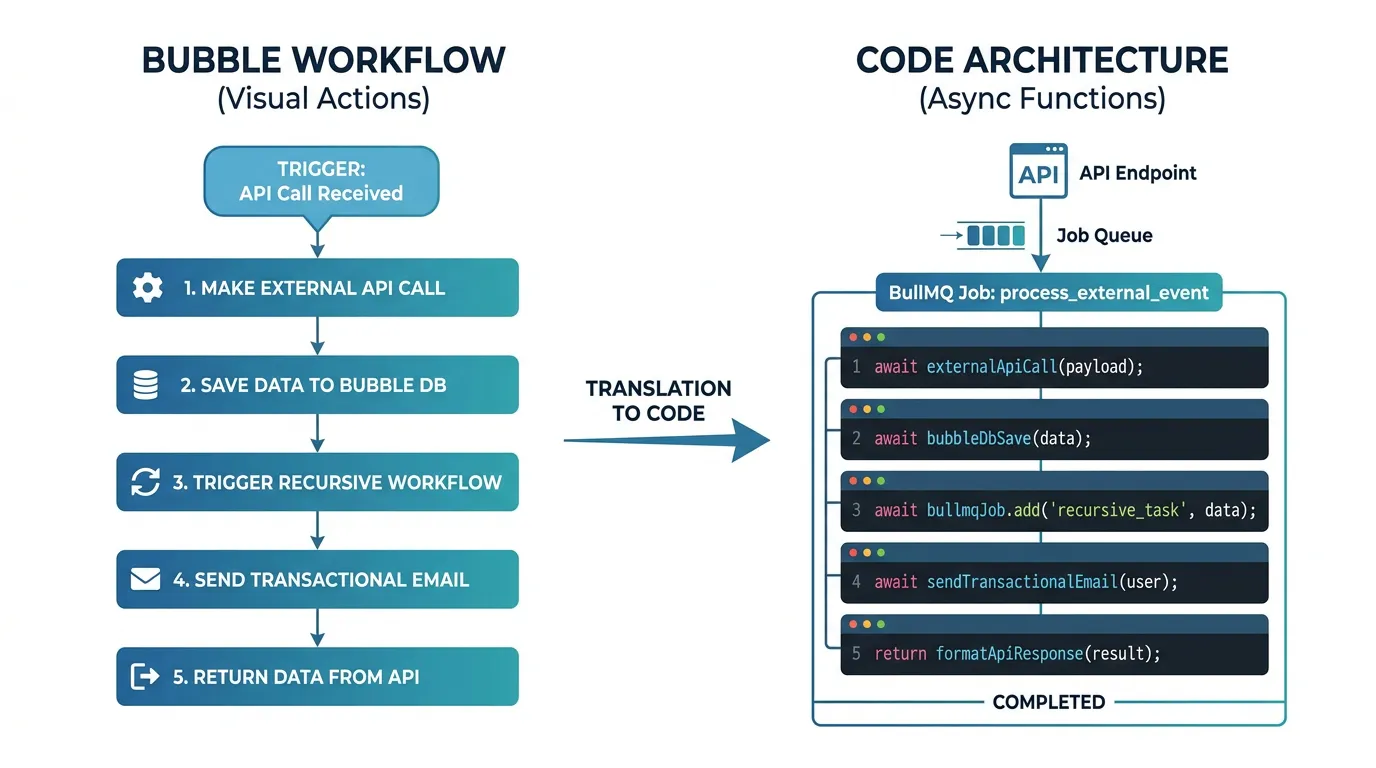
API workflows are the most straightforward to translate. In Bubble, an API workflow is triggered by a frontend action or an external API call. In custom code, the equivalent is: receive the request at an API endpoint, enqueue a job with the request parameters, and process the job asynchronously in a worker.
Why Asynchronous Matters
In Bubble, API workflows run asynchronously by default — the frontend does not wait for completion. In custom code, if you process the workflow synchronously in the API handler, the HTTP request blocks until all actions complete. For workflows that send emails, call external APIs, or process large datasets, this means request timeouts and poor user experience. Always enqueue and process asynchronously.
The Translation Pattern
Each Bubble API workflow becomes three components: (1) an API endpoint that validates the request and enqueues the job, (2) a job handler that implements the workflow's action sequence, and (3) error handling with retry logic for each step. The action sequence from your workflow documentation maps directly to the job handler's function body.
Handling Workflow Chains
Some Bubble workflows call other workflows — a "Process Order" workflow that triggers "Send Confirmation Email" and "Update Inventory" workflows. In custom code, implement this with job chaining: the parent job enqueues child jobs upon completion. Inngest handles this natively with step functions. BullMQ supports it with flow producers. The key is maintaining the execution order while keeping each step independently retriable.
Translating Scheduled and Recurring Workflows
Scheduled workflows are the workflows most commonly missed during migration. They have no UI, no element reference, and no page connection. They simply run at specified times — and when they stop running, the failures are silent.
Common Scheduled Workflow Patterns
- Nightly cleanup: Delete expired records, archive old data, process pending items
- Hourly sync: Synchronize data with external services, update cached aggregations
- Weekly digest: Generate and send weekly summary emails to users
- Subscription lifecycle: Check expiring subscriptions, send renewal reminders, process cancellations
- Rate limit reset: Reset daily/monthly usage counters
Translation to Cron Jobs
Each scheduled workflow becomes a cron entry. The Bubble schedule (every hour, every day at 3 AM, every Monday) maps to standard cron syntax. The workflow's action sequence becomes the job handler. The critical addition: monitoring. In Bubble, scheduled workflows run or they do not — there is no alerting. In custom code, add monitoring for every scheduled job: was it invoked on time? Did it complete successfully? How long did it take? Did it process the expected number of records?
| Bubble Schedule | Cron Syntax | Note |
|---|---|---|
| Every minute | * * * * * |
Consider if this frequency is truly needed |
| Every hour | 0 * * * * |
Runs at minute 0 of every hour |
| Every day at 3 AM | 0 3 * * * |
Use UTC timezone consistently |
| Every Monday at 9 AM | 0 9 * * 1 |
1 = Monday in standard cron |
| First day of month | 0 0 1 * * |
Midnight on the 1st |
Bubble schedules run in the app's configured timezone. Custom code cron jobs typically run in UTC. If your Bubble workflow runs "daily at 9 AM EST," your cron job must account for the timezone difference — and for daylight saving time shifts. Use UTC internally and convert only for display. A timezone mismatch means your job runs at the wrong time twice a year.
Translating Database Trigger Workflows
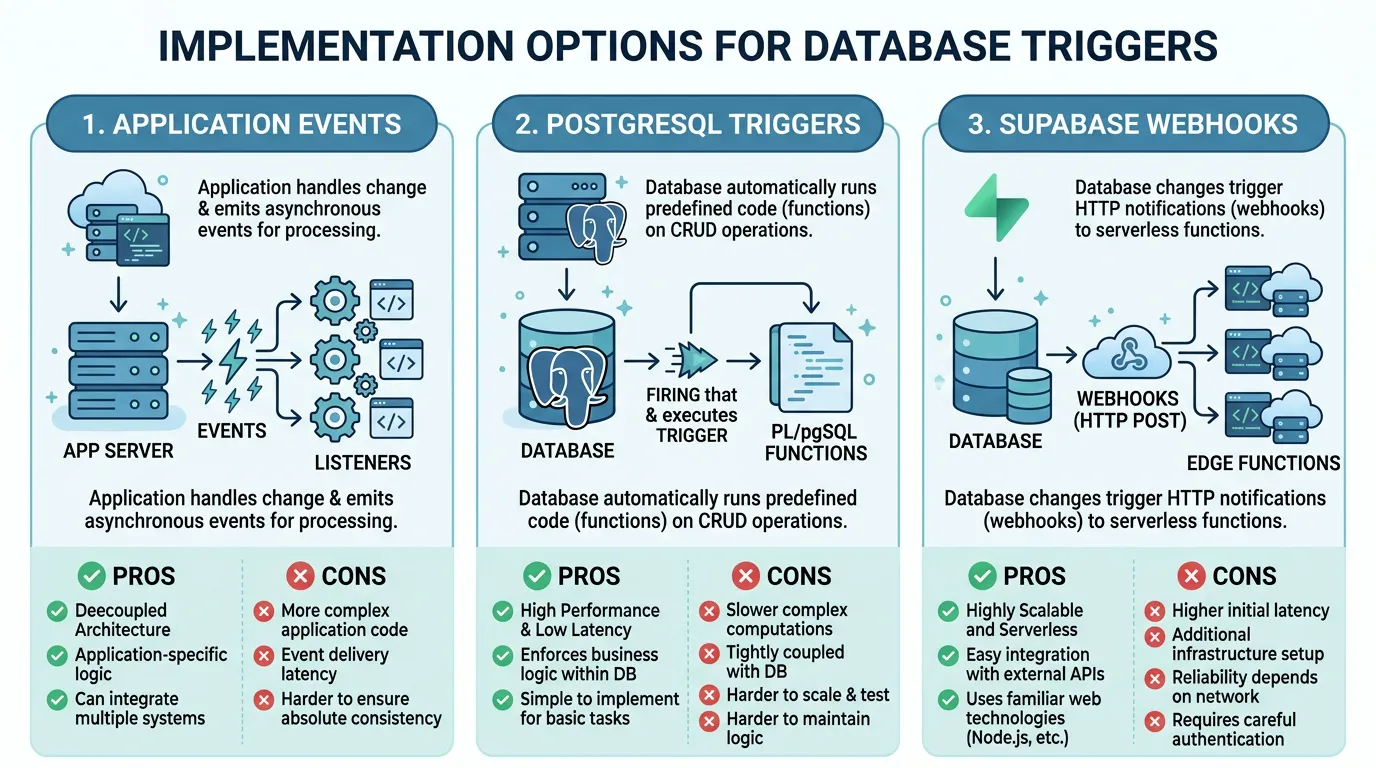
Database trigger workflows fire when a record is created, modified, or deleted. In Bubble, you configure these in the backend workflow editor with conditions like "When a Thing is created and Status is Active." In custom code, you have multiple implementation options.
Option 1: Application-Level Events
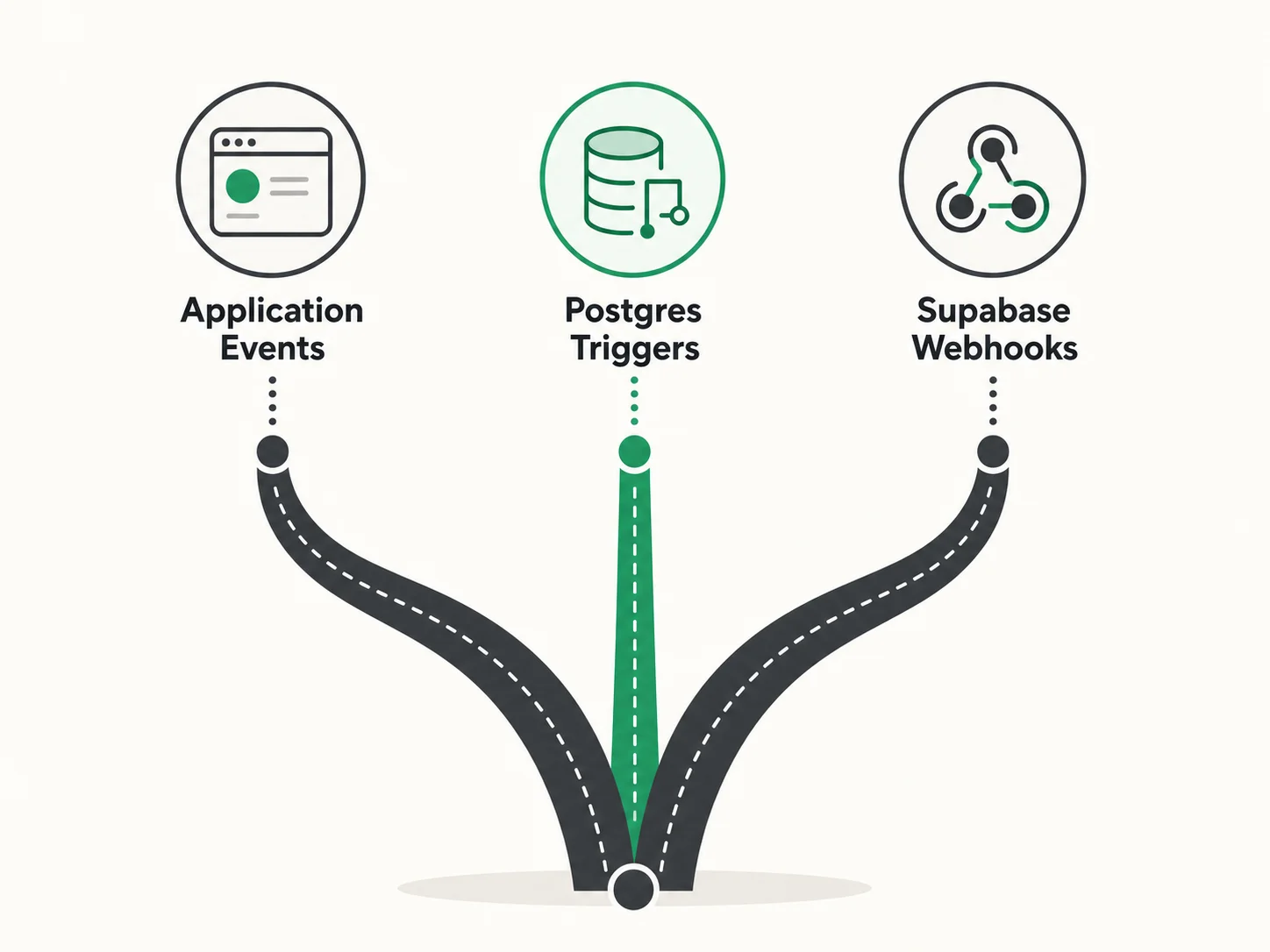
The simplest approach: emit events from your API handlers when records change. After creating a user, emit a "user.created" event. After updating an order status, emit an "order.status_changed" event. Event listeners handle the side effects — sending emails, updating related records, notifying external services. This is the most flexible approach and works with any job queue.
Option 2: PostgreSQL Triggers
PostgreSQL native triggers fire automatically when rows are inserted, updated, or deleted. They can call PL/pgSQL functions that perform additional database operations or notify external listeners via NOTIFY/LISTEN. Advantages: guaranteed execution (the trigger fires regardless of which application wrote to the table). Disadvantage: limited to SQL operations and pg_notify — complex logic should be handled by a job handler that the trigger enqueues.
Option 3: Supabase Database Webhooks
If you are using Supabase, Database Webhooks call an Edge Function or external URL whenever a specified table changes. This bridges the gap between database triggers and application logic — the trigger fires at the database level but the handler runs in your application context with full access to external services.
Choosing the Right Pattern
Use application-level events when: the trigger logic involves external services (email, API calls), you want full control over retry and error handling, and the event source is always your application. Use PostgreSQL triggers when: the side effect is purely database-level (update a counter, maintain an audit log), you need guaranteed execution regardless of which client writes to the table. Use Supabase webhooks when: you want database-triggered events with application-level processing power.
Error Handling, Monitoring, and Observability
In Bubble, workflow errors are swallowed silently. In custom code, you have the opportunity — and the responsibility — to handle errors explicitly. This is an upgrade, not a burden.
Retry Strategies
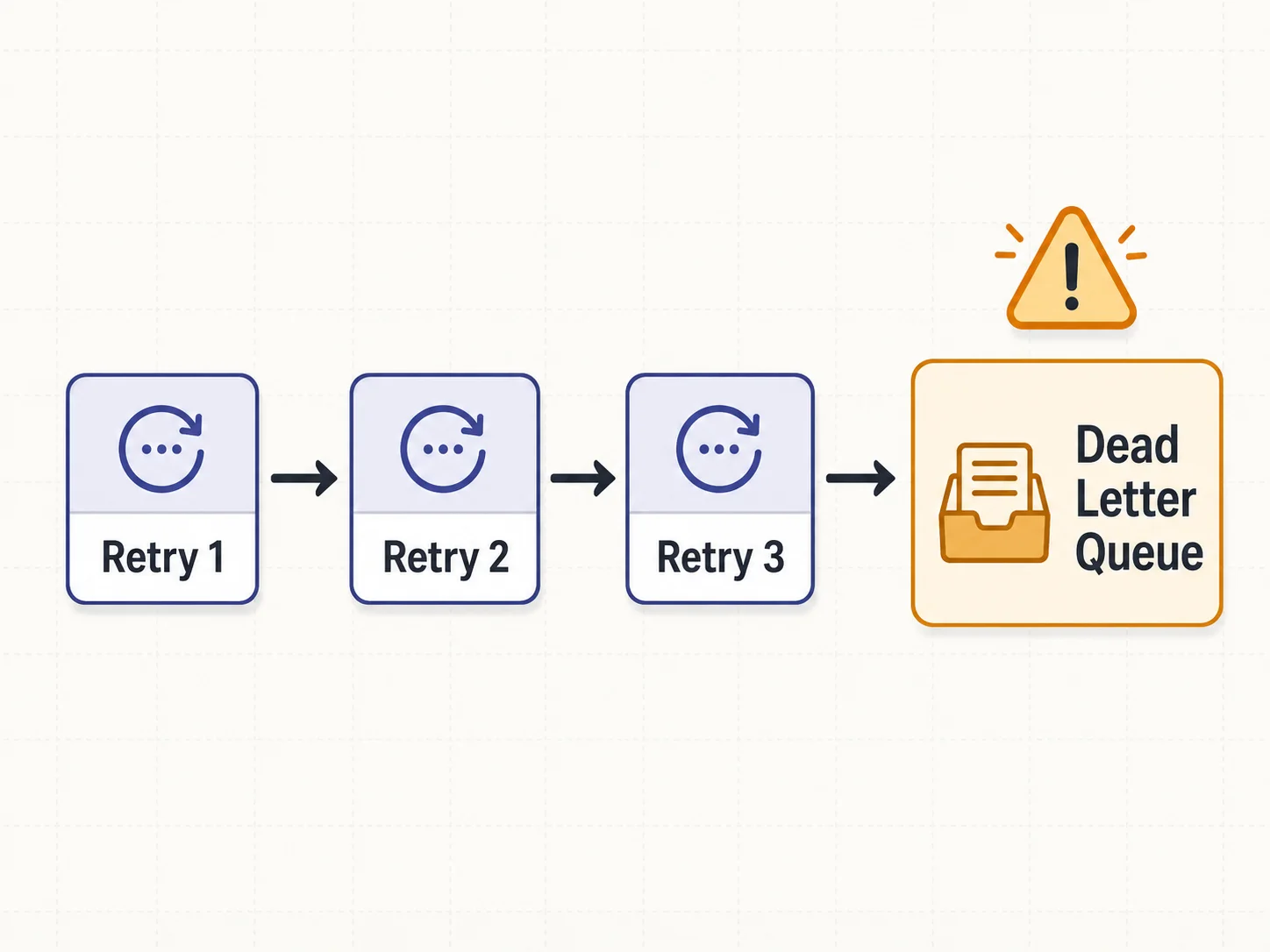
Not all errors should be retried the same way. Classify errors into: transient (network timeout, rate limit hit — retry with exponential backoff), permanent (invalid data, missing record — do not retry, alert), and partial (some items in a batch succeeded — retry only the failed items). Configure your job queue with appropriate retry counts and backoff intervals. Three retries with exponential backoff (1 second, 4 seconds, 16 seconds) handles most transient failures.
Dead Letter Queues
When a job exhausts all retries, it moves to a dead letter queue (DLQ). The DLQ holds failed jobs for manual inspection and replay. Without a DLQ, failed jobs disappear — you never know they failed, and the side effect they were supposed to produce never happens. Every production job queue must have a DLQ.
Monitoring and Alerting
Set up alerts for: jobs that exceed their expected duration (a 10-second job running for 5 minutes indicates a problem), jobs that fail after all retries (DLQ is growing), scheduled jobs that do not fire on time (the scheduler itself has failed), and queue depth that grows faster than processing capacity (backpressure building up). Tools: BullMQ Dashboard (self-hosted), Inngest dashboard (managed), or custom metrics pushed to your monitoring stack (Datadog, Grafana, New Relic).
Every job handler must be idempotent — running the same job twice must produce the same result as running it once. If a "send welcome email" job is retried, the user should not receive two welcome emails. Implement idempotency with a processed_jobs table that tracks job IDs, or use built-in deduplication features in your job queue (Inngest provides this natively). Idempotency is not optional — it is the foundation of reliable job processing.
Frequently Asked Questions
Q. How many backend workflows does a typical Bubble app have?
Commonly observed ranges in our work: simple apps carry a handful of backend workflows, medium-complexity apps a couple of dozen, and complex platforms materially more. The critical number is not total count but the number of scheduled workflows — these are the ones most commonly missed during migration and the hardest to debug when they are absent.
Q. Can I run all workflows in my main application process?
For simple workflows (under 5, no heavy processing), you can use node-cron in your main process. For anything more complex, use a separate worker process with a proper job queue. Running heavy processing in your web server process blocks HTTP requests and causes timeout errors for your users.
Q. How do I test scheduled workflows before launch?
Run the workflow handler as a regular function call in your test suite — test the logic independently from the schedule. Then run the complete scheduled workflow in a staging environment for at least one full cycle (24 hours for daily jobs, one week for weekly jobs) and verify the output. Do not rely on production as your first test environment for scheduled jobs.
Q. What about Bubble's "Schedule API Workflow on a List" (SAWOL)?
SAWOL processes a list of items by scheduling the same workflow for each item. In custom code, this becomes a batch job: receive the list, split it into individual items, and enqueue a job for each item (or process items in parallel within a single job). BullMQ supports bulk job creation. Inngest supports fan-out patterns. The key improvement: custom code batch processing is typically multiple times faster than Bubble's SAWOL because you control concurrency and parallelism.
Q. How do I handle workflows that modify data used by other workflows?
Document the dependency chain first. If Workflow A must complete before Workflow B reads the data it wrote, implement this as: (1) sequential execution — Workflow A enqueues Workflow B upon completion, or (2) event-driven — Workflow A emits an event that Workflow B subscribes to. Never rely on timing (e.g., "A runs at 3 AM and B runs at 4 AM") — timing is fragile and breaks when workflows take longer than expected.
Q. Should I migrate all workflows at once or incrementally?
Migrate in priority order: revenue-critical workflows first (payment processing, subscription management), then user-facing workflows (emails, notifications), then internal workflows (cleanup, sync, reporting). Test each batch thoroughly before adding the next. This limits blast radius — a bug in a reporting workflow is less damaging than a bug in a payment workflow.
Document Every Workflow Before You Rebuild
- Backend workflows are the highest-risk migration component: They are invisible, carry critical business logic, and fail silently when missing. A thorough inventory — trigger type, conditions, action sequence, schedule — is non-negotiable before development starts.
- Three types, three patterns: API workflows become queue job handlers. Scheduled workflows become cron entries. Database triggers become event listeners or PostgreSQL trigger functions. Each type has a well-established pattern in every major framework.
- Choose infrastructure based on complexity: Simple apps can use pg_cron and application-level events. Medium apps benefit from managed services like Inngest or Trigger.dev. Complex apps with high throughput need BullMQ with Redis. The wrong choice adds unnecessary overhead or leaves you without critical reliability features.
- Error handling is the upgrade: Bubble swallows workflow errors silently. Custom code gives you retry logic, dead letter queues, and monitoring. Implement all three — they are the difference between "it works" and "it works reliably in production."
- Make every handler idempotent: Jobs will be retried. Network calls will timeout and succeed on retry. Database writes will occasionally duplicate. If your handler is not idempotent, retries cause data corruption. This is the single most important implementation principle for background jobs.
The teams that launch without backend workflow issues are not the ones with the best developers. They are the ones that documented every workflow — trigger, conditions, actions, schedule — before their developers wrote a single job handler.
Extract Your Backend Workflow Documentation
Relis documents every backend workflow — trigger types, conditions, action sequences, schedules, and parameters — so your developers know exactly what needs rebuilding before they start.
Scan My App — FreeSee Your Bubble Architecture — Automatically
Stop reverse-engineering by hand. Relis extracts your complete database schema, API connections, and backend workflows in under 10 minutes.
See Your Bubble Architecture — Automatically
Stop reverse-engineering by hand. Relis extracts your complete database schema, API connections, and backend workflows in under 10 minutes.