Bubble to Supabase: The Fastest Migration Path for SaaS Applications
Supabase maps to Bubble's architecture better than any other target stack — built-in auth replaces Bubble login, Row-Level Security replaces privacy rules, and real-time subscriptions replace Bubble's live data. A practical migration guide with feature mapping, timeline estimates, and the tradeoffs you should know.
17 min read
When a Bubble founder decides to migrate, the first question is always: which stack? Next.js, Rails, Django, Laravel — each is a valid target. But for SaaS applications built on Bubble, one stack consistently produces the fastest migration with the smallest team: Next.js + Supabase.
The reason is structural, not trendy. Supabase is an open-source Firebase alternative built on PostgreSQL that provides the same categories of infrastructure Bubble provides — authentication, database with access control, file storage, and real-time data subscriptions — but without the visual editor lock-in, the proprietary data format, or the workload unit pricing that triggered your migration decision in the first place. This guide maps every Bubble feature to its Supabase equivalent and covers the gaps that Supabase does not fill.
Why Supabase Is the Natural Migration Target for Bubble Apps
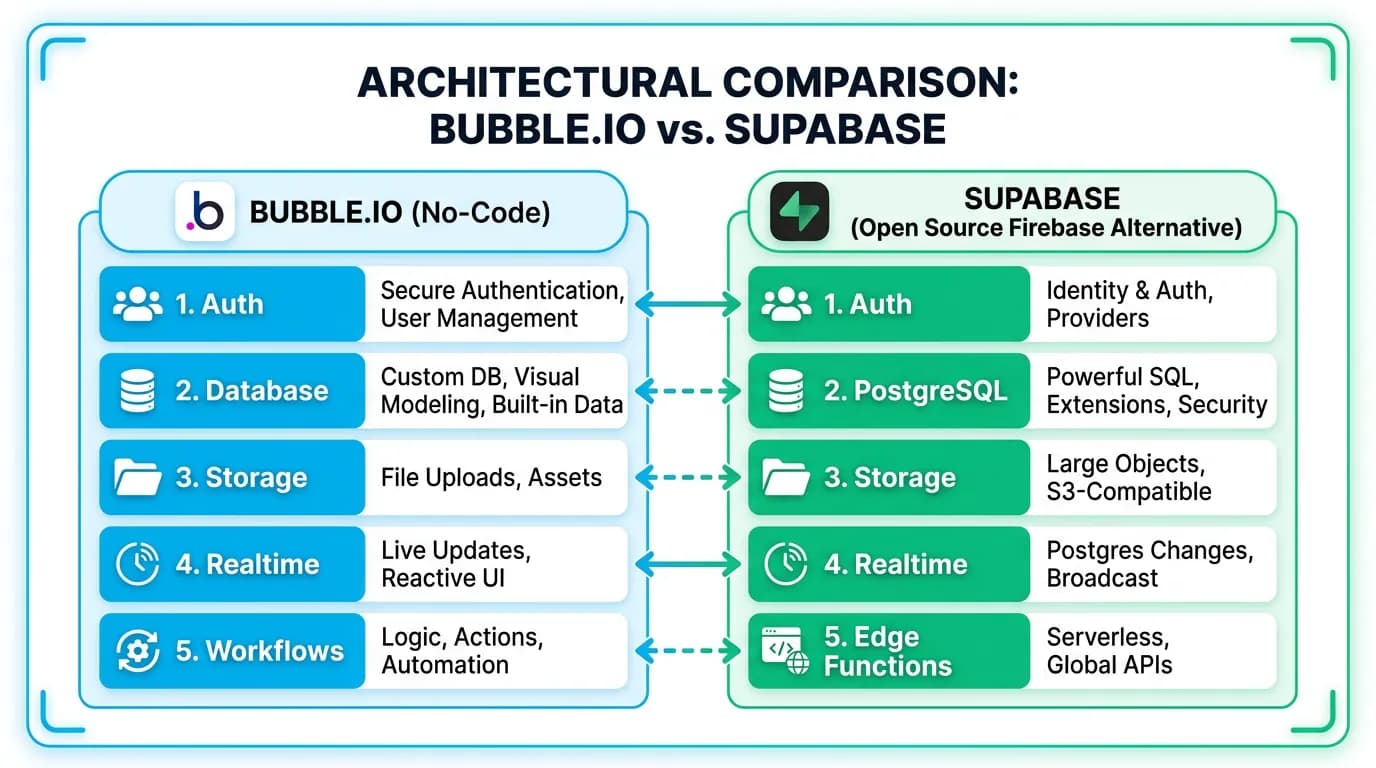
Most migration target stacks require assembling infrastructure from separate services: a database hosting provider, an auth service, a file storage provider, a real-time communication layer. Each requires integration, configuration, and ongoing maintenance. Supabase bundles all of these into a single platform with a unified API, shared authentication context, and consistent access control — the same architecture pattern Bubble uses.
Conceptual Alignment
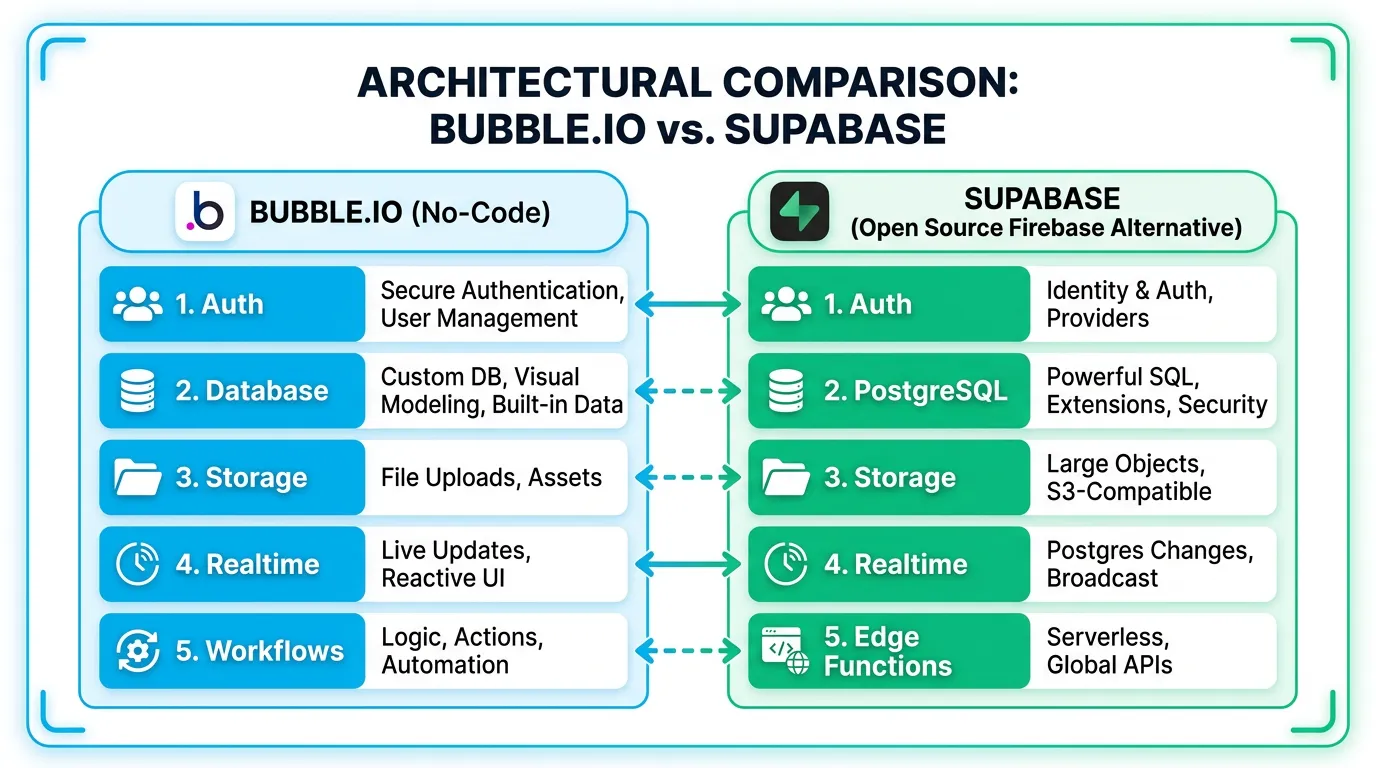
Bubble gives you a database, visual logic, auth, file storage, and real-time updates — all managed through a single interface. Supabase gives you PostgreSQL, Edge Functions, Auth, Storage, and Realtime — all managed through a single dashboard and API. The concepts map nearly one-to-one. Teams migrating to Supabase spend less time learning new paradigms and more time translating existing logic.
The RLS Advantage
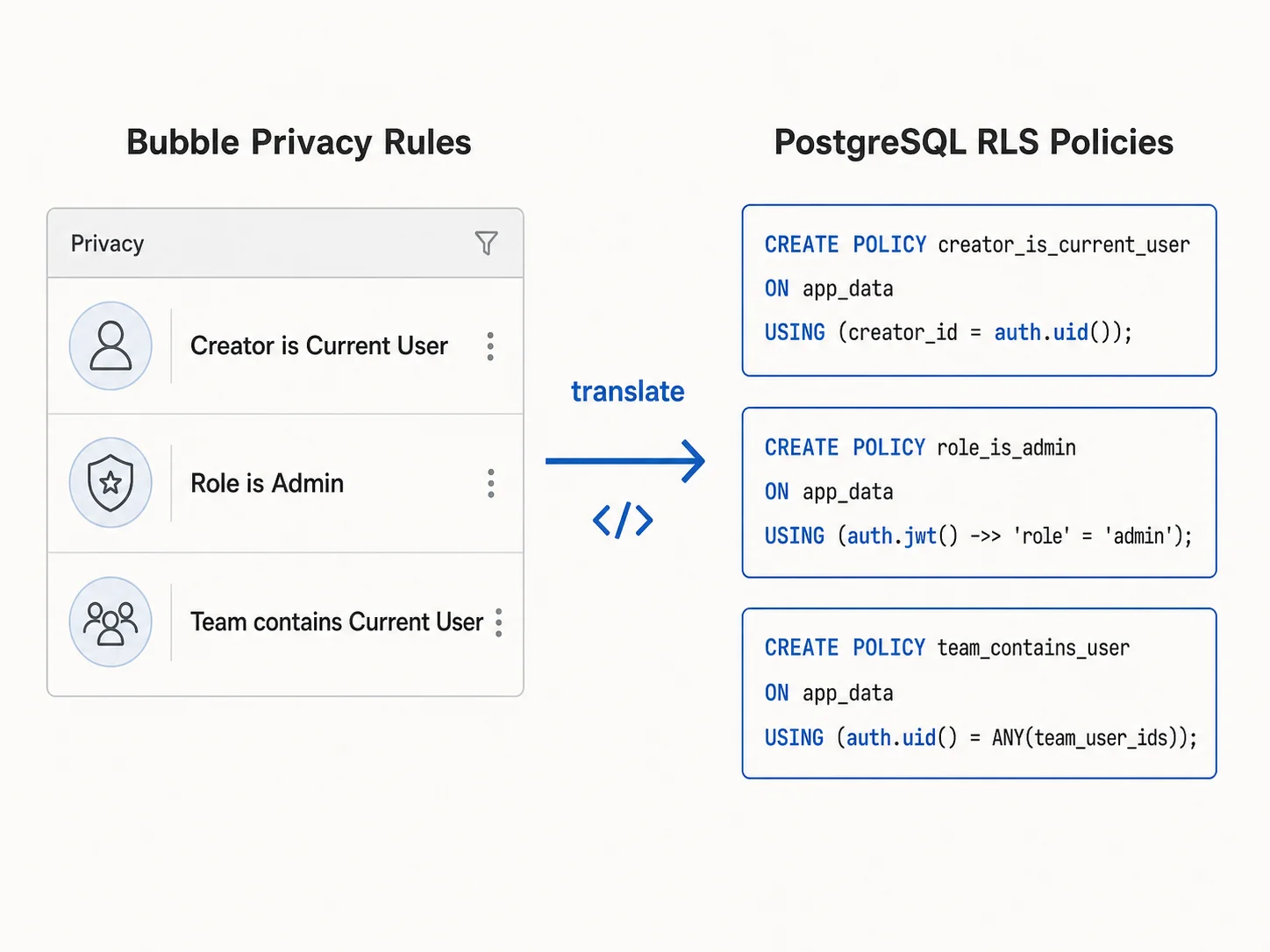
The single biggest reason to choose Supabase for a Bubble migration is Row-Level Security. Bubble's privacy rules — the invisible authorization layer that controls data access — translate directly to PostgreSQL RLS policies. "Current User is Creator" becomes a RLS policy that checks auth.uid(). "User's Role is Admin" becomes a policy that checks the user's role metadata. No other migration target provides this level of structural alignment with Bubble's authorization model.
Feature Mapping: Bubble to Supabase
Every Bubble feature has a Supabase equivalent — or a known gap that requires an additional service. This mapping table is your migration planning document.
| Bubble Feature | Supabase Equivalent | Migration Complexity |
|---|---|---|
| Custom data types | PostgreSQL tables | Low — direct schema translation |
| Data API (CRUD) | Auto-generated REST + GraphQL API | Low — API is auto-generated from schema |
| Privacy rules | Row-Level Security (RLS) policies | Medium — rule-by-rule translation |
| Email/password auth | Supabase Auth (email/password) | Low — built-in, minimal config |
| Social login (Google, etc.) | Supabase Auth (OAuth providers) | Low — provider config in dashboard |
| File uploads | Supabase Storage | Low — S3-compatible, built-in CDN |
| Live data updates | Supabase Realtime | Medium — different subscription model |
| Option Sets | PostgreSQL ENUMs or reference tables | Low — direct translation |
| Backend workflows | Edge Functions + pg_cron | High — requires redesign |
| Scheduled workflows | pg_cron or external scheduler | High — no direct equivalent |
| Visual frontend | Next.js (separate build) | High — complete rebuild |
| Plugins | npm packages + direct APIs | Medium-High — per-plugin effort |
Approximately 70 percent of a typical Bubble app's backend features map directly to Supabase equivalents with low-to-medium migration complexity. The remaining 30 percent — backend workflows, scheduled jobs, complex plugins, and the frontend UI — require significant development work regardless of which stack you choose. Supabase accelerates the 70 percent; the 30 percent is the same everywhere.
Auth Migration: Bubble Login to Supabase Auth
Authentication is the first system to migrate and the most sensitive. Every other feature depends on knowing who the current user is.
What Supabase Auth Provides
Supabase Auth is a complete authentication system: email/password, magic links, phone/SMS, and social OAuth (Google, GitHub, Apple, Facebook, Twitter, Discord, and more). It manages JWTs, refresh tokens, and session persistence. It integrates directly with RLS policies via the auth.uid() function — which is why privacy rule translation works so cleanly.
The Password Migration Problem
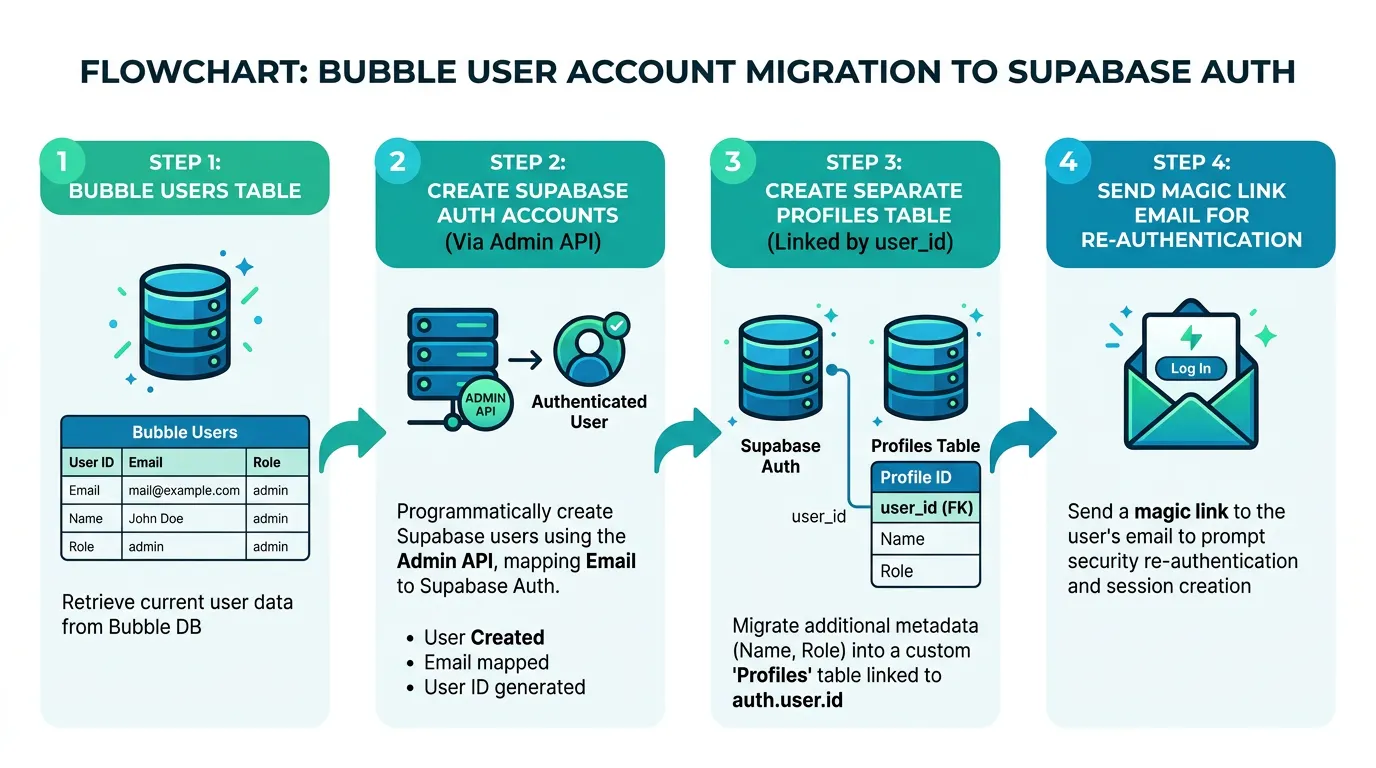
Bubble does not export password hashes. This is a universal migration challenge, not a Supabase-specific one. Your options: (1) send all users a magic link email on first login after migration — Supabase Auth supports magic links natively, (2) force a password reset via email — Supabase provides password reset flows out of the box, or (3) implement a one-time migration login flow that accepts the old Bubble session and creates a new Supabase session. Most teams choose option 1 (magic link) for its simplicity and security.
User Data Migration
Supabase Auth stores user accounts in a system-managed auth.users table. Your custom user profile data (name, role, preferences, company) should live in a separate public.profiles table linked by user_id. During migration: create Supabase Auth accounts for each user (via the Admin API), create profile records in your profiles table with the Bubble user data, and link them with the Supabase-generated user ID.
Privacy Rules to Row-Level Security
This is the migration step that makes Supabase uniquely suited for Bubble apps. Bubble privacy rules and PostgreSQL RLS serve the same function — controlling data access at the data layer, not the application layer.
Direct Rule Translation
The translation follows a consistent pattern. A Bubble rule "Everyone else can search for this type when This Thing's Creator is Current User" becomes a PostgreSQL RLS policy that filters rows where creator_id = auth.uid(). The rule fires automatically on every query — just like in Bubble.
| Bubble Rule | Supabase RLS Policy |
|---|---|
| Creator is Current User | auth.uid() = creator_id |
| Current User's Role is Admin | auth.jwt() ->> 'role' = 'admin' or check profiles table |
| Thing's Team contains Current User | EXISTS (SELECT 1 FROM team_members WHERE team_id = teams.id AND user_id = auth.uid()) |
| Thing is not archived | archived = false added to policy |
| Public (no auth required) | USING (true) — allows all reads |
Field-Level Restrictions
Bubble can hide specific fields from certain users. PostgreSQL RLS operates at the row level, not the column level. For field-level restrictions, create database views that exclude restricted columns, then grant access to the view instead of the table. Alternatively, handle field filtering in your API layer — but this adds application-level complexity that RLS was designed to avoid.
Supabase creates tables with RLS disabled by default. If you forget to enable RLS on a table, every authenticated user can read and write every row. Enable RLS immediately after creating each table, then add permissive policies for the access patterns you want. This "deny by default, permit explicitly" approach mirrors Bubble's behavior and prevents accidental data exposure.
Data Migration: Bubble Types to PostgreSQL Tables
Supabase uses PostgreSQL — so the data migration playbook applies directly. The key differences with Supabase are in tooling, not process.
Schema Creation
Supabase provides a visual Table Editor that lets you create tables, define columns, and set foreign keys — conceptually similar to Bubble's Data tab. For migration, you will likely use SQL DDL scripts generated from your architecture documentation rather than clicking through the UI. Execute your DDL scripts in Supabase's SQL Editor, enable RLS on each table, and verify the schema matches your ERD.
Data Loading
Supabase supports direct SQL access, so you can use PostgreSQL's COPY command for bulk loading — the fastest method for large datasets. For smaller datasets, Supabase's REST API supports batch inserts. The migration pipeline is the same: extract from Bubble, transform (ID translation, type conversion, relationship resolution), load in dependency order.
File Storage Migration
Supabase Storage is S3-compatible. Download files from Bubble's CDN and upload to Supabase Storage buckets. Configure bucket-level access policies (public for profile images, private for user documents). Update file URL references in your database to point to Supabase Storage URLs.
Real-Time: Bubble Live Updates to Supabase Realtime
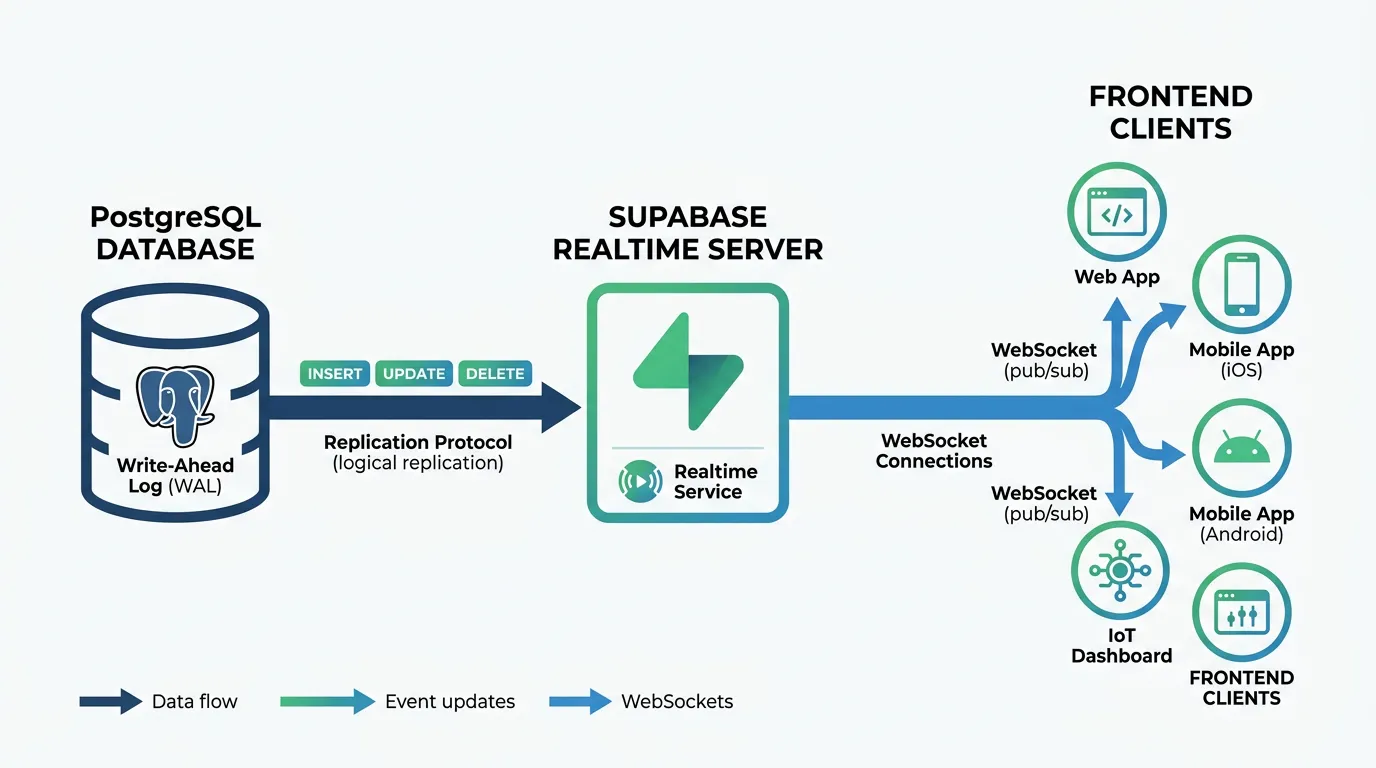
Bubble provides live data updates automatically — when a record changes, any page displaying that record updates in real time. Supabase Realtime provides similar functionality but with a different subscription model.
How Supabase Realtime Works
Supabase Realtime listens to PostgreSQL's WAL (Write-Ahead Log) and broadcasts changes to subscribed clients via WebSockets. You subscribe to specific tables, specific events (INSERT, UPDATE, DELETE), and optionally filter by column values. When a matching change occurs, the client receives the new row data.
Key Differences from Bubble
In Bubble, live updates are automatic and implicit — every element on the page listens for changes to the data it displays. In Supabase, subscriptions are explicit — you must subscribe to specific tables and handle incoming events in your frontend code. This gives you more control (subscribe only to what you need) but requires more setup (every real-time feature needs a subscription).
| Feature | Bubble | Supabase Realtime |
|---|---|---|
| Setup | Automatic — all data is live | Explicit — subscribe per table/event |
| Granularity | Record-level | Table, event type, column filter |
| Access control | Via privacy rules | Via RLS policies (applied to subscriptions) |
| Protocol | Proprietary | WebSocket (standard) |
| Presence | Not built-in | Built-in (online users, cursor tracking) |
What Supabase Does Not Replace
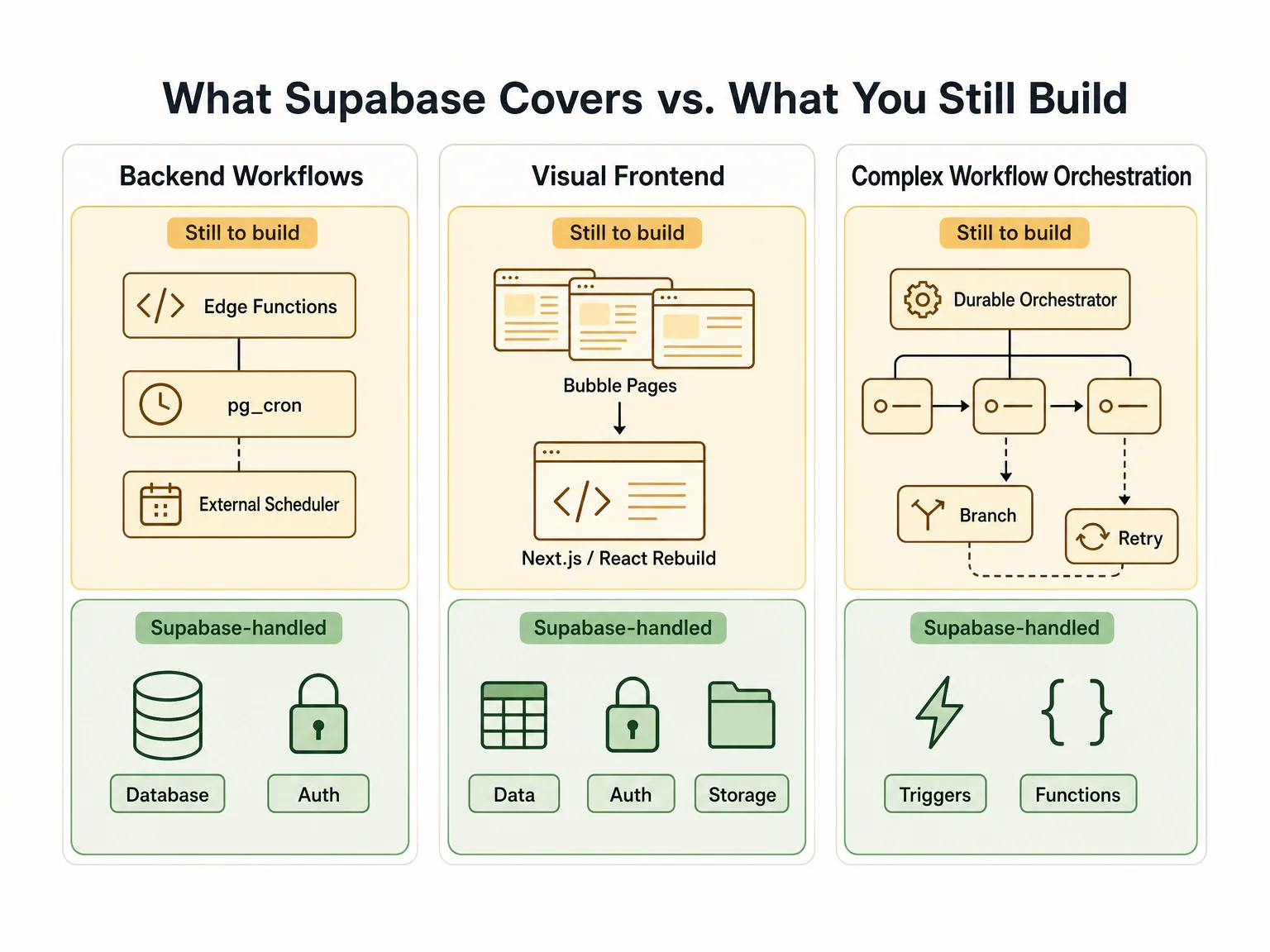
Supabase covers the data layer comprehensively but has gaps that require additional services or custom code. Knowing these gaps before you start prevents mid-migration surprises.
Backend Workflows → Edge Functions + External Schedulers
Bubble's backend workflows — scheduled jobs, database triggers, and custom API workflows — do not have a one-button equivalent in Supabase. Supabase Edge Functions handle event-driven logic (triggered by database changes via webhooks, or by HTTP requests). For scheduled jobs, use pg_cron (available on Supabase) for simple SQL-based schedules, or an external service like Inngest, Trigger.dev, or BullMQ for complex background job processing.
Visual Frontend → Next.js or React
Supabase has no visual frontend builder. Your Bubble pages need to be rebuilt in a frontend framework. Next.js is the most common pairing because: Supabase provides an official Next.js SDK, server-side rendering works with Supabase Auth cookies, and the App Router's server components can query Supabase directly. The frontend rebuild is the largest single workstream in any Bubble migration — Supabase does not change this.
Complex Workflow Orchestration
Bubble workflows that chain 10+ actions with conditional branches, error handling, and rollback logic need a workflow engine that Edge Functions alone cannot provide. For these, consider Inngest (event-driven workflow orchestration), Temporal (durable execution), or a custom queue-based system. Document your backend workflows completely before choosing an orchestration solution — the complexity of your workflows determines which tool fits.
Supabase dramatically accelerates backend migration — auth, database, storage, and real-time are handled. But the frontend rebuild (converting Bubble's visual pages to React/Next.js components) still consumes 40 to 50 percent of total migration time regardless of backend choice. Supabase does not shortcut the frontend. Plan and budget for it separately.
Frequently Asked Questions
Q. How much faster is migration with Supabase compared to a custom PostgreSQL setup?
For the backend layer, Supabase reduces setup time by 40 to 60 percent because auth, storage, real-time, and the REST API are pre-built. The total project timeline reduction is 20 to 30 percent because frontend rebuild time is unchanged. A mid-complexity migration that takes 14 weeks with a custom setup might take 10 to 11 weeks with Supabase.
Q. Can Supabase handle my Bubble app's scale?
Supabase runs on PostgreSQL with connection pooling via PgBouncer. In our experience, the Pro plan ($25/month) supports SaaS apps in the low-hundreds-of-thousands-of-MAU range before tier upgrades become attractive. For higher scale, the Team plan ($599/month) provides dedicated compute. Supabase scales significantly beyond Bubble's performance ceiling — if your Bubble app is hitting limits, Supabase will not.
Q. What happens to my Bubble data during migration?
Extract your data from Bubble (CSV export or Data API), transform it (translate IDs, convert types, resolve relationships per the data migration playbook), and load it into Supabase's PostgreSQL database. Supabase supports direct SQL access, so you can use COPY for bulk loading. The migration pipeline is identical to any PostgreSQL target.
Q. Should I use Supabase's auto-generated API or build custom API routes?
Use both. Supabase auto-generates REST and GraphQL APIs from your schema — these handle standard CRUD operations without any code. For complex business logic (validation, multi-step transactions, external API calls), build custom API routes in your Next.js application or Supabase Edge Functions. The auto-generated API covers 60 to 70 percent of use cases.
Q. Is Supabase truly open-source? Can I self-host?
Yes. Supabase is open-source (Apache 2.0 license) and can be self-hosted via Docker. Self-hosting gives you full control over data residency, infrastructure costs, and customization. Most teams start with Supabase's managed platform and consider self-hosting only when they need specific compliance requirements (data sovereignty, on-premise) that the managed platform cannot satisfy.
Q. How do Supabase costs compare to Bubble?
Supabase Free tier handles small apps. Pro ($25/month) covers most SaaS applications. Team ($599/month) handles enterprise scale. Compare this to Bubble: Team plan ($349/month) plus variable WU overages (commonly into the hundreds of dollars per spike) plus plugin fees. For apps hitting Bubble's performance ceiling, Supabase typically costs meaningfully less with materially better performance for the same workload — see Bubble's pricing page for current overage and plan details.
The Fastest Path, Not the Easiest
- Supabase mirrors Bubble's architecture categories: Auth, database, storage, and real-time all have direct equivalents. This structural alignment reduces the number of new concepts your team needs to learn and the number of separate services you need to integrate.
- RLS is the killer feature for Bubble migrations: No other target stack provides a direct translation path for Bubble privacy rules at the database level. RLS policies enforce the same access control that privacy rules enforce — automatically, on every query, without application code.
- Backend workflows remain the hard part: Supabase Edge Functions and pg_cron cover simple cases. Complex workflow orchestration (10+ step chains, conditional branches, retry logic) requires additional tooling — Inngest, Trigger.dev, or a custom queue system.
- The frontend is still 40 to 50 percent of the work: Supabase accelerates the backend dramatically but does not touch the frontend. Bubble's visual pages need a complete rebuild in Next.js or React. Budget for this as the single largest workstream.
- Start with architecture documentation: Supabase migration is fastest when your schema, privacy rules, and API specifications are documented before you start. Feed these documents to Supabase's Table Editor, RLS policy builder, and your AI coding tools for maximum acceleration.
Supabase is the fastest path from Bubble to custom code — but fast does not mean effortless. The backend migration is genuinely simpler. The frontend rebuild is genuinely hard. Plan for both, and start with the blueprint that makes both possible.
Extract Your Bubble Architecture for Supabase Migration
Relis documents your complete Bubble backend — data schemas ready for PostgreSQL, privacy rules ready for RLS policies, API specs ready for Edge Functions. Start your Supabase migration with the full picture.
Scan My App — FreeReady to Plan Your Migration?
Get a complete architecture blueprint — ERD, DDL, API docs, workflow specs — everything your developers need to start rebuilding.
Ready to Plan Your Migration?
Get a complete architecture blueprint — ERD, DDL, API docs, workflow specs — everything your developers need to start rebuilding.