Bubble.io SEO Limitations: When Search Performance Forces a Migration
Bubble apps struggle with Core Web Vitals, server-side rendering, clean URL structures, and page speed — all factors that directly impact Google rankings. This guide maps Bubble's specific SEO limitations, quantifies their impact with real data, and defines the threshold where migration becomes the only path to competitive search visibility.
18 min read
If your Bubble app does not depend on organic search traffic, you can stop reading. But if Google is a meaningful acquisition channel — if potential customers search for your product category and you need to appear in results — Bubble's technical limitations create a measurable ceiling on your search visibility that no amount of content optimization can overcome.
This is not about Bubble being a bad platform. It is about Google's ranking algorithm increasingly favoring pages that load fast, render server-side, and meet specific technical benchmarks called Core Web Vitals. Bubble's architecture — client-side rendering, heavy JavaScript payloads, and a shared hosting infrastructure — works against these benchmarks in ways that are structural, not fixable with optimization. This guide quantifies the gap and defines when migration becomes the only path to competitive search rankings.
Why SEO Matters for Bubble Apps
SEO is irrelevant for apps behind a login wall — dashboards, admin panels, and internal tools. It is critical for: landing pages and marketing sites that drive signups, content pages (blogs, documentation, help centers) that capture search traffic, marketplace listings that need to appear in Google results, and public-facing directories or tools that compete for search visibility.
The Traffic Equation
For SaaS companies, organic search typically drives 30 to 60 percent of website traffic. If your signup funnel starts with a Google search — "project management tool" or "invoice generator" or "CRM for agencies" — your search ranking directly determines your customer acquisition cost. A first-page ranking costs you nothing per click. A position on page two means paying for ads to get the same traffic. When your Bubble app's page speed prevents first-page rankings, you are paying for traffic that faster competitors get for free.
The Five SEO Limitations of Bubble
Bubble's SEO limitations are architectural — they stem from how Bubble builds and serves pages, not from configuration mistakes you can fix.
Limitation 1: Client-Side Rendering
Bubble renders pages client-side. The server sends a JavaScript bundle, and the browser builds the page content from that JavaScript. Google can render client-side JavaScript — but it does so on a second pass, sometimes days after the initial crawl. This means: your content may not be indexed immediately, dynamic content loaded after page render may be missed, and your page competes at a disadvantage against server-side rendered competitors whose content is immediately available to Googlebot.
Limitation 2: Heavy JavaScript Payload
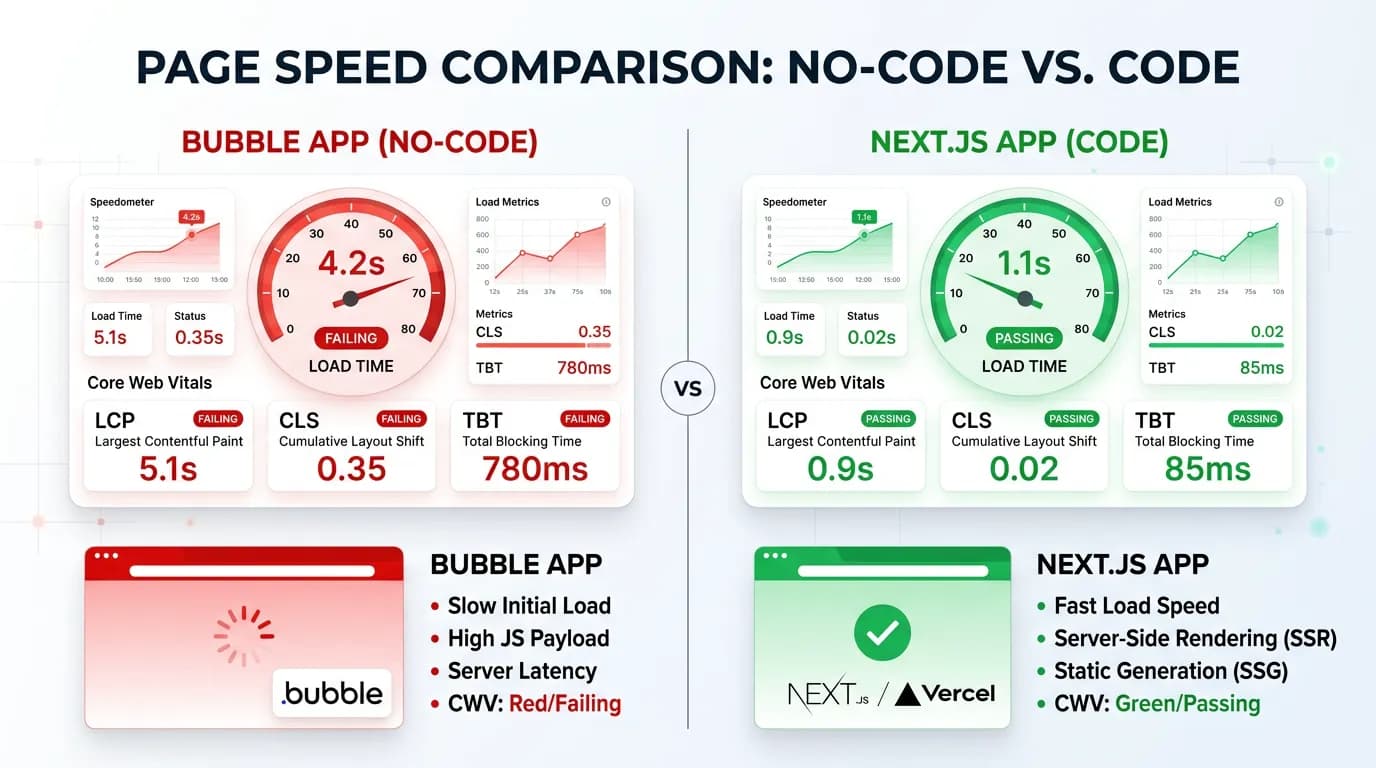
Every Bubble page loads Bubble's runtime engine — a JavaScript payload of 1 to 3 MB before your app-specific code. Custom code pages with equivalent functionality typically load 100 to 300 KB of JavaScript. The result: longer Time to Interactive (TTI), higher Largest Contentful Paint (LCP), and worse Total Blocking Time (TBT) — all Core Web Vitals metrics that Google uses for ranking.
Limitation 3: URL Structure Constraints
Bubble provides some URL control (custom page slugs, dynamic page URLs), but with limitations: query parameters are added to URLs in ways that create duplicate content issues, canonical URL management requires manual configuration, and URL patterns do not always match SEO best practices (clean, keyword-rich, hierarchical). Custom code gives you complete control over URL structure, redirects, and canonical tags.
Limitation 4: Limited Meta Tag Control
Bubble allows setting page titles and meta descriptions, but advanced SEO requirements are harder to implement: dynamic Open Graph tags for social sharing, structured data (JSON-LD) for rich snippets, hreflang tags for multilingual sites, and custom robots directives per page. While some of these are achievable with Bubble plugins or meta tag overrides, the implementation is often fragile and limited compared to custom code where you control every HTML element.
Limitation 5: Shared Infrastructure Performance
Bubble apps run on shared infrastructure. Your page speed is affected by other apps on the same cluster. During peak hours, response times can increase unpredictably. Custom hosting (Vercel, AWS, Cloudflare) provides dedicated or auto-scaling resources that maintain consistent performance regardless of other tenants.
| SEO Factor | Bubble | Custom Code (Next.js) |
|---|---|---|
| Rendering | Client-side (CSR) | Server-side (SSR) + Static (SSG) |
| JavaScript bundle | 1–3 MB baseline | 100–300 KB optimized |
| URL control | Limited (slug-based) | Full control (file-based routing) |
| Meta tags | Basic (title, description) | Complete (OG, JSON-LD, hreflang, robots) |
| Page speed (typical) | 3–6 seconds | 0.5–1.5 seconds |
| Core Web Vitals pass rate | ~20–30% | ~70–90% |
| Image optimization | Manual | Automatic (next/image, sharp) |
| Sitemap generation | Plugin-based | Automatic (next-sitemap) |
Core Web Vitals: The Numbers Bubble Cannot Hit
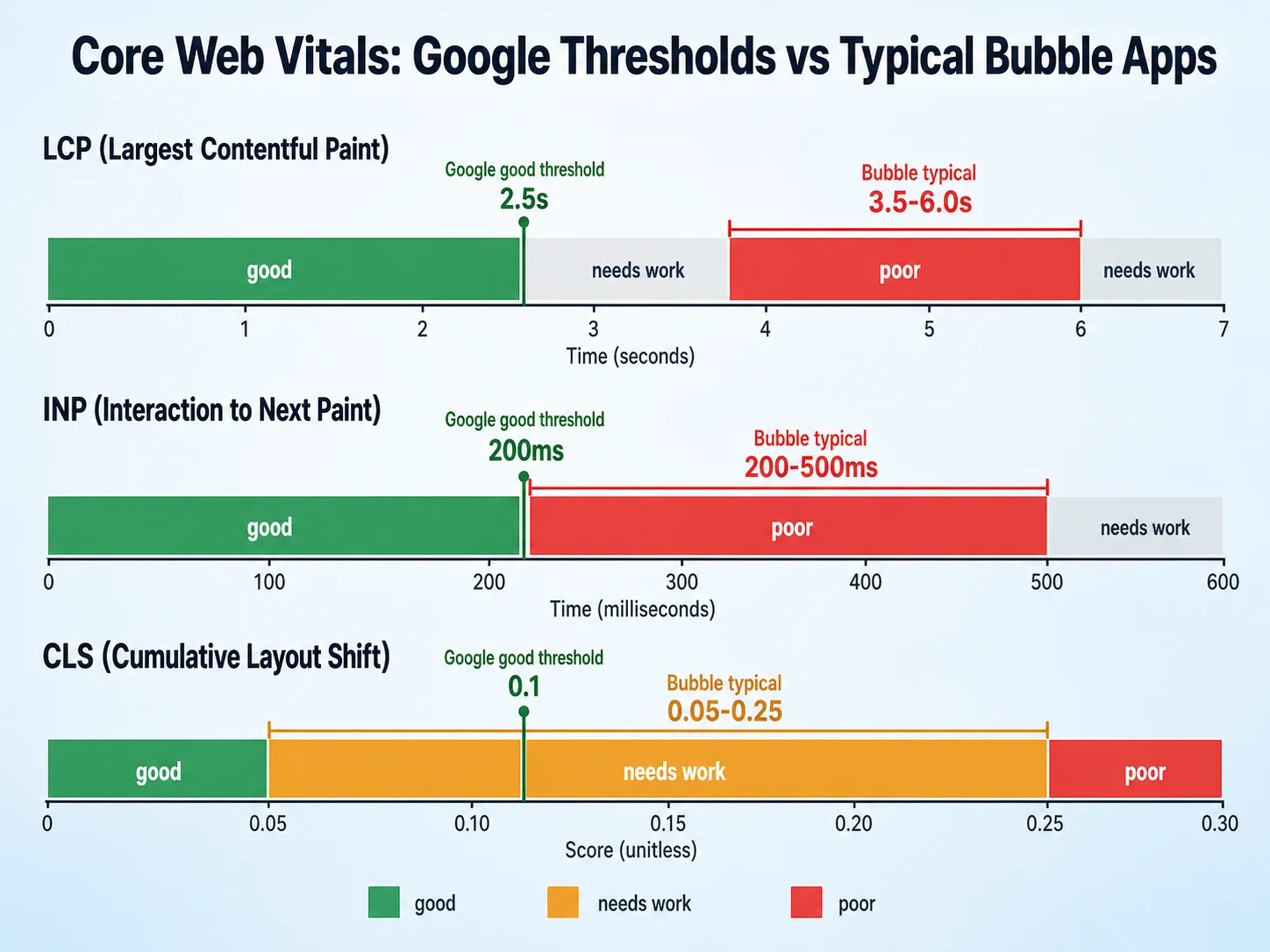
Core Web Vitals (CWV) are Google's technical performance metrics that directly influence search rankings. Three metrics matter: Largest Contentful Paint (LCP), First Input Delay (FID) / Interaction to Next Paint (INP), and Cumulative Layout Shift (CLS).
| Metric | Google "Good" Threshold | Typical Bubble Score | Typical Next.js Score |
|---|---|---|---|
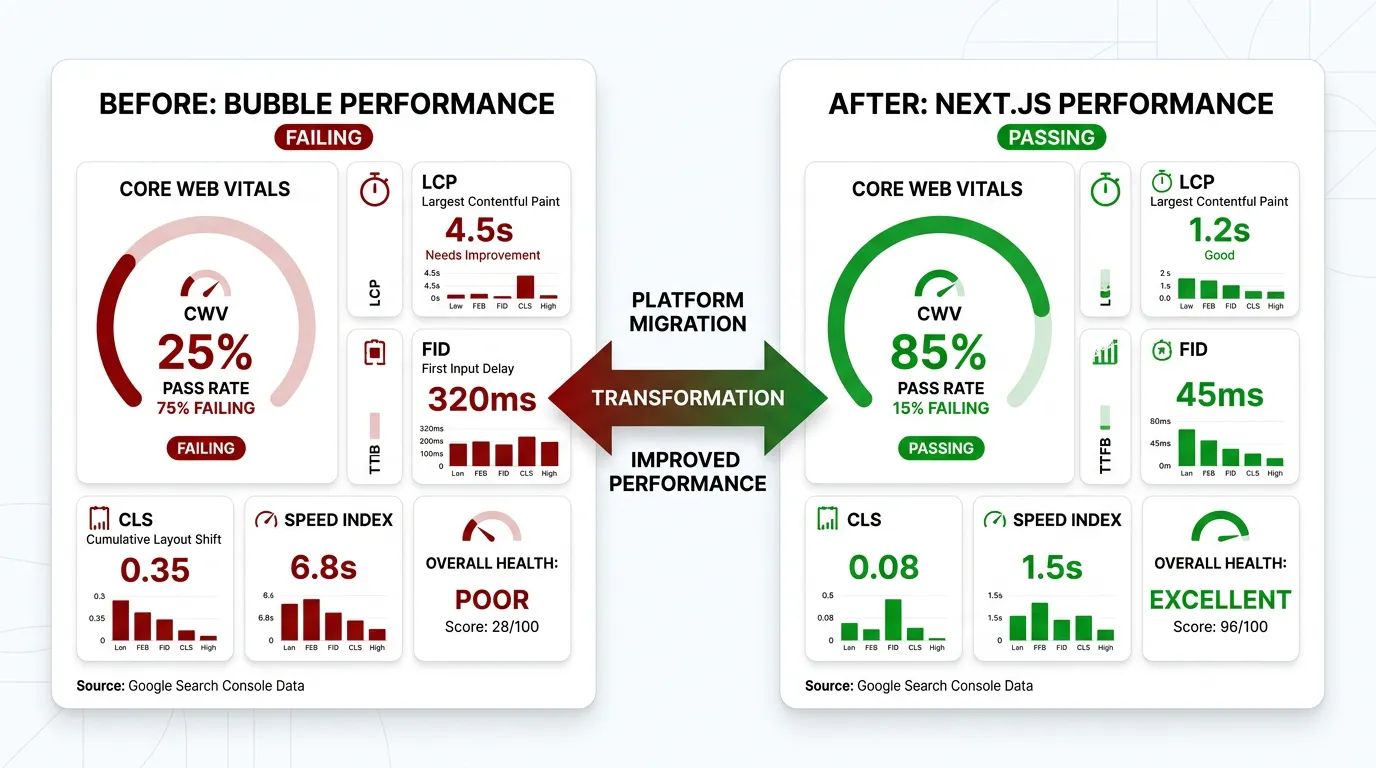
| LCP (Largest Contentful Paint) | Under 2.5 seconds | 3.5–6.0 seconds | 0.8–1.5 seconds |
| INP (Interaction to Next Paint) | Under 200ms | 200–500ms | 50–150ms |
| CLS (Cumulative Layout Shift) | Under 0.1 | 0.05–0.25 | 0.01–0.05 |
Why LCP Is the Critical Metric
LCP measures when the largest visible element on the page finishes rendering. For Bubble, this is heavily penalized because: the JavaScript runtime must download and parse before any content renders (1 to 3 seconds of blank screen), the page content is built client-side after the runtime loads (additional 1 to 3 seconds), and images are not optimized with modern formats (WebP, AVIF) or responsive sizing by default.
Google's threshold for "good" LCP is 2.5 seconds. In our PageSpeed Insights checks, most Bubble pages score 3.5 to 6.0 seconds — firmly in the "needs improvement" or "poor" category. This is not a configuration issue — it is a fundamental consequence of Bubble's client-side rendering architecture.
The Ranking Impact
Google confirmed in 2020 that Core Web Vitals would become a ranking factor (rolled out in 2021), and their weight has increased through subsequent updates. While CWV alone will not make a poor-content page rank first, they serve as a tiebreaker between pages with similar content quality. In competitive niches — where 10 quality pages compete for 10 first-page positions — the pages with better CWV win the marginal positions. If your Bubble page and a competitor's Next.js page have equivalent content, the Next.js page ranks higher.
Do not rely on these ranges — measure your actual pages. Open PageSpeed Insights, enter your Bubble app URL, and check your Core Web Vitals scores. If your LCP is above 2.5 seconds and your content depends on organic search, you have a quantified SEO problem that requires either aggressive optimization or migration to resolve.
What You Can Optimize on Bubble (and What You Cannot)
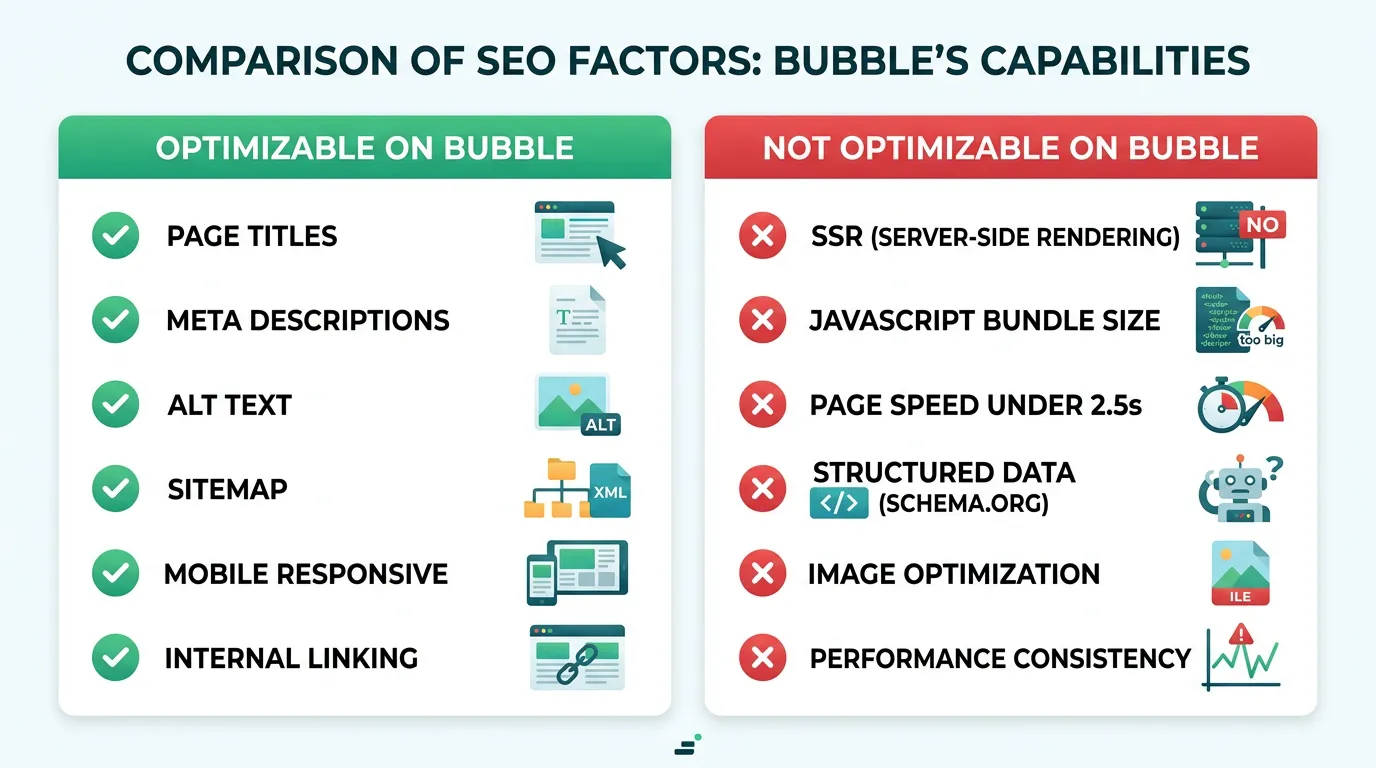
Some SEO factors are optimizable within Bubble. Others are architectural and cannot be changed without migration.
Optimizable on Bubble
- Page titles and meta descriptions: Set unique, keyword-rich titles for every page
- Image alt text: Add descriptive alt text to every image element
- Content structure: Use proper heading hierarchy (H1, H2, H3) in your page content
- Sitemap: Use a sitemap plugin to generate and submit an XML sitemap
- Mobile responsiveness: Ensure your pages render correctly on mobile devices
- Internal linking: Link between pages with descriptive anchor text
Not Optimizable on Bubble (Architectural Limits)
- Server-side rendering: Bubble is CSR only — no way to serve pre-rendered HTML
- JavaScript bundle size: Bubble's runtime is loaded on every page — cannot be reduced
- Page speed below 2.5 seconds: The rendering architecture creates a floor that optimization cannot break through
- Advanced structured data: JSON-LD for products, reviews, events, and other rich snippet types is limited or requires workarounds
- Image optimization: No automatic WebP/AVIF conversion, no responsive srcset, no lazy loading optimization
- Performance consistency: Shared infrastructure means speed varies with other tenants' load
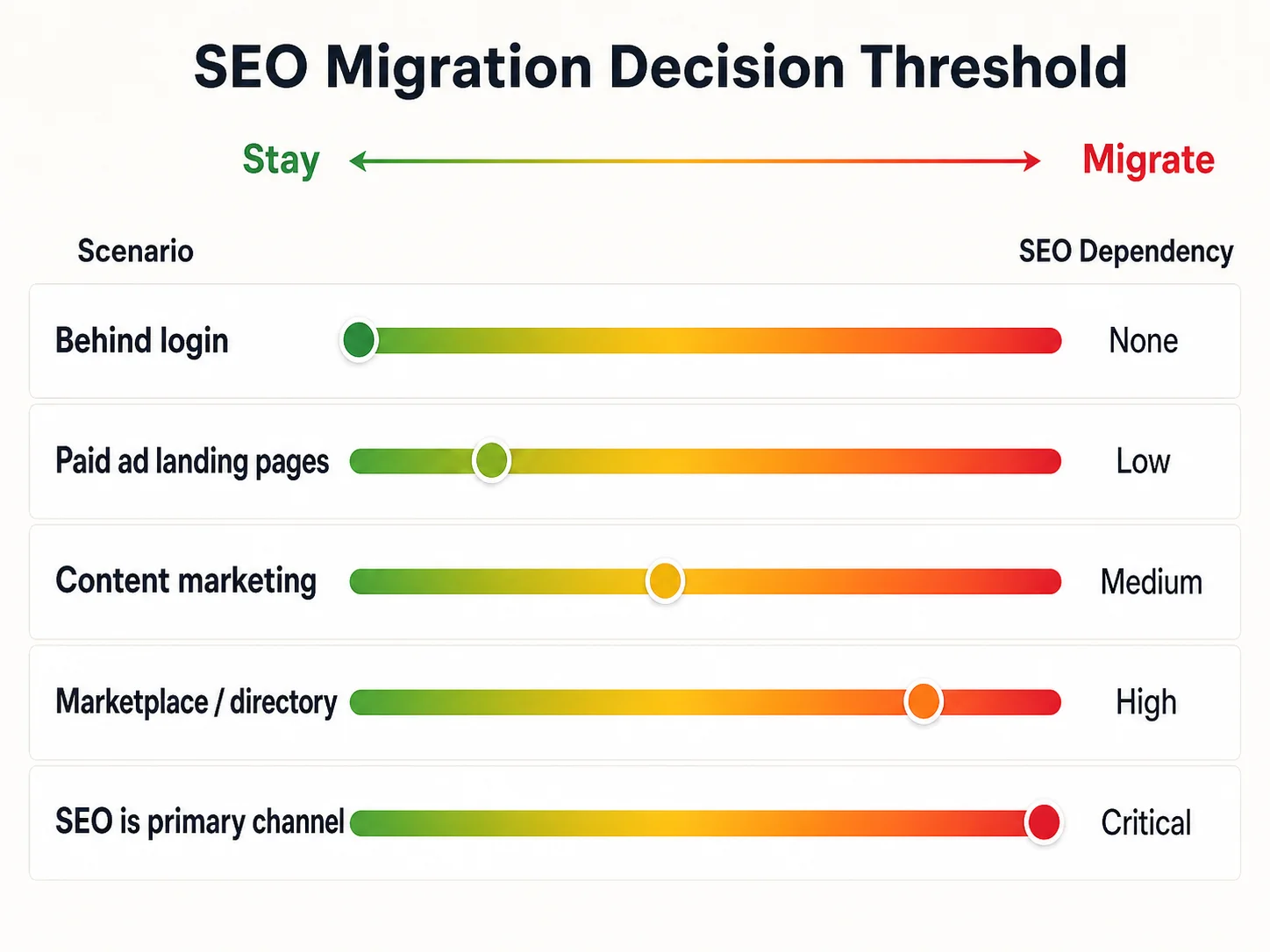
The Migration Threshold: When SEO Forces the Decision
Not every Bubble app needs to migrate for SEO. The threshold depends on how much your business depends on organic search traffic.
| Scenario | SEO Dependency | Recommendation |
|---|---|---|
| App behind login wall (dashboard, SaaS tool) | None | Stay on Bubble — SEO is irrelevant for authenticated pages |
| Landing pages for paid ad campaigns | Low | Consider a separate landing page on Webflow or Next.js, keep app on Bubble |
| Content-driven marketing (blog, guides, resources) | Medium | Host content on a separate fast platform, keep app on Bubble |
| Marketplace or directory needing search visibility | High | Migrate — public listings need fast, crawlable, SSR pages |
| SEO is primary acquisition channel (30%+ traffic) | Critical | Migrate — every ranking position lost costs real revenue |
The Hybrid SEO Solution
For apps where the authenticated experience works well on Bubble but marketing pages need SEO performance, consider a hybrid approach: host your marketing site, blog, and landing pages on a fast platform (Webflow, Next.js, WordPress) and keep your application on Bubble. Users find you through the fast marketing site and log into the Bubble app. This gives you competitive SEO without a full migration.
Many successful SaaS companies use this pattern even without Bubble: marketing site on a static/SSR platform (fast, SEO-optimized), application on a separate domain or subdomain (authenticated, functionality-focused). This is not a workaround for Bubble — it is a best practice. Your marketing pages and your application have different requirements. Serving both from the same platform is a convenience, not a necessity.
SEO After Migration: What Custom Code Unlocks
Migration to a framework like Next.js does not automatically improve SEO. It unlocks capabilities that Bubble cannot provide — but you still need to implement them correctly.
Server-Side Rendering and Static Generation
Next.js provides three rendering strategies: Static Site Generation (SSG) for pages that do not change frequently — pre-built at deploy time, served instantly from CDN, Server-Side Rendering (SSR) for pages with dynamic content — rendered on each request with fresh data, and Incremental Static Regeneration (ISR) — the middle ground, where static pages are revalidated periodically. For SEO, SSG and ISR are the gold standard: content is available in the initial HTML response, no JavaScript execution needed for Googlebot to read your content.
Automatic Image Optimization
Next.js's Image component automatically: converts images to WebP/AVIF format (30 to 50 percent smaller than JPEG), generates responsive srcset for different screen sizes, lazy-loads below-the-fold images, and reserves space to prevent layout shift (CLS). These optimizations collectively improve LCP by 1 to 2 seconds — often the difference between failing and passing Core Web Vitals.
Performance Budget
Custom code lets you set and enforce a performance budget: maximum JavaScript bundle size, maximum LCP, minimum Lighthouse score. CI/CD pipelines can block deployments that exceed these budgets. On Bubble, your performance is determined by the platform — you have no enforcement mechanism.
Migrating to Next.js gives you: server-side rendering for instant Googlebot content access, automatic image optimization (WebP/AVIF, responsive srcset, lazy loading), full structured data control (JSON-LD for rich snippets), complete URL and canonical tag management, and a performance budget enforced in CI/CD. None of these require additional tools — they are built into the framework. The gap between Bubble's SEO ceiling and what custom code provides is not configuration — it is architectural.
Frequently Asked Questions
Q. Can Bubble apps rank on Google at all?
Yes. Bubble apps can and do rank, especially for low-competition keywords where content quality matters more than page speed. The limitation is competitive niches — when multiple quality pages compete for the same keywords, the pages with better Core Web Vitals win the marginal positions. If your competitors are on fast platforms and your content quality is equivalent, you lose on technical metrics.
Q. Does Google penalize Bubble apps specifically?
No. Google does not penalize specific platforms. It measures page speed, rendering, and user experience metrics. Bubble pages tend to score poorly on these metrics because of their client-side rendering architecture and heavy JavaScript payloads. The effect is the same — lower rankings — but it is a consequence of technical performance, not platform discrimination.
Q. Can I use a separate blog platform for SEO and keep my app on Bubble?
Yes, and this is often the most cost-effective approach. Host your blog on a subdomain (blog.yourdomain.com) using Ghost, WordPress, or a Next.js static site. The blog captures organic traffic with fast, SEO-optimized pages. Users who sign up are directed to your Bubble app. You get competitive SEO without a full migration.
Q. How much does page speed actually affect rankings?
Google treats Core Web Vitals as a tiebreaker, not a primary ranking factor. Content relevance, backlinks, and domain authority still matter more. But in competitive niches where 10 pages have similar content quality, pages passing CWV rank higher than those failing. For high-competition keywords, the speed difference between Bubble and custom code can mean positions 5 versus 15 — the difference between page one and page two.
Q. What is the typical SEO improvement after migrating from Bubble?
Teams report meaningful LCP and Core Web Vitals improvements after migrating to SSR-capable stacks like Next.js — typical patterns are LCP dropping from several seconds into the 1 to 1.5 second range and CWV pass rates rising materially. Reported organic traffic gains vary widely depending on the niche, content quality, and pre-existing technical SEO debt; treat any single percentage as illustrative rather than guaranteed. The traffic upside comes from both improved rankings and higher click-through rates (fast-loading pages have lower bounce rates, which signals quality to Google).
Q. Should I migrate just for SEO?
Only if organic search is a critical acquisition channel (30%+ of traffic) and you are in a competitive niche. If your primary acquisition is paid ads, referrals, or direct traffic, Bubble's SEO limitations may not justify the migration cost. Use the separate blog/landing page approach as a lower-cost alternative. Migrate for SEO only when the revenue impact of lost rankings exceeds the migration cost.
Rank or Migrate
- Bubble's SEO limitations are architectural, not configurable: Client-side rendering, heavy JavaScript payloads, and shared infrastructure create a page speed floor that no optimization can break through. You can optimize content and meta tags — you cannot optimize the rendering engine.
- Core Web Vitals are a measurable gap: Bubble pages typically score 3.5 to 6.0 seconds LCP versus Google's 2.5-second threshold. Custom code pages score 0.8 to 1.5 seconds. In competitive niches, this gap costs you search positions and the organic traffic those positions provide.
- Not every app needs SEO migration: Apps behind login walls, apps driven by paid acquisition, and apps in low-competition niches can stay on Bubble without meaningful SEO impact. Migrate for SEO only when organic search is a critical channel and you are losing positions to faster competitors.
- The hybrid blog approach solves most SEO problems without full migration: Host your marketing content on a fast platform (subdomain blog, landing pages) and keep your application on Bubble. You get competitive SEO where it matters without rebuilding your entire product.
- Post-migration SEO gains are real but variable: Teams report meaningful LCP and Core Web Vitals improvements after migrating to SSR frameworks. Reported organic traffic gains vary widely by niche and prior technical SEO debt — measure your own baseline first. The improvement comes from passing Core Web Vitals, faster indexing, and lower bounce rates.
SEO is a business decision, not a technical one. If organic search drives your growth, your page speed is your ranking speed. Measure it, benchmark it against your competitors, and make the decision that maximizes the traffic you need to grow.
Understand Your Architecture Before You Decide
Whether you optimize for SEO on Bubble or migrate for better performance, understanding your complete architecture is the first step. Relis extracts your data schemas, API specs, backend workflows, and app settings — the blueprint for whatever path you choose.
Scan My App — FreeHow Complex Is Your Bubble App?
Find out in minutes. Relis automatically extracts and documents your entire Bubble architecture — data types, APIs, workflows, and settings.
How Complex Is Your Bubble App?
Find out in minutes. Relis automatically extracts and documents your entire Bubble architecture — data types, APIs, workflows, and settings.