Hybrid Architecture for Bubble Apps: Keep Bubble, Offload the Bottleneck
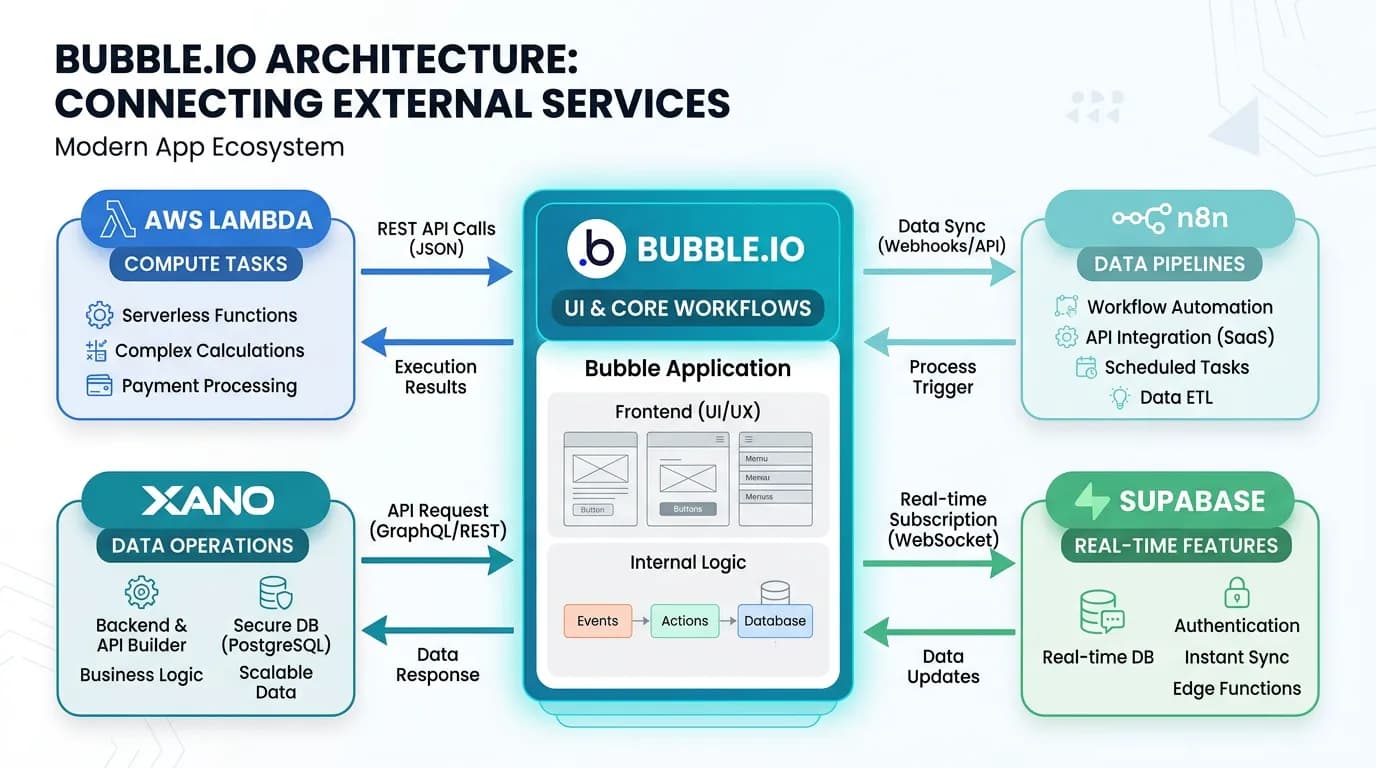
A full migration is not your only option. Hybrid architecture keeps Bubble as your UI and orchestration layer while offloading performance-critical operations to external services. This guide covers four proven hybrid patterns — Bubble + Lambda, Bubble + Xano, Bubble + Supabase, and Bubble + n8n — with real implementation details and cost comparisons.
18 min read
The Bubble migration conversation has a hidden assumption: that the only way to solve Bubble's limitations is to leave Bubble entirely. For many apps, this assumption is wrong — and expensive. A full migration costs $20,000 to $60,000 and takes eight to sixteen weeks. A hybrid architecture that offloads one bottleneck costs $5,000 to $20,000 and takes two to six weeks. It solves the specific problem without the risk, cost, and timeline of a complete rebuild.
Hybrid architecture is not a compromise — it is a legitimate production pattern. Multiple production apps use Bubble as their orchestration layer with external services (custom APIs, serverless functions, dedicated databases) handling specialized logic at scale. The pattern works because most Bubble apps have concentrated bottlenecks: one feature that is slow, one operation that is expensive, one requirement that Bubble cannot meet. Fix that one thing and the rest of the app works fine.
When Hybrid Beats Full Migration
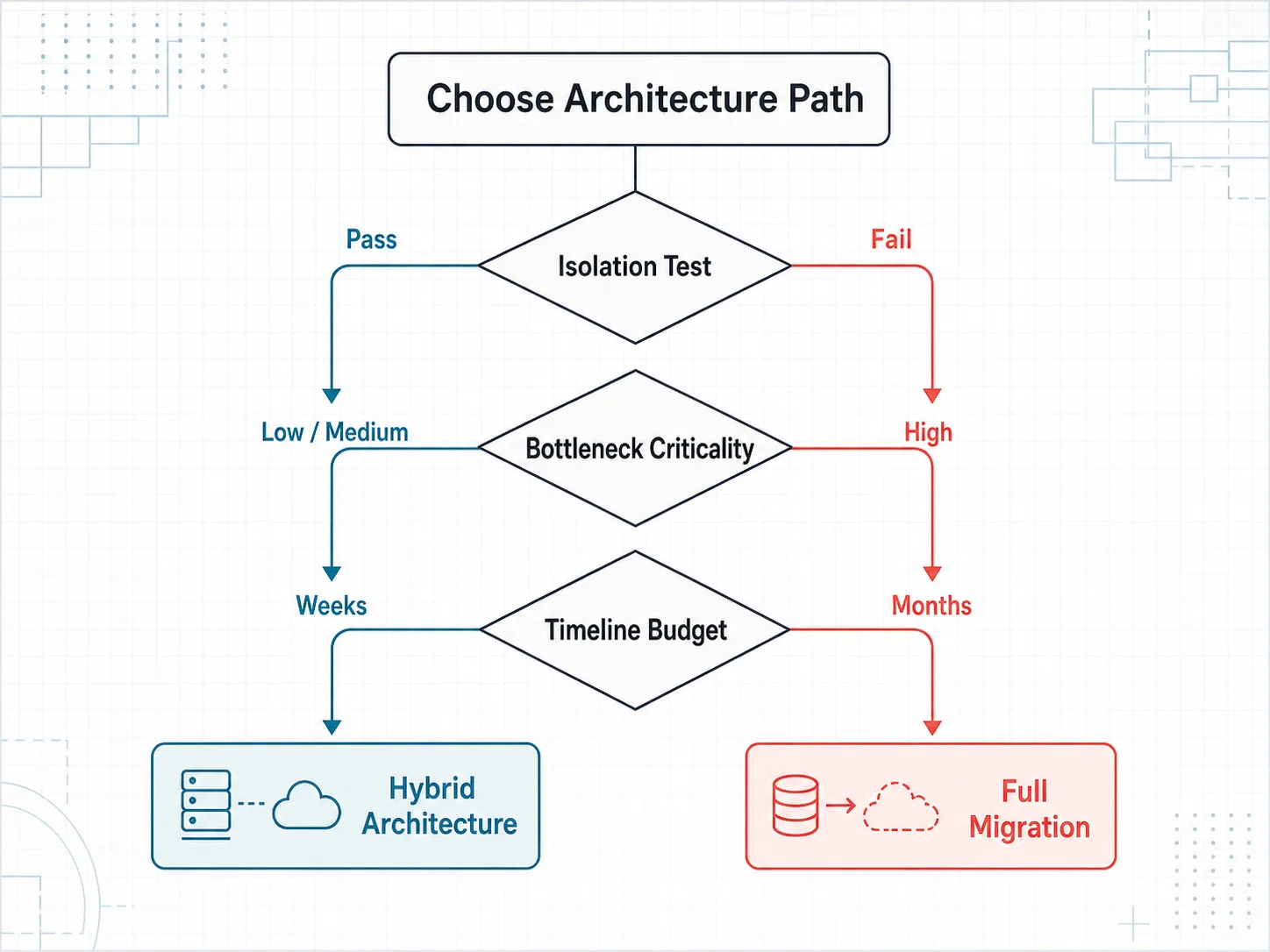
Hybrid is the right choice when three conditions are true: your bottleneck is isolated (not systemic), your Bubble UI and core workflows work acceptably, and you cannot afford the cost or timeline of a full migration. If all three conditions hold, a hybrid approach solves your problem at 10 to 30 percent of the full migration cost.
The Isolation Test
Ask: "If I could make one part of my app 10x faster, would the rest be acceptable?" If yes, you have an isolated bottleneck — perfect for hybrid. If no — if your entire app is slow, your data model is fundamentally wrong, or you need capabilities Bubble cannot provide at any level — a full migration is the right path.
Common Hybrid Triggers
| Problem | Hybrid Solution | Why Not Full Migration |
|---|---|---|
| PDF generation is slow (30+ seconds) | Lambda function generates PDFs | One feature, rest of app works |
| Search is slow on 100K+ records | Algolia or Supabase for search | One query pattern, data model is fine |
| Complex calculations exceed WU limits | External API for computation | Isolated compute need |
| Real-time features needed | Supabase Realtime or Firestore | One feature, not a platform problem |
| Data pipeline is complex | n8n or Make.com for ETL | Data processing, not app architecture |
| Image processing needed | Lambda + Sharp for resizing | One operation, not systemic |
How Hybrid Architecture Works with Bubble
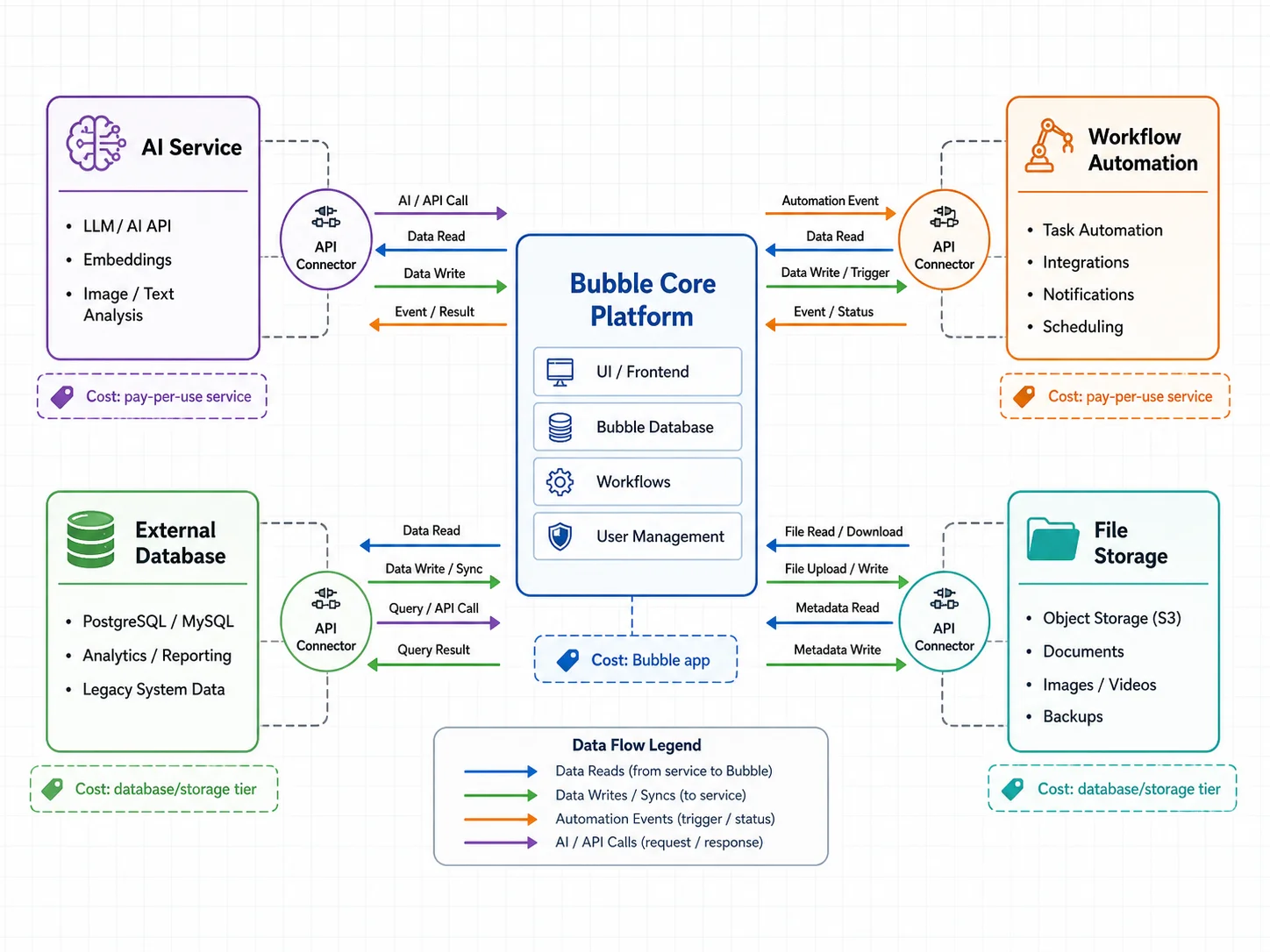
The connection point between Bubble and external services is the API Connector. Bubble calls your external service via HTTP, receives the response, and uses the result in its workflows. From the user's perspective, the experience is seamless — they interact with Bubble's interface while the heavy work happens elsewhere.
The API Connector Bridge
Set up an API Connector entry in Bubble with: the external service URL, authentication headers (API key, Bearer token), request parameters, and the expected response format. Bubble can call this connector from page workflows, backend workflows, and even dynamic data expressions. The external service processes the request and returns results that Bubble uses just like its own data.
Authentication Between Systems
Secure the connection between Bubble and your external service with API keys (simplest — a shared secret in the request header), JWT tokens (more secure — Bubble passes the user's token, the service verifies it), or OAuth2 (most secure — for services that require user-level authorization). For most hybrid setups, an API key with HTTPS is sufficient. Add IP whitelisting if your service provider supports it.
Data Synchronization
Some hybrid patterns require data in both Bubble and the external service. Keep Bubble as the source of truth and sync data to the external service when needed. Options: push-based (Bubble workflow sends data to external service after each change), pull-based (external service queries Bubble's Data API on a schedule), or event-driven (webhooks from Bubble trigger sync operations). Push-based is the most common and reliable for hybrid architectures.
Unlike full migration, hybrid architecture is additive — you are adding capability, not replacing it. There is no cutover weekend, no DNS switch, no user re-authentication. Deploy the external service, configure the API Connector, update the relevant workflows, and the feature is live. If something goes wrong, remove the API Connector call and revert to Bubble-only behavior. The rollback path is instant.
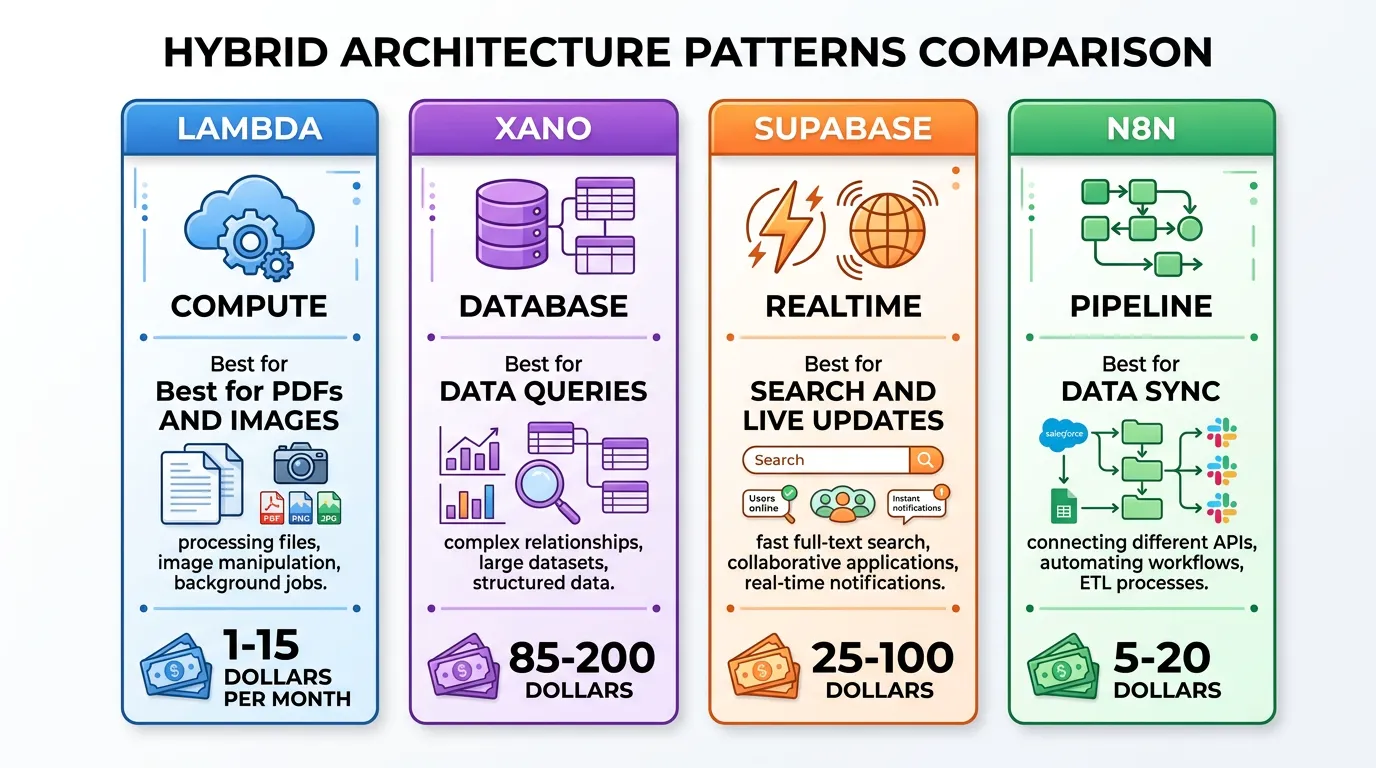
Pattern 1: Bubble + AWS Lambda for Compute-Heavy Tasks
AWS Lambda runs code on demand without managing servers. You pay only for the compute time you use — typically fractions of a cent per invocation. This makes it ideal for operations that exceed Bubble's compute capabilities.
When to Use This Pattern
PDF generation (complex multi-page reports), image processing (resizing, format conversion, watermarking), data aggregation (calculating dashboards from large datasets), AI/ML inference (running models on user data), and file format conversion (CSV to JSON, Excel generation).
Implementation
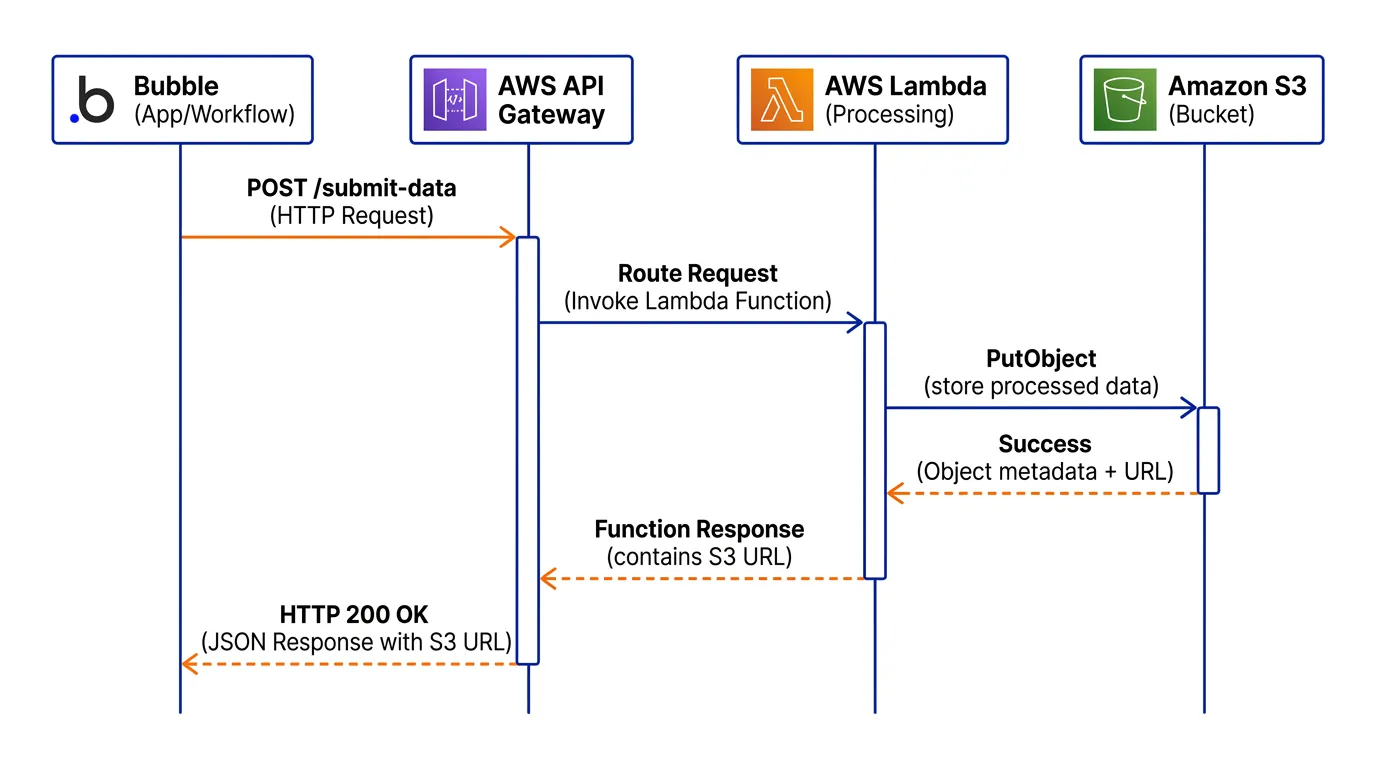
Create a Lambda function with your processing logic, expose it via API Gateway as an HTTPS endpoint, configure the endpoint in Bubble's API Connector, and call it from your workflow when the heavy operation is needed. The Lambda function runs in seconds (or minutes for complex operations), and Bubble receives the result — a file URL, a calculated value, or a processed dataset.
Cost Example
A Lambda function generating 500 PDFs per month with 10-second average execution: approximately $0.50 per month for compute; AWS API Gateway costs are typically a few cents at this volume — verify current rates on AWS's pricing page. Compare this to the WU cost of running the same logic in Bubble — or the $20,000+ cost of migrating to generate PDFs in custom code. The hybrid approach costs only a couple of dollars per month in infrastructure at this volume.
Pattern 2: Bubble + Xano for High-Volume Data Operations
Xano is a no-code backend that provides a PostgreSQL database with a visual API builder. For Bubble apps that need faster data operations without full migration, Xano handles the data-heavy work while Bubble handles the UI.
When to Use This Pattern
Search and filtering on large datasets (100K+ records), complex queries with multiple JOINs that Bubble cannot perform, data aggregation and reporting that exceeds Bubble's query capabilities, and batch operations that consume excessive workload units.
Implementation
Mirror the relevant data types from Bubble to Xano's PostgreSQL database. Set up sync workflows that push changes from Bubble to Xano when records are created or modified. Build API endpoints in Xano for the data-heavy operations. Call those endpoints from Bubble via API Connector. Bubble remains the source of truth for writes; Xano handles read-heavy operations.
Cost Comparison
| Scenario | Bubble-Only | Bubble + Xano |
|---|---|---|
| Platform cost | $349/mo (Team plan; approx., verify current rates on bubble.io/pricing) | $349/mo + $85/mo (Xano Scale; approx., verify current rates on bubble.io/pricing and xano.com/pricing) |
| WU overages | $200–$650/mo | $0–$50/mo (heavy ops offloaded) |
| Total monthly | $549–$999/mo | $434–$484/mo |
| Search speed (100K records) | 3–8 seconds | 0.2–0.5 seconds |
Pattern 3: Bubble + Supabase for Real-Time and Search
Supabase provides PostgreSQL, real-time subscriptions, and full-text search — three capabilities where Bubble apps commonly hit limits. As a hybrid component, Supabase handles specific features while Bubble manages the rest.
When to Use This Pattern
Real-time collaborative features (live cursors, typing indicators, instant messaging), full-text search with relevance ranking and typo tolerance, and apps that need to serve data to both Bubble and external consumers (mobile apps, third-party integrations) from the same database.
Implementation
Set up a Supabase project with tables for the real-time or search-heavy data. Sync data from Bubble via API workflows that push changes to Supabase's REST API. In your Bubble frontend, use Supabase's JavaScript client library (loaded via an HTML element) for real-time subscriptions. Search queries go directly to Supabase's PostgreSQL full-text search instead of Bubble's built-in search.
The Stepping Stone Advantage
This pattern has a unique strategic benefit: if you eventually decide to fully migrate, you already have a Supabase database with some of your data model migrated. The hybrid phase becomes step one of a gradual migration rather than throwaway work. This makes Supabase hybrid particularly attractive for teams that are not sure whether they will need full migration in 12 to 18 months.
Pattern 4: Bubble + n8n for Complex Data Pipelines
n8n is an open-source workflow automation tool that connects services, transforms data, and handles complex multi-step pipelines. For Bubble apps with data processing needs that exceed what Bubble workflows can handle efficiently, n8n acts as a powerful data pipeline engine.
When to Use This Pattern
Multi-step data imports that clean, transform, and validate data before it reaches Bubble, automated reporting that pulls data from multiple sources (Bubble, Stripe, Google Analytics) and generates reports, data synchronization between Bubble and external systems (CRM, accounting, ERP), and complex webhook processing that requires conditional branching and error handling.
Implementation
Self-host n8n (free, Docker-based) or use n8n Cloud (from $20/month). Build workflows that: receive triggers (webhook from Bubble, scheduled timer, external event), process data through multiple steps (API calls, transformations, conditions), and push results back to Bubble via its Data API or Workflow API. n8n handles the orchestration; Bubble handles the UI and data storage.
Cost Example
n8n self-hosted on a $5/month VPS handles 10,000+ workflow executions per month. Compare this to building equivalent logic in Bubble backend workflows — which would consume thousands of WUs — or building a custom Node.js data pipeline — which takes weeks of development. n8n provides the same capability at a fraction of the cost.
Choosing Your Pattern and Managing the Transition
Match your bottleneck to the pattern that solves it most directly. Do not over-engineer — a single Lambda function is better than a Supabase + n8n + Lambda stack for a PDF generation problem.
| Your Bottleneck | Recommended Pattern | Setup Time | Monthly Cost |
|---|---|---|---|
| Heavy computation (PDF, image, AI) | Bubble + Lambda | 1–2 weeks | $1–$15 |
| Slow data queries (100K+ records) | Bubble + Xano | 2–4 weeks | $85–$200 |
| Real-time features or search | Bubble + Supabase | 2–4 weeks | $25–$100 |
| Data pipelines and sync | Bubble + n8n | 1–3 weeks | $5–$20 |
| Multiple bottlenecks | Consider full migration | 8–16 weeks | Varies |
Managing Two Systems
Hybrid architecture adds operational complexity. You now maintain Bubble and at least one external service. Minimize this overhead by: keeping Bubble as the single source of truth for data, using one-directional sync (Bubble pushes to external, not bidirectional), monitoring the external service separately, and documenting the API contracts between systems. The operational overhead is manageable for one to two external services. If you find yourself adding a third or fourth, the complexity cost may exceed the migration cost — time to reconsider full migration.
Hybrid works for one to two external services solving specific bottlenecks. Beyond that, you are building a distributed system on top of Bubble — with all the debugging complexity and none of the development tooling. If your app needs three or more hybrid integrations, the total cost and complexity often exceeds a clean full migration. Use the performance audit to determine whether your problems are isolated (hybrid) or systemic (migrate).
Whether you go hybrid or full migration, you need to understand your current architecture first. A hybrid solution without understanding which data types, workflows, and API connectors are involved risks breaking dependencies. Extract your architecture to identify exactly which components need offloading and which can stay on Bubble.
Frequently Asked Questions
Q. Is hybrid architecture a permanent solution or a stepping stone?
It can be either. Multiple production apps run permanently on Bubble hybrid architectures, while other companies use hybrid as a stepping stone — offloading one service at a time until the app is gradually migrated. The pattern is a legitimate production architecture, not a temporary patch. Choose based on your growth trajectory: if Bubble will serve your needs for 2+ years with the bottleneck removed, permanent hybrid is efficient.
Q. How does hybrid affect my Bubble workload unit costs?
Hybrid reduces WU costs by offloading expensive operations. The Bubble API Connector call itself consumes WUs (0.5–1.0 per call), but the heavy processing happens in the external service. If the offloaded operation was consuming 5–10 WUs in Bubble, you save 4–9 WUs per invocation minus the small cost of the external service. Net savings are typically 50 to 80 percent on the offloaded operation.
Q. What if the external service goes down?
Build fallback behavior into your Bubble workflows. If the API Connector call fails, show a user-friendly error message and retry after a delay. For critical operations (payment processing), implement a queue pattern: store the request in Bubble, retry the external call periodically, and process the result when the service recovers. Monitor service availability with uptime tools (UptimeRobot, Better Uptime) and set up alerts.
Q. Can I hire a Bubble developer for hybrid architecture?
The Bubble side (API Connector setup, workflow integration) can be done by a Bubble developer. The external service side (Lambda function, Xano API, Supabase setup) requires a traditional developer. Some Bubble agencies offer hybrid architecture services with both skill sets. Budget for both and ensure they can collaborate — the integration point is where most bugs occur.
Q. How do I keep data in sync between Bubble and the external service?
Use push-based sync: Bubble workflows send data to the external service after each create, update, or delete. This is more reliable than pull-based sync (external service polling Bubble's API) because it is real-time and does not depend on scheduled queries. For critical data, add a verification step: periodically compare record counts between systems and reconcile differences.
Q. What is the maximum complexity a hybrid architecture can handle?
One to two external services solving specific bottlenecks — this is the sweet spot. Three or more external services create a distributed system that is harder to debug, monitor, and maintain than a full custom codebase. If your audit reveals three or more isolated bottlenecks, the combined hybrid cost and complexity often exceeds a clean migration. Use the performance audit to quantify.
Fix the Bottleneck, Not the Platform
- Hybrid solves isolated bottlenecks at 10 to 30 percent of migration cost: A $5K–$20K hybrid solution eliminates the specific performance problem without the $20K–$60K cost and 8–16 week timeline of a full rebuild. The math is compelling when your problem is concentrated, not systemic.
- Four patterns cover most use cases: Lambda for compute (PDFs, images, AI), Xano for data operations (search, aggregation), Supabase for real-time and search, and n8n for data pipelines. Match your bottleneck to the pattern that solves it most directly.
- Zero downtime, instant rollback: Hybrid is additive — no cutover weekend, no DNS switch, no user re-authentication. Deploy the external service, connect via API Connector, and the feature is live. Revert by removing the API Connector call.
- Complexity has a ceiling: One to two external services is manageable. Three or more creates a distributed system that may cost more to maintain than a clean migration. Know when hybrid stops being the right answer.
- Architecture documentation enables both paths: Whether you go hybrid or full migration, understanding your complete architecture is the prerequisite. Extract it first, identify the bottleneck, then choose the path that fixes it most efficiently.
Not every problem requires a complete rebuild. Sometimes the smartest engineering decision is the smallest one — fix the 20 percent that is broken and leave the 80 percent that works alone.
Identify Your Bottleneck with Architecture Data
Relis extracts your complete Bubble architecture — data schemas, API connectors, backend workflows, and app settings. Use the blueprint to pinpoint exactly which component needs offloading and which can stay on Bubble.
Scan My App — FreeReady to Plan Your Migration?
Get a complete architecture blueprint — ERD, DDL, API docs, workflow specs — everything your developers need to start rebuilding.
Ready to Plan Your Migration?
Get a complete architecture blueprint — ERD, DDL, API docs, workflow specs — everything your developers need to start rebuilding.