7 Bubble Database Design Mistakes That Make Migration 3x Harder
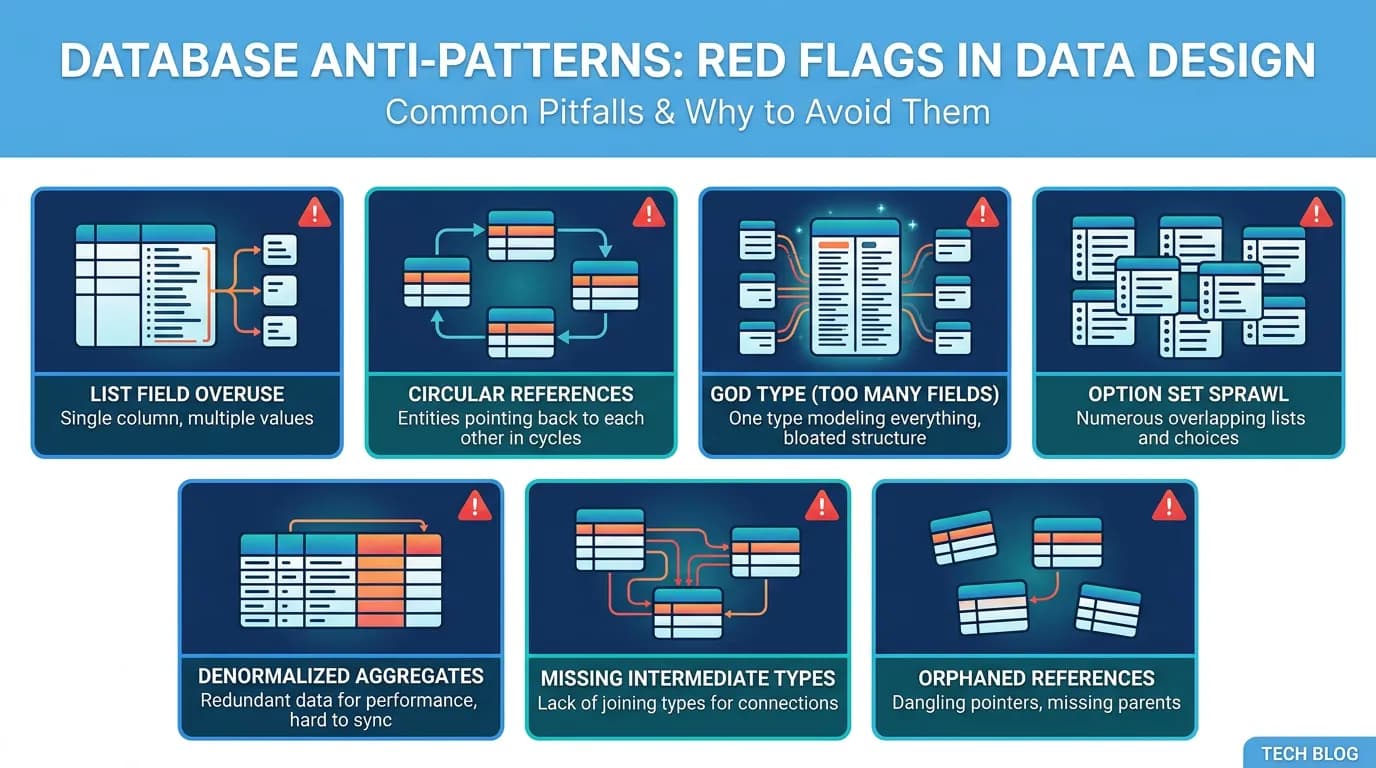
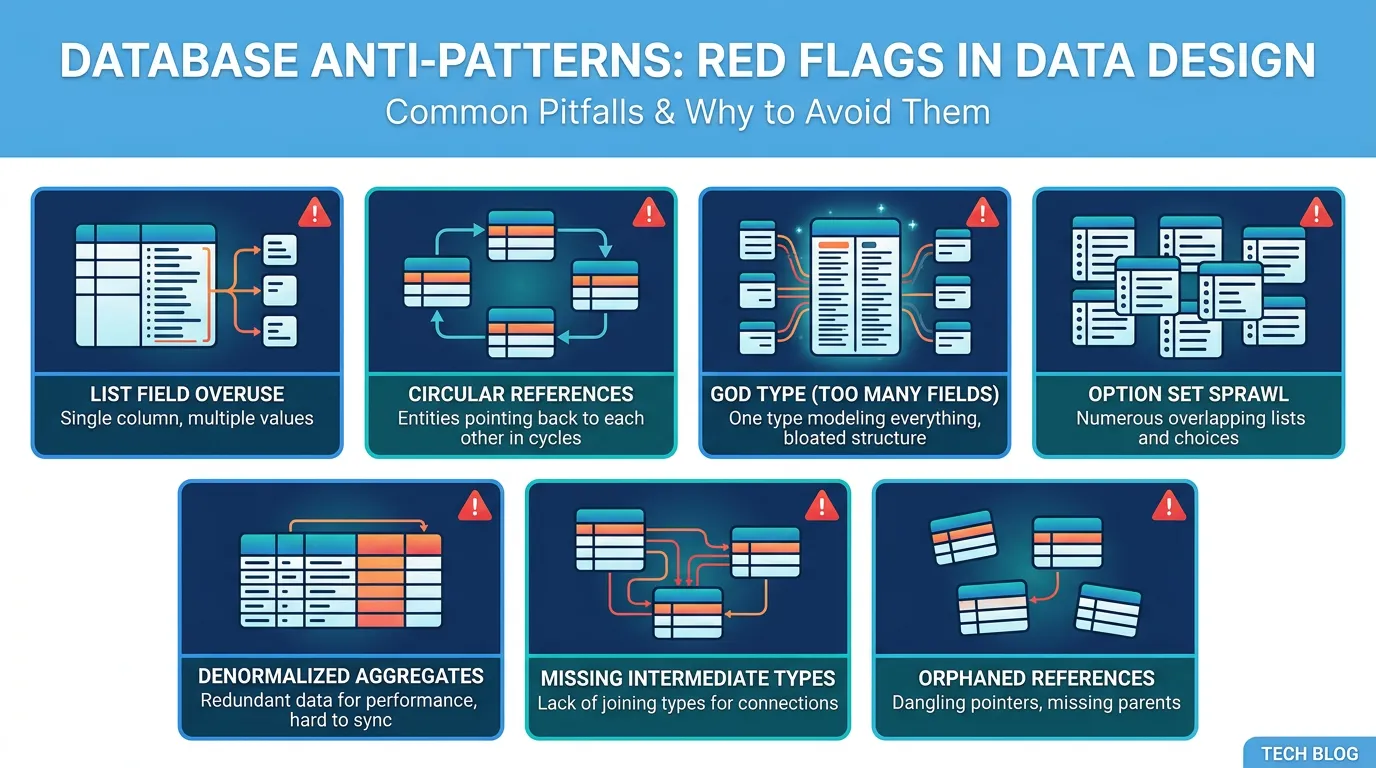
Bubble's visual data model encourages patterns that work well on Bubble but create nightmares during migration to SQL. This guide covers the 7 most common database design mistakes — list field overuse, circular references, Option Set sprawl, denormalized aggregates, missing types, God types, and orphan-generating deletions — with fixes you can apply now to reduce future migration cost.
18 min read
Bubble's visual data model is one of its greatest strengths. You create a data type, add fields, draw relationships — and the database just works. No migrations, no schema files, no ORM configuration. This ease of use is also the source of migration pain, because Bubble lets you build data structures that are impossible or extremely expensive to replicate in a relational database.
The patterns in this guide are not bugs. They are design decisions that Bubble handles gracefully but PostgreSQL does not. A list field that stores many-to-many relationships in a single column works perfectly in Bubble and requires a junction table in SQL. A circular reference between two types is invisible in Bubble and creates a foreign key dependency cycle in PostgreSQL. Each pattern adds complexity — and cost — to your eventual migration. The good news: most can be fixed on Bubble before you migrate, reducing your migration cost by 20 to 40 percent.
Why Bubble's Data Model Creates Migration Debt
Bubble's data engine is not a relational database. It is a document-style store that presents a relational-looking interface. This mismatch means patterns that are natural in Bubble create structural debt when translated to SQL.
The Fundamental Mismatch
In a relational database, relationships are explicit: foreign keys, junction tables, constraints, indexes. In Bubble, relationships are implicit: a field of type "User" is a reference, a field of type "list of Users" is a many-to-many — and neither has constraints, indexes, or cascade rules. Bubble handles the mechanics invisibly. PostgreSQL requires you to define every detail.
The Cost Multiplier
Each design mistake in this guide adds 1 to 3 weeks to migration timeline and $2,000 to $8,000 to migration cost. An app with all seven mistakes can double its migration timeline compared to a cleanly designed app with the same number of features. The timeline overruns we discuss in Why Your Bubble Migration Takes 3x Longer Than Quoted often trace back to data model complexity, not feature complexity.
Mistake 1: List Field Overuse
List fields are Bubble's implicit many-to-many relationships. A Project with a "Members" field of type "list of Users" creates a many-to-many between Projects and Users. In Bubble, this is one field. In PostgreSQL, this requires a project_members junction table with foreign keys, indexes, and potentially additional columns (role, added_date).
Why It Is Expensive
Each list field generates: one new junction table (CREATE TABLE), two foreign keys with constraints, two indexes for query performance, a data extraction script that parses comma-separated IDs from the Bubble export, and insert logic that creates one row per relationship. An app with 20 list fields creates 20 junction tables that did not exist in Bubble. The schema doubles in complexity. The ETL pipeline must parse and transform each one.
The Fix (Before Migration)
Audit your list fields. For each one, ask: does this truly need to be many-to-many, or would a simple one-to-many reference suffice? A Task with a "Watchers" list is genuinely many-to-many. A Task with an "Assignee" list that always contains exactly one user should be a single reference, not a list. Convert single-item lists to direct references — each conversion eliminates one junction table.
| List Fields | Junction Tables Created | Added Migration Time | Added Cost |
|---|---|---|---|
| 0–5 | 0–5 | +1–2 days | +$500–$1,000 |
| 6–15 | 6–15 | +3–7 days | +$2,000–$5,000 |
| 16+ | 16+ | +1–3 weeks | +$5,000–$10,000 |
Mistake 2: Circular References
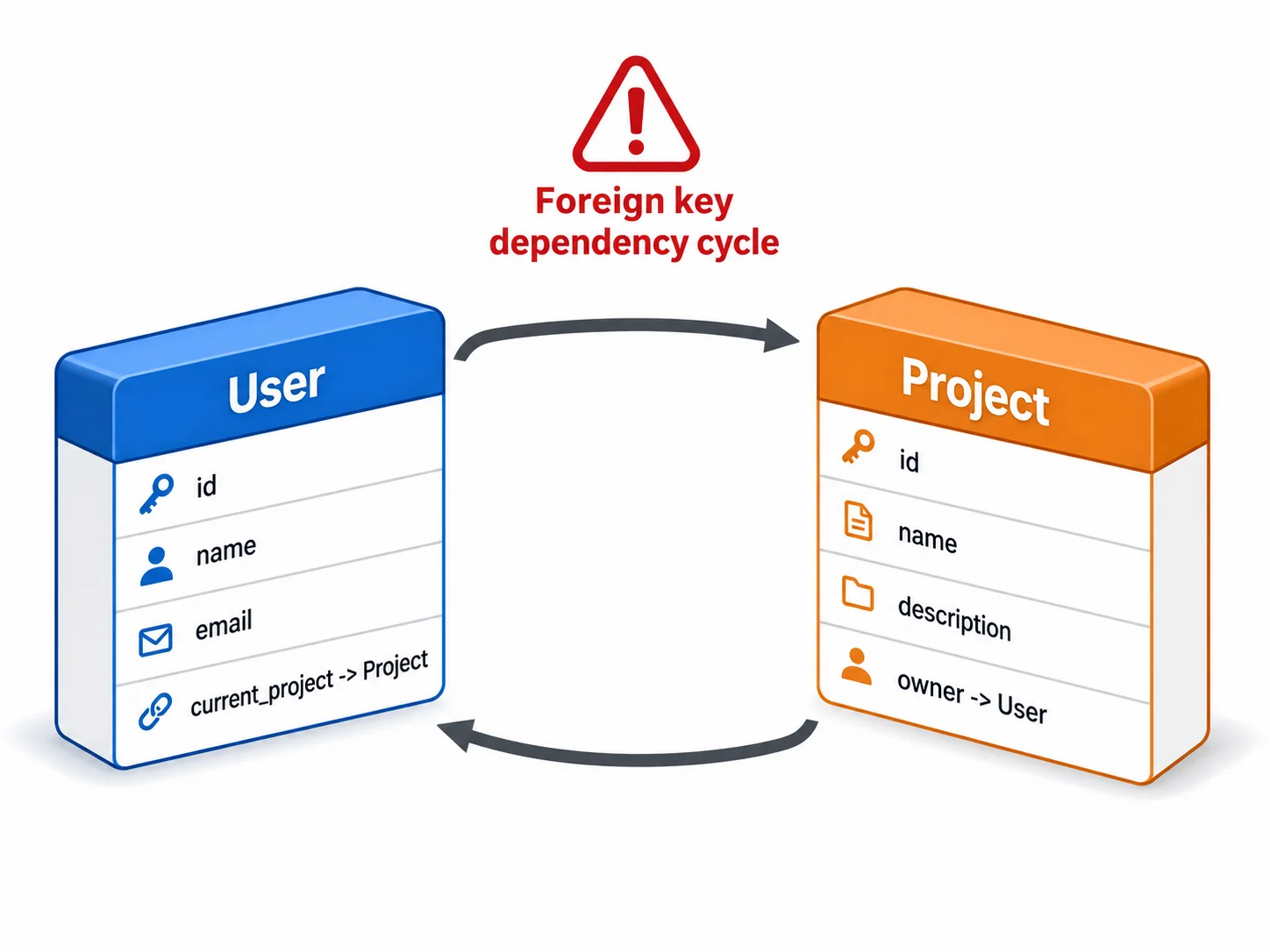
A circular reference occurs when Type A references Type B and Type B references Type A. Example: a User has a "Current Project" field (type: Project), and a Project has a "Owner" field (type: User). In Bubble, this works seamlessly. In PostgreSQL, this creates a foreign key dependency cycle that complicates table creation order, data loading order, and cascade deletion rules.
Why It Is Expensive
PostgreSQL requires tables to be created before they can be referenced by foreign keys. If Users references Projects and Projects references Users, neither table can be created first. The solution: create tables without foreign keys, load data, then add foreign keys with ALTER TABLE. This doubles the schema migration script complexity and requires careful ordering in the ETL pipeline.
The Fix
Break circular references by introducing a direction. Instead of User → current_project → Project and Project → owner → User, keep only Project → owner → User and add a separate query to find a user's current project (e.g., search for the most recent active project where owner equals the user). This eliminates the circle while preserving the functionality.
Circular references do not break Bubble, so they are easy to miss during architecture review. Before writing any SQL, export your ERD and trace every bidirectional arrow between types. A reference that goes both ways is a dependency cycle. Mark each one and decide which direction to keep — this decision must be made before table creation order is planned. Discovering a cycle mid-migration forces a schema rewrite.
Mistake 3: The God Type
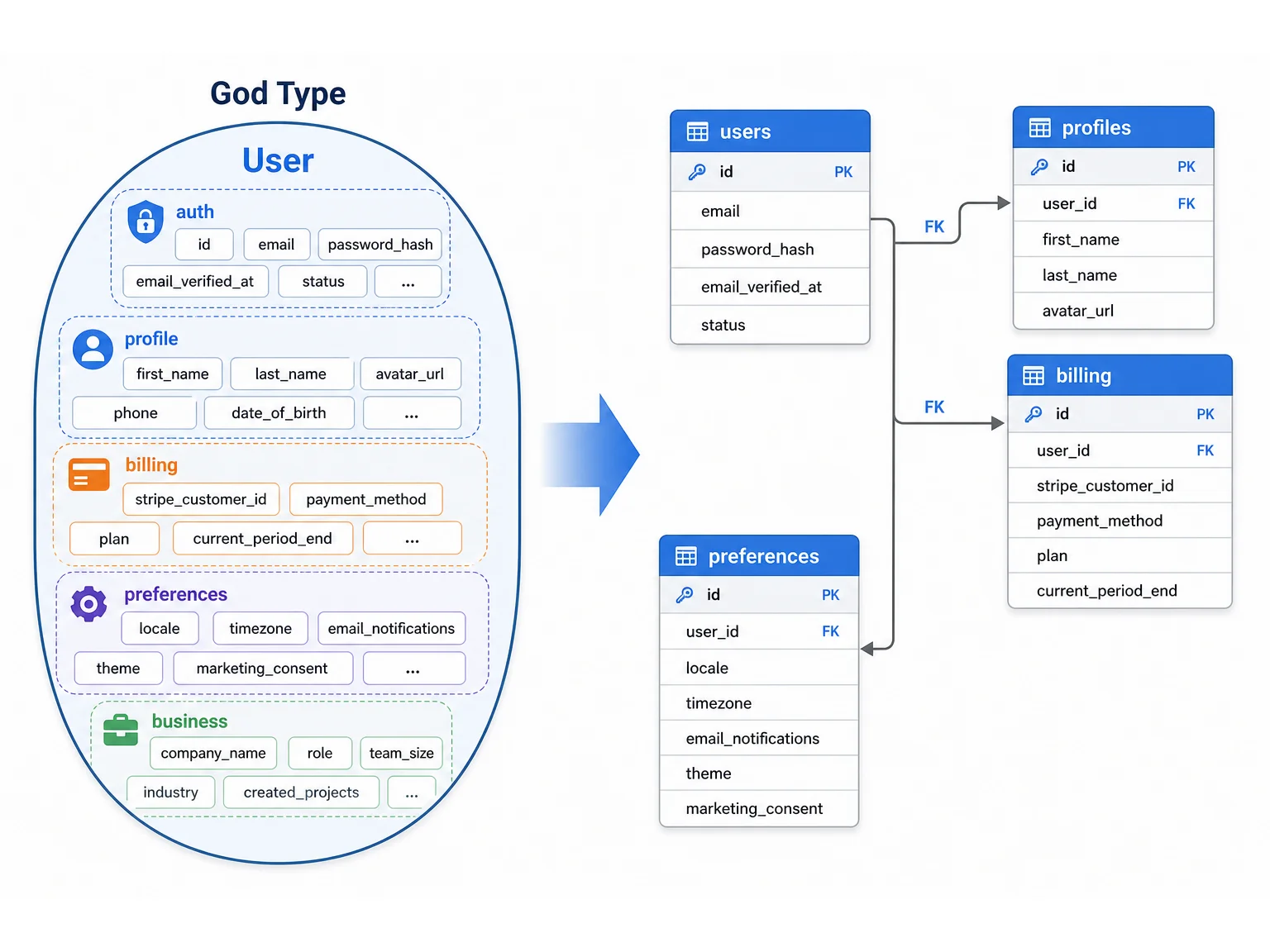
A God type is a data type with 30, 40, or 50+ fields that combines multiple concerns. A User type with personal info (name, email, avatar), authentication data (role, last_login, email_verified), billing data (plan, stripe_customer_id, subscription_status), preferences (theme, language, timezone, notification_settings), and business-specific fields (company, department, team_lead, hire_date) is a God type.
Why It Is Expensive
God types create three migration problems: every page that loads a User record transfers 50 fields when it needs 3, the SQL table has 50 columns making queries slow and migrations fragile, and the type mixes concerns that should be separate tables (users, profiles, billing, preferences). During migration, the God type must be decomposed into multiple normalized tables — a design exercise that should have happened earlier.
The Fix
Split God types into focused types. User (auth fields: email, password, role), Profile (display fields: name, avatar, bio), Billing (stripe_customer_id, plan, subscription_status), and Preferences (theme, language, timezone). Connect them with one-to-one references. This is feasible on Bubble and directly translates to clean SQL tables.
If any data type has more than 25 fields, it is likely a God type that combines multiple concerns. Audit it. Identify field groups that change together (billing fields change on subscription events, preference fields change on settings saves). Each group should be its own data type with a one-to-one reference to the parent. This improves Bubble performance today and migration cost tomorrow.
Mistake 4: Option Set Sprawl
Option Sets are Bubble's enum equivalent — predefined value lists for statuses, roles, categories. The mistake is not using Option Sets — it is creating too many with overlapping values, using them inconsistently, or embedding business logic in Option Set attributes.
Why It Is Expensive
During migration, each Option Set becomes either a PostgreSQL ENUM type or a reference table. Option Sets with attributes (a Status option set where each value has a "color" and "display_order" attribute) must become reference tables, not simple enums. If your app has 15 Option Sets with 3 attributes each, you are creating 15 additional tables with their data — tables that need to be populated before any record that references them can be inserted.
The Fix
Consolidate overlapping Option Sets. If "Project Status" and "Task Status" share values (Active, Archived, Completed), consider whether they can be a single "Status" Option Set. Remove unused Option Set values that accumulated over time. Document which types use which Option Sets — this mapping becomes your enum creation script.
Mistake 5: Denormalized Aggregates
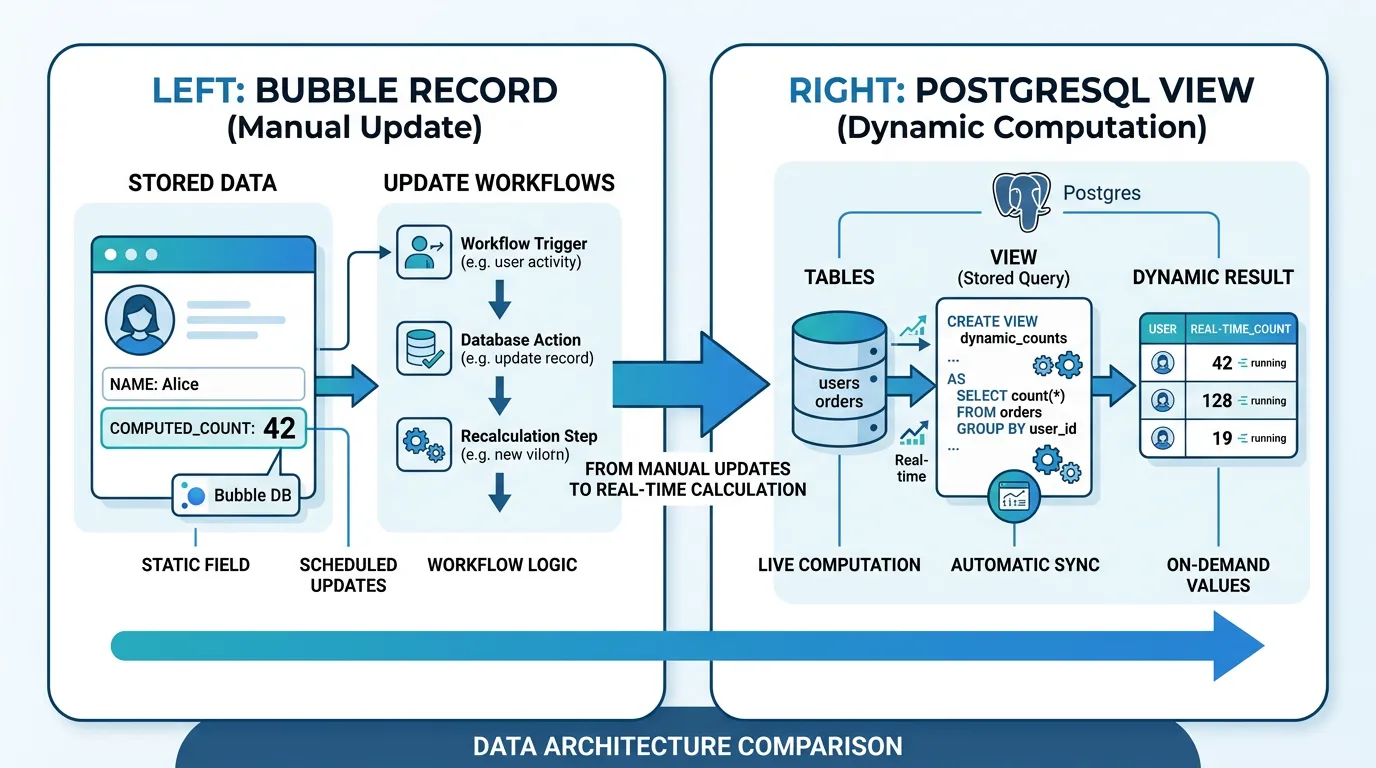
Bubble encourages storing calculated values on parent records for performance: a Project with a "task_count" field that is updated whenever a Task is created or deleted, an Organization with a "total_revenue" field updated by payment workflows. In Bubble, this avoids expensive "count" and "sum" searches. In SQL, these aggregates are cheap to compute in real-time with proper indexes.
Why It Is Expensive
Denormalized aggregates must be migrated as data (they exist in the export) but they also need workflows to keep them updated in the new system. If you migrate the "task_count" field but forget to add the trigger that increments it on task creation, the count becomes stale. During migration, you must: decide whether to keep each aggregate (some are not needed in SQL), rebuild the update logic for aggregates you keep, and verify that initial values match the actual counts.
The Fix
Identify denormalized aggregates (fields that store calculated values from other types). For each, determine: can this be computed in real-time in SQL (yes for simple counts and sums — use a database view or computed column instead of storing the value)? If yes, drop the field before migration and compute it in SQL. If no (because the calculation is expensive even in SQL), keep it and document the update logic.
Mistakes 6–7: Missing Types and Orphan-Generating Deletions
Mistake 6: Missing Intermediate Types
When a relationship needs attributes, it should be its own type. Example: a User is a "Member" of a Project with a specific role (Admin, Editor, Viewer) and a join date. In Bubble, teams often store this as a list field on Project ("Members" list of Users) and lose the ability to track role and join date per membership. In SQL, this must be a junction table with additional columns — but the data for those columns does not exist in Bubble because the intermediate type was never created.
The Fix: Create the intermediate type on Bubble. Instead of Project having a "Members" list, create a "ProjectMembership" type with fields: user (User), project (Project), role (Option Set), joined_at (date). This directly translates to a junction table with all needed columns.
Mistake 7: Orphan-Generating Deletions
Bubble does not enforce cascade deletions. When you delete a User, all Projects that reference that User as "Creator" still have the Creator field — it just points to nothing. Over years of production use, these orphaned references accumulate. A 2-year-old app might have hundreds of orphaned references across its data types.
The Fix: Before migration, run an orphan detection audit. For each relationship field on each type, count records where the referenced record no longer exists. Either delete the orphaned records, set the reference to NULL (if the field is optional), or create a placeholder record (e.g., a "Deleted User" record) that orphaned references can point to. The data migration playbook covers this in detail.
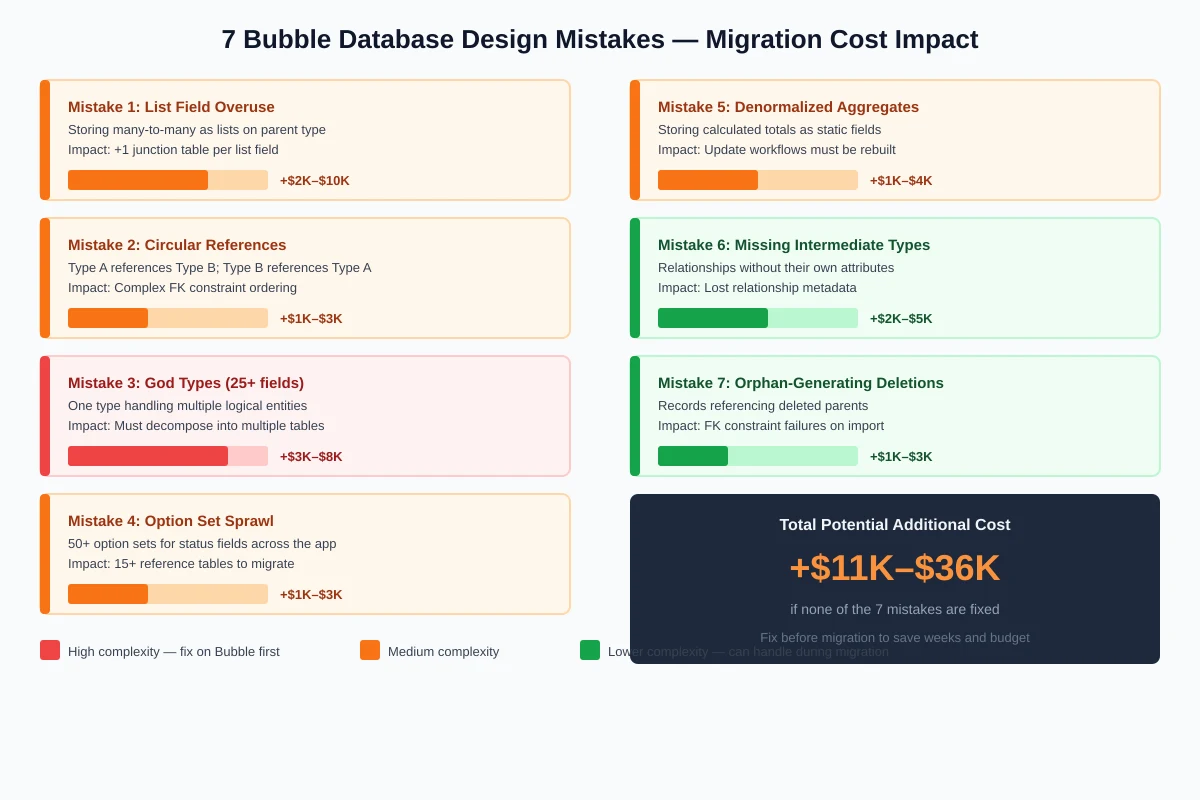
| Mistake | Migration Impact | Fix Difficulty on Bubble | Cost If Not Fixed |
|---|---|---|---|
| List field overuse | +1 junction table per field | Medium (data restructure) | +$2K–$10K |
| Circular references | Complex FK ordering | Low (remove one direction) | +$1K–$3K |
| God types (30+ fields) | Must decompose to tables | High (data migration within Bubble) | +$3K–$8K |
| Option Set sprawl | 15+ reference tables needed | Low (consolidate, document) | +$1K–$3K |
| Denormalized aggregates | Update logic must be rebuilt | Low (identify, document) | +$1K–$4K |
| Missing intermediate types | Lost relationship metadata | Medium (create types, backfill) | +$2K–$5K |
| Orphaned references | FK constraint failures on import | Low (audit, clean) | +$1K–$3K |
Before migration, audit your data model for all seven patterns. Relis extracts your complete data schema — every type, every field, every relationship — into an ERD diagram that makes these patterns visible. Count your list fields, identify circular references, flag God types, and catalog Option Sets. Each pattern you fix before migration saves weeks and thousands of dollars during the rebuild.
Frequently Asked Questions
Q. Can I fix these mistakes on Bubble without breaking my app?
Most can be fixed incrementally. Splitting a God type requires creating new types and migrating data within Bubble — do it in phases, one field group at a time. Converting list fields to intermediate types requires updating workflows that reference the list. The lowest-risk fixes are orphan cleanup and Option Set consolidation, which can be done without changing any workflows.
Q. How do I know how many of these mistakes my app has?
Extract your architecture documentation. The ERD diagram shows: list fields (many-to-many indicators), circular references (bidirectional arrows between types), God types (types with 25+ fields), and relationship patterns. Automated extraction produces this view in minutes. Manual audit requires clicking through every type in the editor — budget 2 to 4 hours.
Q. Is it worth fixing these before migration or just handling them during migration?
Fixing on Bubble first is cheaper if the fix is straightforward (orphan cleanup, Option Set consolidation, breaking circular references). Fixing during migration is better for complex structural changes (splitting God types) where the Bubble-side migration is as much work as just handling it in the SQL schema design. Rule of thumb: fix the easy ones on Bubble, plan for the hard ones in the migration budget.
Q. Do these design patterns affect Bubble performance too?
Yes. God types slow every page that loads the type (loading 50 fields when you need 3). List fields with thousands of entries degrade search performance. Denormalized aggregates require update workflows that consume workload units. Fixing these patterns improves Bubble performance today and reduces migration cost tomorrow — a rare win-win.
Q. My app has been in production for 3 years. Are these fixable?
Yes, but carefully. Long-running apps have the most accumulated debt but also the most data to transform. Start with a complete architecture extraction to understand the scope. Fix non-destructive issues first (orphan cleanup, documentation). Plan structural changes (God type splitting) as dedicated projects with their own QA cycles. Do not attempt to fix everything at once.
Q. If I design my Bubble app well, does migration become trivial?
It becomes significantly easier — but not trivial. A well-designed Bubble app with clean one-to-many relationships, no circular references, and focused data types translates to PostgreSQL with minimal schema redesign. The migration cost is determined by volume (data types, workflows, integrations), not just structure. Good design reduces the structural complexity multiplier from 2x to 3x down to 1x to 1.5x.
Design for Migration, Even If You Are Not Migrating Yet
- Bubble's ease of use creates migration debt: Patterns that Bubble handles gracefully — list fields, circular references, God types — become expensive structural problems in SQL. Each one adds 1 to 3 weeks and $2,000 to $8,000 to migration cost.
- Seven patterns account for most data model complexity: List field overuse, circular references, God types, Option Set sprawl, denormalized aggregates, missing intermediate types, and orphan-generating deletions. Fixing even half of them can cut migration complexity by 30 to 40 percent.
- Most fixes improve Bubble performance too: Splitting God types reduces data transfer. Cleaning orphans improves data integrity. Converting unnecessary lists to references simplifies queries. Good data design is good for both platforms.
- Audit before you budget: Your migration cost estimate is only accurate if it accounts for data model complexity. An ERD diagram that shows every type, field, and relationship reveals these patterns instantly — and the migration team can price them accurately.
- Design new features for portability: For every new data type you create, ask: "How would this look in PostgreSQL?" Use focused types instead of God types, explicit intermediate types instead of list fields where possible, and unidirectional references instead of circular ones. This costs nothing extra on Bubble and saves weeks during migration.
The best time to fix your data model was when you built it. The second best time is before you migrate. An architecture audit reveals every pattern, and each one you fix is time and money saved when migration day arrives.
See Your Data Model Clearly
Relis extracts your complete Bubble data schema — every type, every field, every relationship — into an ERD diagram that reveals list fields, circular references, God types, and every pattern that adds migration complexity. See the debt before you pay it.
Scan My App — FreeSee Your Bubble Architecture — Automatically
Stop reverse-engineering by hand. Relis extracts your complete database schema, API connections, and backend workflows in under 10 minutes.
See Your Bubble Architecture — Automatically
Stop reverse-engineering by hand. Relis extracts your complete database schema, API connections, and backend workflows in under 10 minutes.