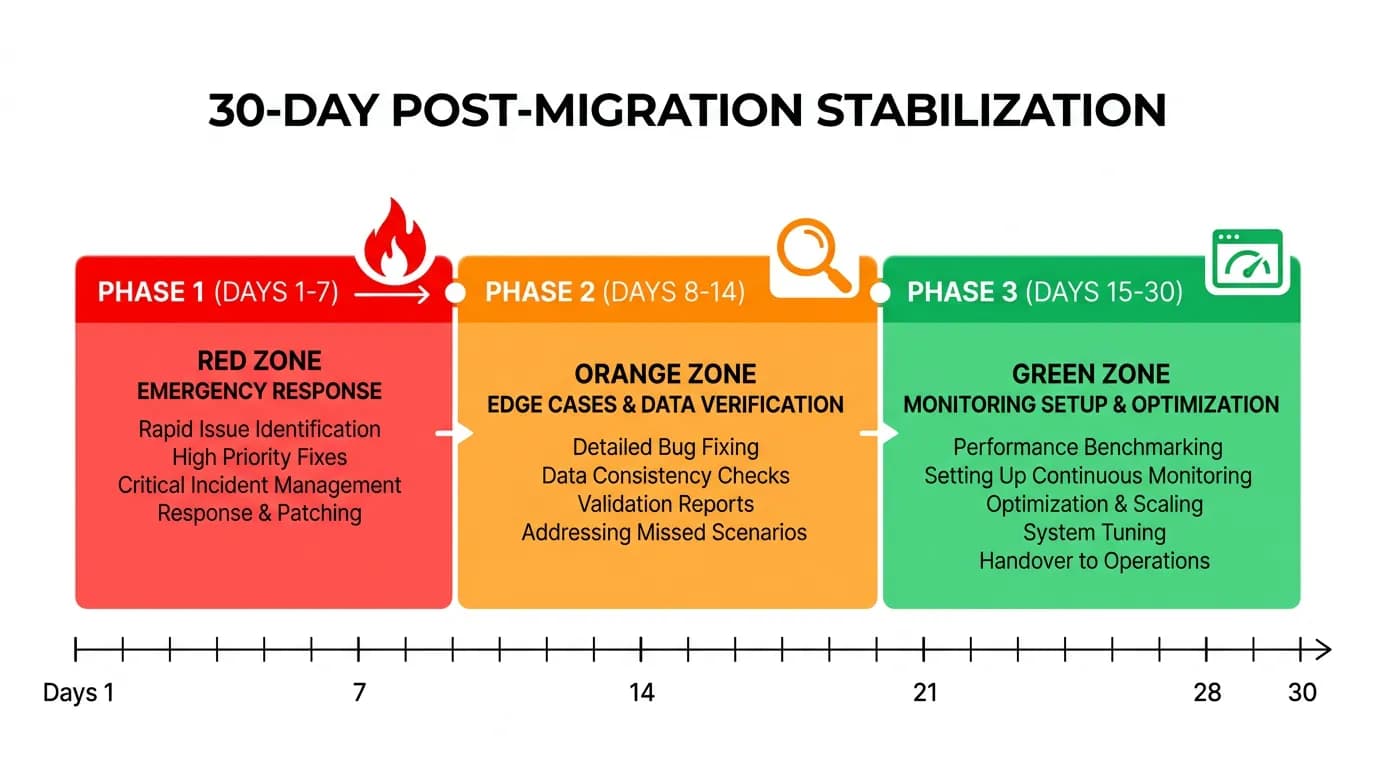
The First 30 Days After Migration: A Post-Launch Stabilization Playbook
Migration day is not the finish line — it is the start of the hardest 30 days. This playbook covers the support spike, edge case bugs, monitoring setup, rollback procedures, user communication, and the stabilization process that separates successful launches from emergency weekends.
17 min read
Every Bubble migration project has a launch date. Most teams treat that date as the finish line — the moment when months of work pay off and the team can finally rest. It is not. Launch day is the beginning of the most intense phase of the entire project: the first 30 days of production operation, when real users encounter real data in a system that has never handled production traffic before.
Migration agencies and teams that have shipped multiple production cutovers report the same pattern: even with thorough staging tests, real users find edge cases, and support tickets spike in the first 2 weeks. This is not a failure of planning — it is the nature of software migration. Staging environments cannot replicate every user behavior, every data edge case, and every third-party service interaction. The first 30 days are when the remaining margin of issues surfaces. This playbook prepares you for them.
Why the First 30 Days Are the Riskiest
Three factors converge to make the post-launch period uniquely challenging.
Factor 1: Production Data Surprises
You tested with staging data — either a subset of production or synthetic data generated to match your schema. Production data has edge cases that no staging environment captures: records from 2019 with deprecated field values, users with special characters in their names that break URL parsing, file URLs that reference deleted Bubble CDN objects, and payment subscriptions in states that your code does not handle (paused, past due, trialing with no payment method).
Factor 2: User Behavior Diversity
Your QA team tested the happy paths and the documented edge cases. Your users will find the undocumented ones: clicking buttons faster than your loading states expect, using browser extensions that modify your DOM, accessing the app from network conditions you did not test (slow 3G, corporate VPNs, countries with different CDN latencies), and performing operations in sequences your state machine does not anticipate.
Factor 3: Third-Party Service Configuration
Every webhook URL, every OAuth redirect URI, every DNS record that pointed to your Bubble app now needs to point to your new infrastructure. Plugins you replaced, API connectors you rebuilt, and integrations you translated all have configuration that references the old Bubble URLs. Miss one and that integration silently breaks — often discovered by users, not monitoring.
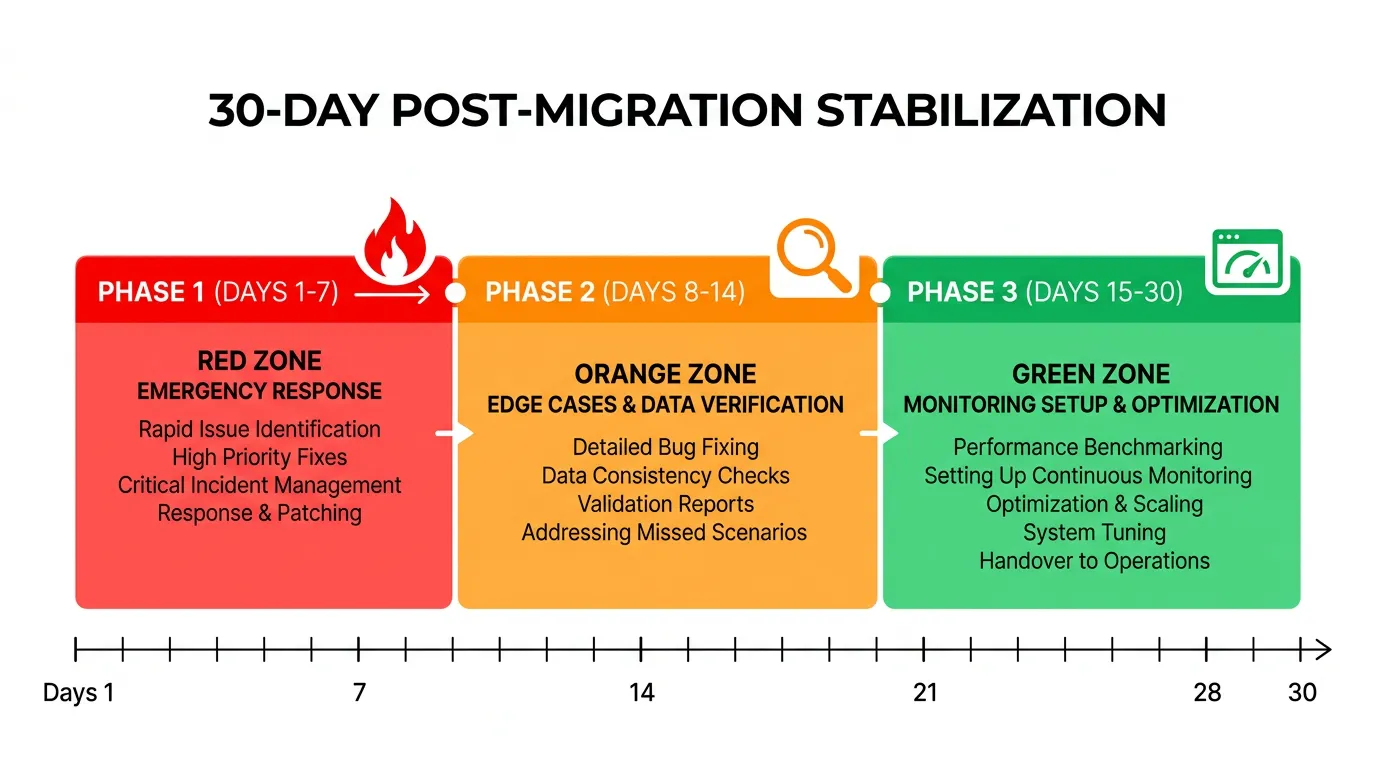
Week 1: Stabilization and Emergency Response
Week 1 is about survival. Your primary goal is keeping the app running, responding to user issues within hours, and fixing anything that blocks core functionality.
The War Room Setup
Designate a war room (physical or virtual) for the first 5 business days. The migration team should be on-call and available for immediate response. Set up: a dedicated Slack channel for production issues, an escalation path (developer → tech lead → on-call engineer), and a shared document tracking every reported issue with status and owner. Do not disband the migration team on launch day.
The Support Spike
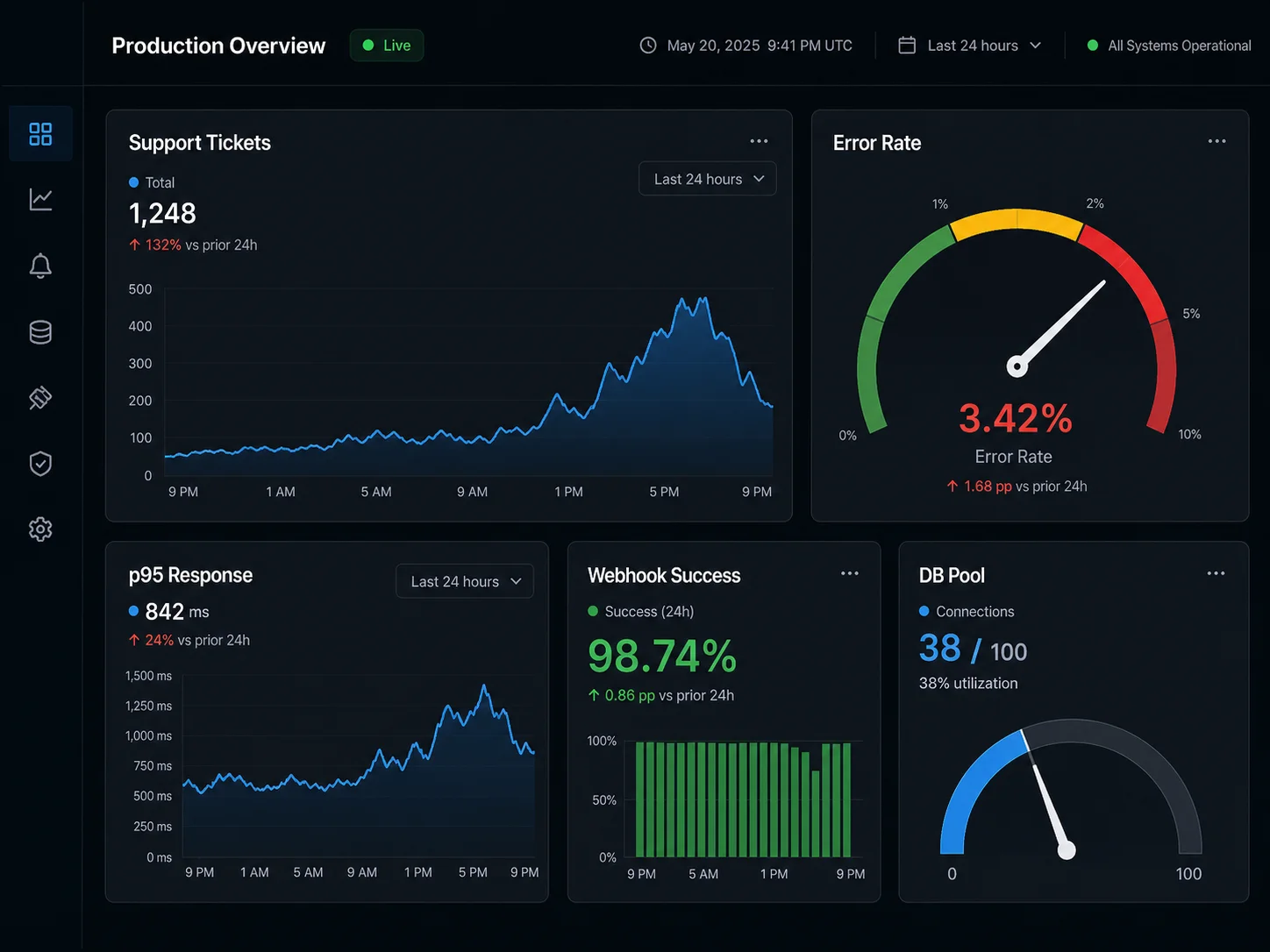
Expect support ticket volume to increase 3x to 5x in the first week. Most tickets fall into predictable categories: login issues (users who cannot authenticate with the new system), missing data (records that did not migrate correctly or display differently), UI differences (features that look or behave slightly differently from Bubble), and broken integrations (third-party services that have not been updated to point to the new system). Prepare template responses for each category before launch.
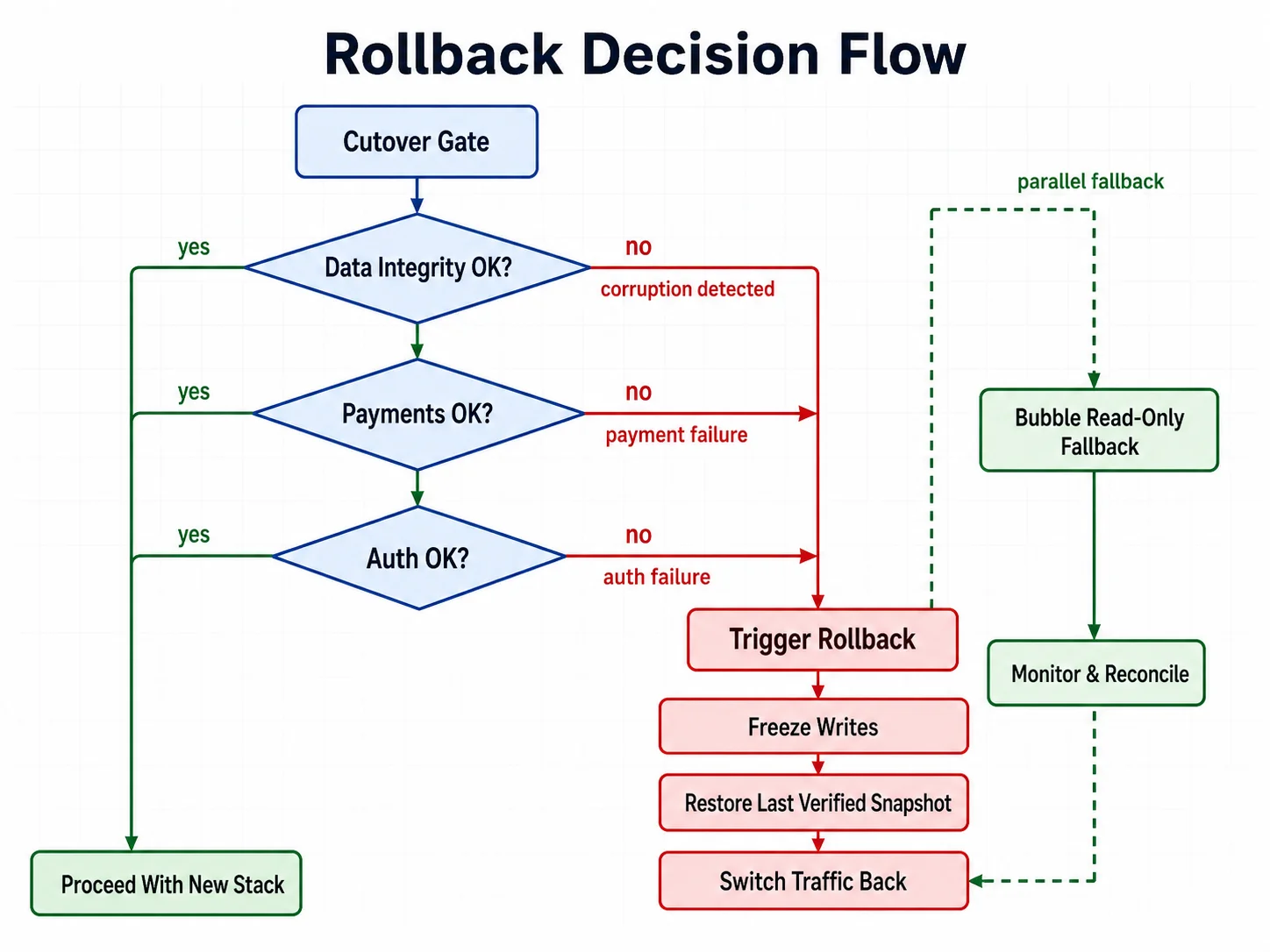
The Rollback Decision
Know your rollback criteria before launch. Define the conditions under which you will switch back to Bubble: data corruption affecting more than N users, payment processing failure lasting more than N minutes, or authentication system failure preventing all logins. Keep Bubble in read-only mode for the first two weeks as a safety net. Switching back is always possible if the new system has a critical failure — but only if you prepared for it.
| Issue Type | Priority | Response Time | Resolution Target |
|---|---|---|---|
| Users cannot log in | P0 — Critical | 30 minutes | 2 hours |
| Payment processing broken | P0 — Critical | 30 minutes | 2 hours |
| Data missing or corrupted | P1 — High | 2 hours | 24 hours |
| Feature not working correctly | P2 — Medium | 4 hours | 48 hours |
| UI difference from Bubble | P3 — Low | 24 hours | 1 week |
The temptation after launch is to start building the new features that motivated the migration. Resist it. Week 1 is for stabilization only. Every code change in the first week should be a bug fix, not a feature. New features introduce new bugs that compound with migration bugs — the worst possible outcome when your support team is already handling a spike.
Week 2: Edge Cases and Data Integrity
By week 2, the critical issues are resolved. Now the subtle ones emerge — the edge cases that only appear when real users interact with real data at scale.
The Edge Case Pattern
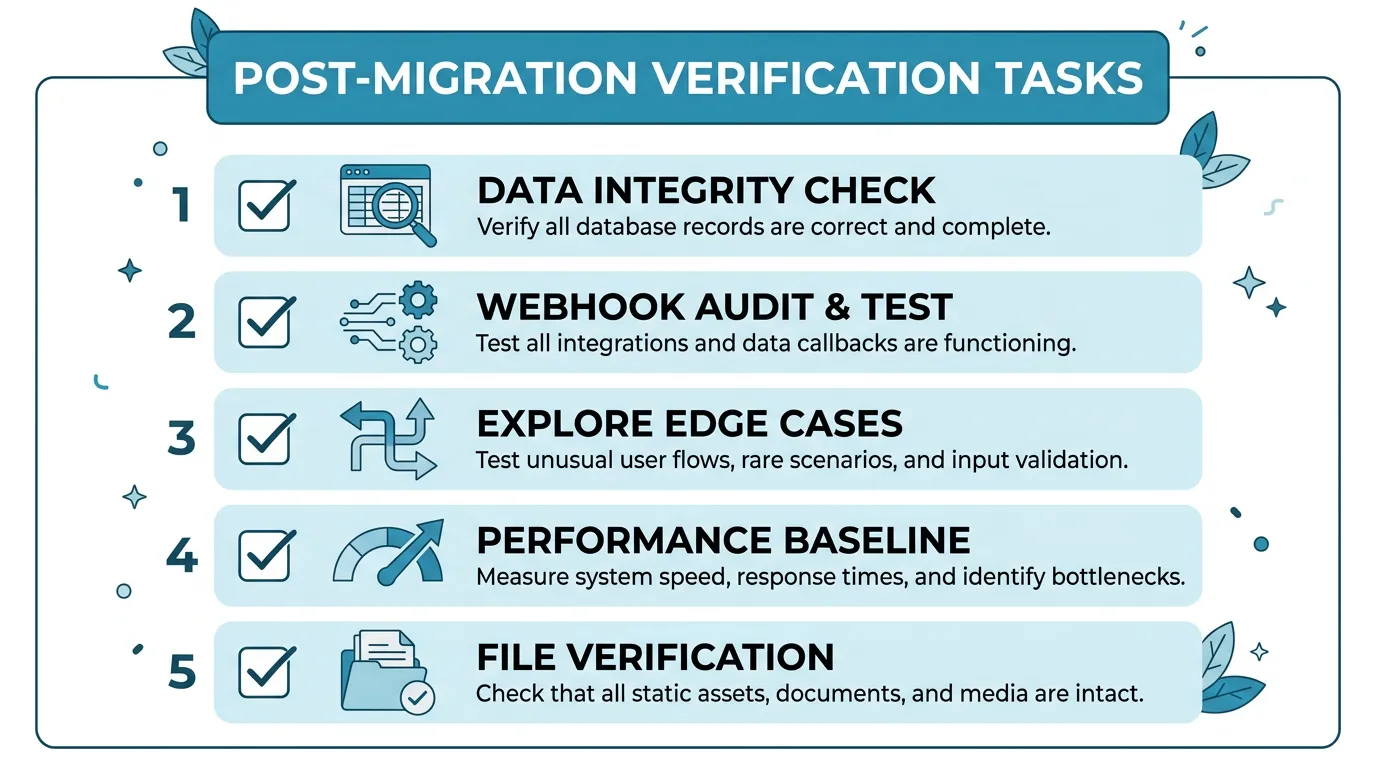
Week 2 issues follow a pattern: they work for 95 percent of users but fail for 5 percent with unusual data. A user whose company name contains an ampersand that breaks an API call. A record with a date from before your system's epoch. A subscription that was migrated mid-billing-cycle and now shows an incorrect amount. These are not bugs in your code — they are gaps in your data migration that the transform phase did not catch.
Data Integrity Verification
Run a comprehensive data integrity check in week 2. Compare: record counts between Bubble and the new database (they should match, minus intentionally excluded records), key business metrics (total revenue, active subscriptions, user counts) between old and new systems, and file accessibility (sample 100 migrated file URLs and verify they load). Any discrepancy is a potential data migration bug that needs investigation.
The Webhook Audit
By week 2, most webhook-dependent features have been triggered at least once. Check: Stripe webhooks are reaching your new endpoint and processing correctly, email delivery events (bounces, opens, clicks) are being tracked, and any third-party service that sends callbacks to your app is pointed at the new URLs. The webhook audit is the single most effective way to find forgotten integration points.
Weeks 3–4: Monitoring, Optimization, and Cleanup
By week 3, the app is stable. Support tickets have returned to normal levels. Now is the time to establish the operational foundation for long-term health.
Performance Baseline
Measure and record baseline performance metrics: average page load time, API response times (p50, p95, p99), database query times, background job processing times, and error rates by endpoint. These baselines become your reference point for detecting performance regression in the future. You should be seeing dramatically better numbers than Bubble — if not, investigate.
Performance baselines captured in the first week are skewed by edge case bugs, incomplete caches, and above-average server load from the migration itself. Wait until week 3, when traffic has normalized, to record the numbers you will compare against in six months. A baseline captured too early will falsely flag normal operation as a regression — and miss real regressions because the reference point is itself degraded.
Monitoring and Alerting
Set up production monitoring that the migration team can hand off to an operations team. Essential monitors: uptime checks on all critical endpoints (5-minute intervals), error rate alerts (alert if error rate exceeds 1 percent), response time alerts (alert if p95 exceeds 2 seconds), database connection pool utilization, background job queue depth and failure rate, and SSL certificate expiration (alert 30 days before expiry).
Bubble Decommissioning
By week 4, if the new system is stable and no rollback has been needed, begin decommissioning Bubble. Downgrade to the cheapest plan (do not cancel immediately — keep it for 1 to 2 months as an emergency fallback). Redirect the old Bubble URL to the new domain. Export any remaining data that was not migrated. Document any Bubble-specific knowledge that might be needed for future reference.
| Phase | Focus | Key Metrics | Team Size |
|---|---|---|---|
| Days 1–7 | Emergency response, critical bug fixes | Support ticket volume, P0 resolution time | Full migration team (on-call) |
| Days 8–14 | Edge cases, data integrity, webhook audit | Data discrepancy count, integration status | 2–3 developers + support |
| Days 15–21 | Monitoring setup, performance baseline | Response times, error rates, uptime | 1–2 developers |
| Days 22–30 | Cleanup, Bubble decommission, handoff | Operational readiness score | 1 developer + ops |
Before the migration team disbands, create a handoff document covering: architecture overview of the new system, known issues and workarounds, monitoring and alerting configuration, deployment procedures, and emergency contacts and escalation paths. This document ensures the operations team can maintain the system without the migration team's tribal knowledge.
The Monitoring Stack You Need on Day One
Do not launch without monitoring. The issues you do not detect are the ones that become emergencies.
| Category | Tool Options | What It Catches | Cost |
|---|---|---|---|
| Uptime monitoring | UptimeRobot, Better Uptime | Site down, endpoint failures | Free–$20/mo |
| Error tracking | Sentry, Bugsnag | Runtime errors, stack traces | Free–$26/mo |
| Performance monitoring | Vercel Analytics, New Relic | Slow pages, API latency | Free–$49/mo |
| Log management | Logflare, Datadog Logs | Error patterns, debugging | Free–$15/mo |
| Database monitoring | pganalyze, Supabase Dashboard | Slow queries, connection issues | Free–$50/mo |
User Communication Before, During, and After
Users tolerate disruption when they understand why it is happening and when it will end. They do not tolerate surprises.
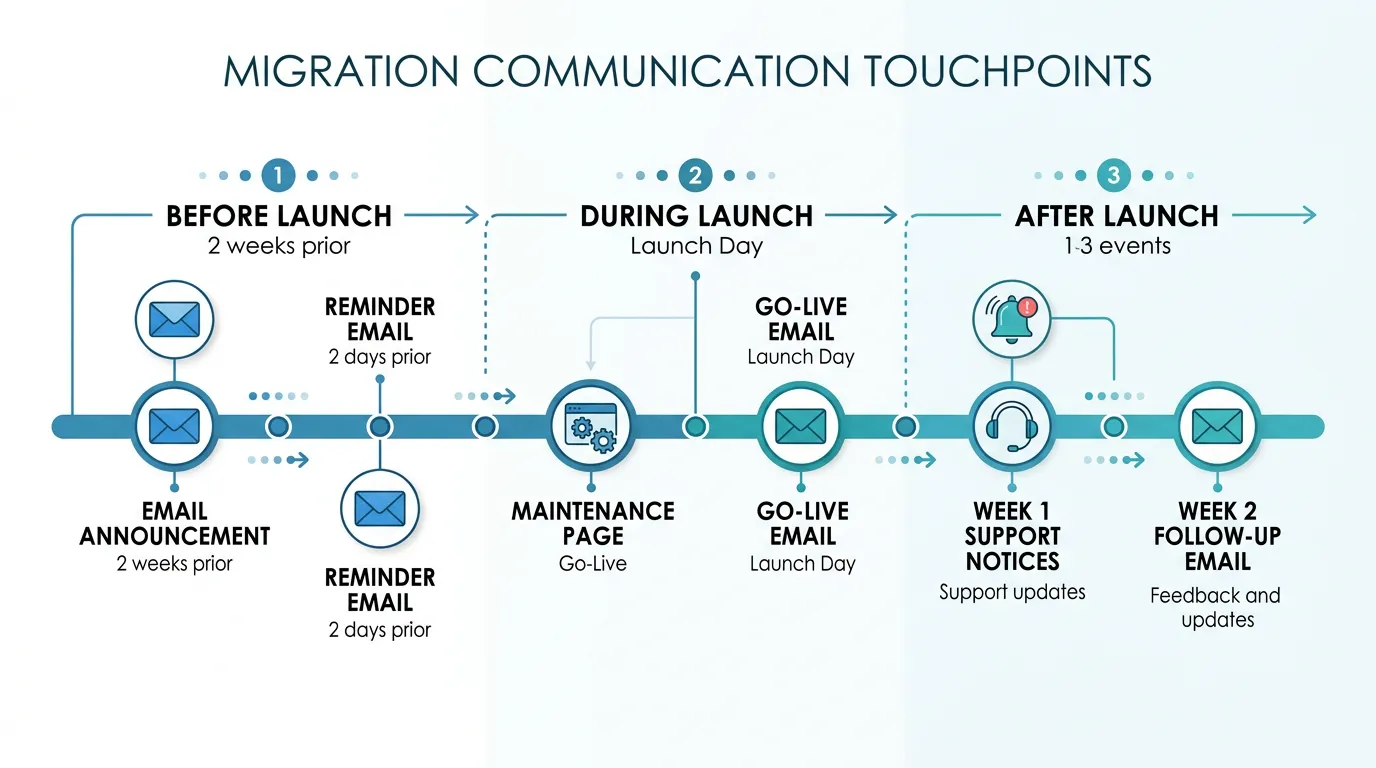
Before Launch (1 to 2 Weeks Prior)
Send an email explaining: what is changing (we are upgrading our platform for better performance), when it is happening (specific date and time), what users need to do (re-authenticate via magic link), what to expect (the app will look slightly different but all features work the same), and where to get help (support email, help center link). Send this email twice — once two weeks before and once two days before.
During Launch (Day Of)
If you have a planned downtime window, display a maintenance page with an estimated completion time. When the new system is live, send a "we are live" email with the new login link and a brief guide for any changed workflows. Pin a notice in the app for the first week pointing to a "What Changed" help article.
After Launch (First Two Weeks)
Respond to every support ticket within the committed response time. For recurring issues, update the "What Changed" help article with solutions. Send a follow-up email at the end of week 2 thanking users for their patience and highlighting the performance improvements they should be experiencing. This closes the communication loop and signals that the transition is complete.
Frequently Asked Questions
Q. How long should I keep Bubble running after launch?
Keep Bubble in read-only mode for 2 weeks minimum. After 2 weeks of stable operation, downgrade to the cheapest Bubble plan and keep it for 1 to 2 additional months as an emergency fallback. Cancel only after you are confident the new system handles all production scenarios. Total overlap: 6 to 10 weeks.
Q. What percentage of issues are typically found in the first 30 days?
Teams report finding roughly a single-digit share of total issues post-launch — practitioner accounts commonly cluster in a 5 to 10 percent band — across a mix of data edge cases, integration configuration issues, and user-behavior edge cases. The first 30 days are the final QA phase — plan for it, do not be surprised by it.
Q. Should I hire dedicated support staff for the post-launch period?
For apps with more than 1,000 active users, yes — or at least assign a dedicated support person from your existing team. The support spike is predictable and temporary (2 weeks), so a temporary contractor or re-assigned team member works well. For smaller apps, the development team can handle support directly during week 1.
Q. What is the most common post-launch emergency?
Authentication failures. Users cannot log in because: the magic link email went to spam, the OAuth redirect URI still points to Bubble, or the JWT token format is slightly different from what the frontend expects. Test authentication thoroughly before launch and have a bypass procedure ready (admin can manually verify users) for the first 48 hours.
Q. When is it safe to start building new features?
After week 2, when: support ticket volume has returned to normal, no P0 or P1 issues are open, monitoring is in place and baselines are established, and the team is confident that all migration-related bugs have been resolved. Starting new features before this point risks compounding migration bugs with feature bugs.
Q. How do I handle users who lost data during migration?
First, verify the data loss is real (not a display issue or authorization mismatch). If data is genuinely missing, check the Bubble backup (which you kept running). Restore individual records from the Bubble data export or the staging migration data. Communicate with affected users personally — data loss erodes trust faster than any other issue. For future prevention, add the missing records to your data validation checks.
Plan the Landing, Not Just the Launch
- The first 30 days are the final QA phase: 5 to 10 percent of issues surface only in production with real users and real data. This is not failure — it is the expected conclusion of every migration. Plan for it with a war room, escalation paths, and template responses.
- Week 1 is survival, not improvement: Fix critical bugs, respond to support tickets, and resist the urge to ship new features. Every code change in week 1 should be a stabilization fix, not a feature addition.
- Week 2 is systematic verification: Data integrity checks, webhook audits, and edge case resolution. The subtle bugs that 95 percent of users never encounter but 5 percent hit every day.
- Weeks 3–4 are operational foundation: Set up monitoring, establish performance baselines, create handoff documentation, and begin Bubble decommissioning. This is when the system transitions from "just launched" to "production-grade."
- User communication prevents support overload: Proactive emails before, during, and after launch set expectations and reduce surprise-driven support tickets by 30 to 50 percent. Users tolerate disruption when they understand it.
The teams that survive post-launch are not the ones with zero bugs. They are the ones that planned for bugs, staffed for support, monitored for failures, and communicated with users at every step. Plan the landing, not just the launch.
Start Your Migration with Complete Documentation
The best post-launch experience starts with the best pre-launch documentation. Relis extracts your complete Bubble architecture so nothing is discovered after launch — every workflow, every integration, every data relationship documented before development begins.
🚀 Scan My App — FreeSee Your Bubble Architecture — Automatically
Stop reverse-engineering by hand. Relis extracts your complete database schema, API connections, and backend workflows in under 10 minutes.
See Your Bubble Architecture — Automatically
Stop reverse-engineering by hand. Relis extracts your complete database schema, API connections, and backend workflows in under 10 minutes.