Bubble to FlutterFlow vs. Bubble to Code: Choosing the Right Exit Path
Migration does not always mean custom code. FlutterFlow, WeWeb, and other no-code/low-code platforms offer a middle path — less lock-in than Bubble with less cost than custom code. This guide compares Bubble-to-code versus Bubble-to-alternative-platform across cost, timeline, portability, and long-term scalability.
14 min read
The Bubble migration conversation usually starts with "we need to move to custom code." But 2026 has introduced a middle option that did not exist when most migration guides were written: no-code and low-code platforms that export to real, editable code. FlutterFlow exports to Flutter/Dart. WeWeb exports to Vue.js. Plasmic exports to React. These platforms offer visual development with an escape hatch — build visually, export to code when you outgrow the platform.
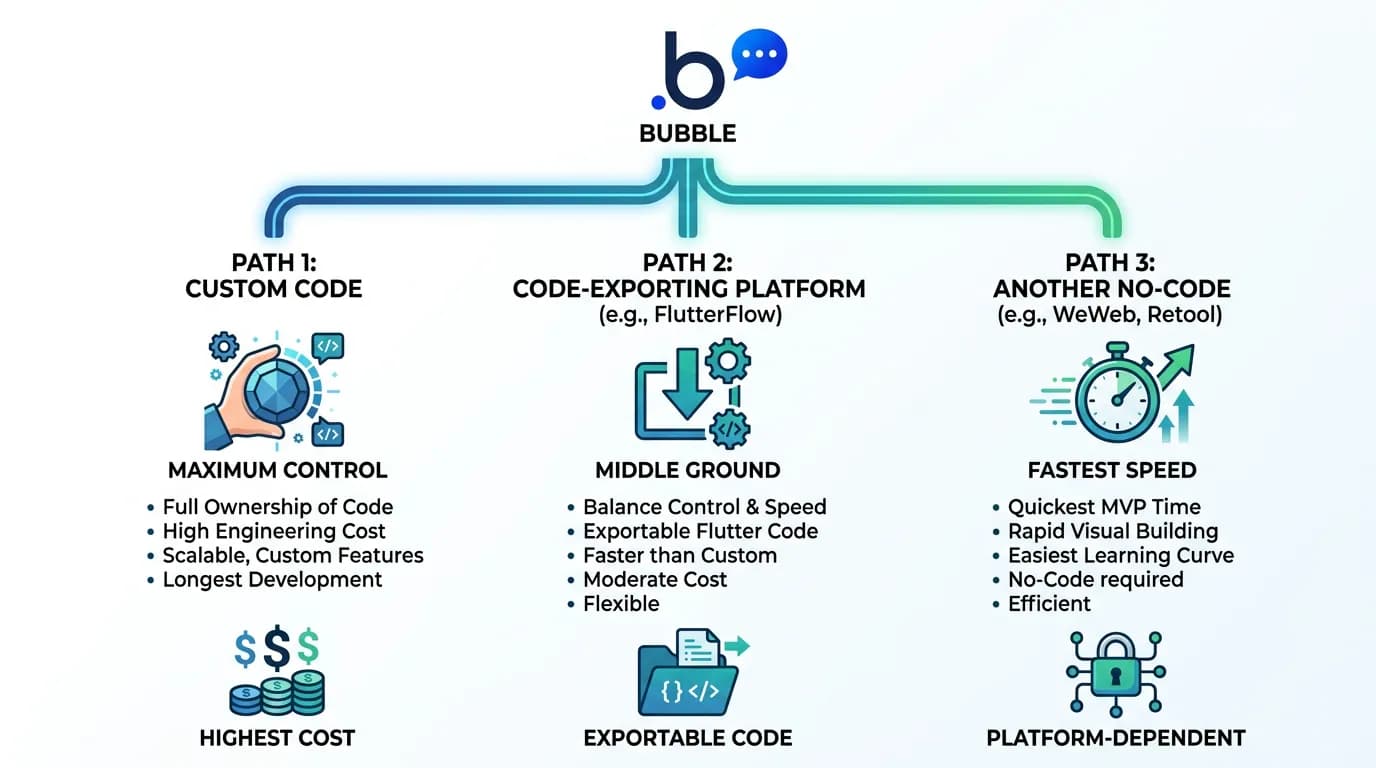
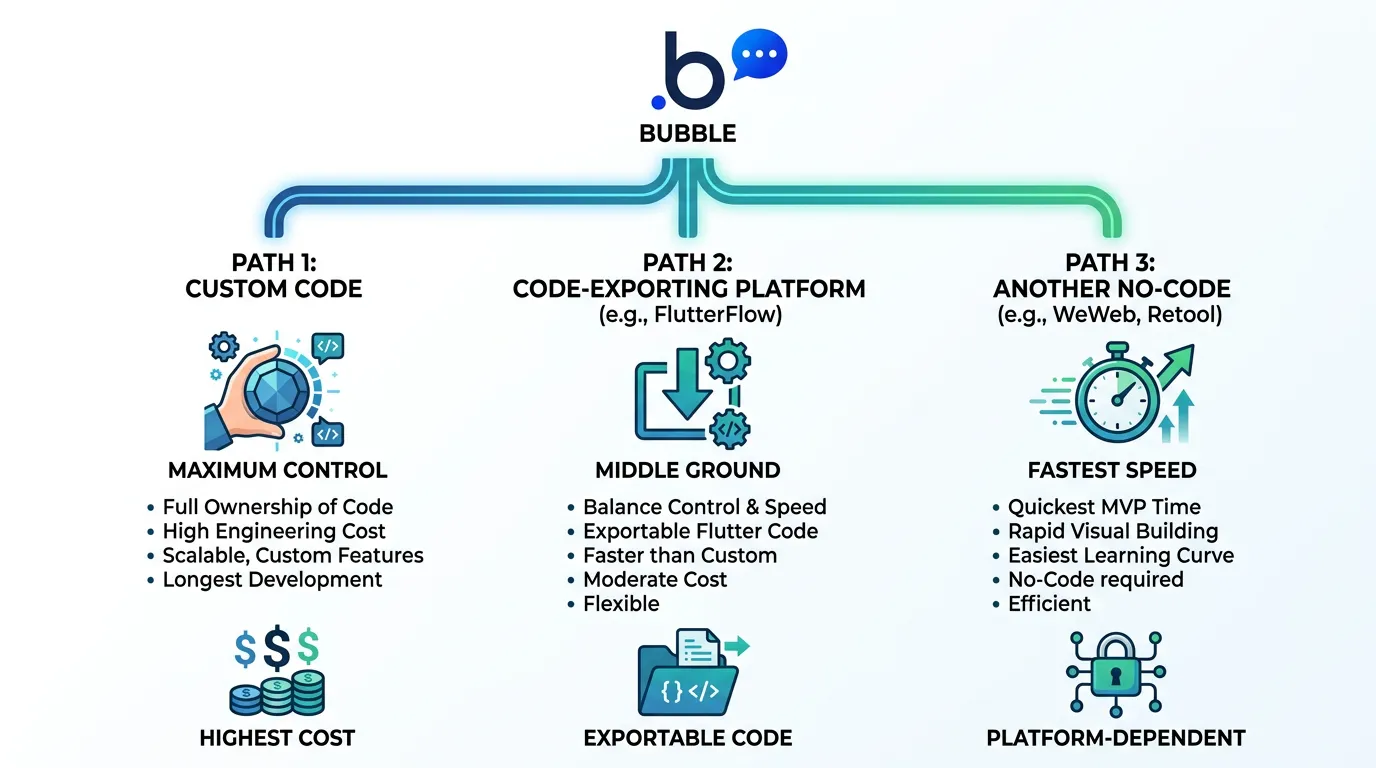
For Bubble founders, this creates a three-way decision: migrate to custom code (maximum control, highest cost), migrate to a code-exporting platform (middle ground), or migrate to another no-code platform that better fits your needs (lowest cost, potentially trading one lock-in for another). This guide compares all three paths so you choose based on your app's requirements and your business's growth trajectory — not on hype.
The Three Exit Paths from Bubble
| Path | Examples | Cost | Timeline | Code Ownership |
|---|---|---|---|---|
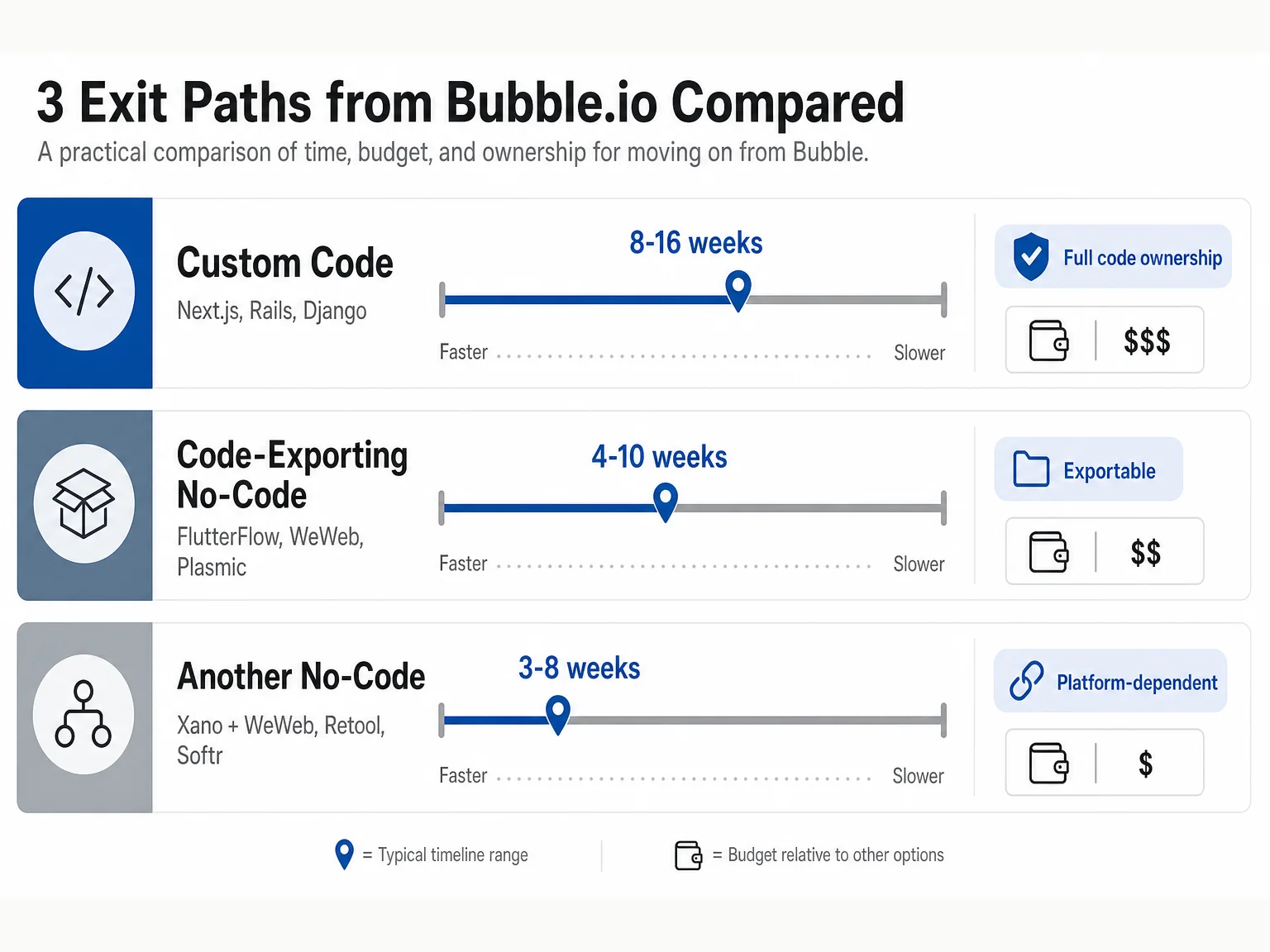
| Custom code | Next.js, Rails, Django | $20K–$60K | 8–16 weeks | Full |
| Code-exporting no-code | FlutterFlow, WeWeb, Plasmic | $10K–$30K | 4–10 weeks | Exportable |
| Another no-code | Xano + WeWeb, Retool, Softr | $5K–$20K | 3–8 weeks | Platform-dependent |
Path 1: Bubble to Custom Code (Full Migration)
This is the path covered in the migration roadmap. You rebuild your entire application in a programming framework — Next.js, Rails, Django, or Laravel. You own every line of code, host on your own infrastructure, and have zero platform dependencies.
When Custom Code Is the Right Choice
- Your app needs performance that no platform can match (sub-second loads, real-time multiplayer)
- Enterprise customers require SOC 2 compliance at the application level
- You plan to raise Series B or beyond (investors expect custom code)
- Your competitive advantage depends on custom technology (AI models, proprietary algorithms)
- You need native mobile apps with platform-specific features
When Custom Code Is Overkill
If your app is a standard SaaS with CRUD operations, user authentication, and a few integrations — and performance is "good enough" at your scale — custom code may be more technology than you need. You will spend $30K+ and 3+ months to get what a code-exporting platform provides in 4 to 8 weeks at half the cost.
Custom code, FlutterFlow, and Xano have very different complexity ceilings. Your Bubble app's backend workflow count, API integration surface, and data model complexity determine which path is realistic on your timeline and budget. An app with 40 backend workflows and 12 API connectors has different migration requirements than one with 5 workflows and 2 connectors. Extract your architecture before you request a quote — not after.
Path 2: Bubble to Code-Exporting No-Code (FlutterFlow, WeWeb)
Code-exporting platforms let you build visually but export the result as real code. This is the key difference from Bubble — when you outgrow the platform, you take the code with you.
FlutterFlow → Flutter/Dart
FlutterFlow builds mobile and web apps using Google's Flutter framework. It exports to Flutter/Dart code that you can open in any IDE, modify, and deploy independently. Best for: apps that need mobile and web from the same codebase, apps targeting iOS and Android natively, and teams that plan to hire Flutter developers eventually.
WeWeb → Vue.js
WeWeb is a frontend builder that exports to Vue.js. It pairs with backend services like Xano, Supabase, or your own API. Best for: web-only SaaS applications, teams that want visual frontend development with a code-based backend, and apps where the frontend is the complex part.
The Trade-offs
Code-exporting platforms give you more portability than Bubble but less control than custom code. The exported code is machine-generated — readable but not as clean as hand-written code. Some platform-specific features may not export cleanly. And the visual builder constrains your design options more than hand-coding. For many SaaS apps, these trade-offs are acceptable. For apps with complex custom logic, they may not be.
Path 3: Bubble to Another No-Code Platform
Sometimes the problem is not no-code itself — it is Bubble specifically. Another no-code platform might solve your specific pain point without the cost and timeline of a code migration.
When This Makes Sense
Your problem is performance → Xano (backend) + WeWeb (frontend) handles higher data volumes. Your problem is mobile → FlutterFlow or Adalo provides native mobile apps Bubble cannot. Your problem is internal tools → Retool or Appsmith are purpose-built for admin panels and internal dashboards. Your problem is simple websites → Softr or Webflow handles content sites with better SEO and speed.
The Lock-In Trade-off
Moving from one no-code platform to another trades one set of limitations for a different set. You solve your current pain point but potentially introduce new ones. Before choosing this path, verify that the destination platform does not have the same bottleneck you are leaving Bubble for — otherwise you are paying for migration without solving the problem.
The combination of Xano (backend) and WeWeb (frontend) addresses the two most common Bubble pain points — limited backend performance and poor SEO — without requiring a full custom code migration. Xano provides a scalable API backend with version control and proper database indexing. WeWeb exports to Vue.js when you outgrow the visual builder. For teams that want more than Bubble but are not ready for a full code migration, this stack merits serious evaluation.
Head-to-Head Comparison
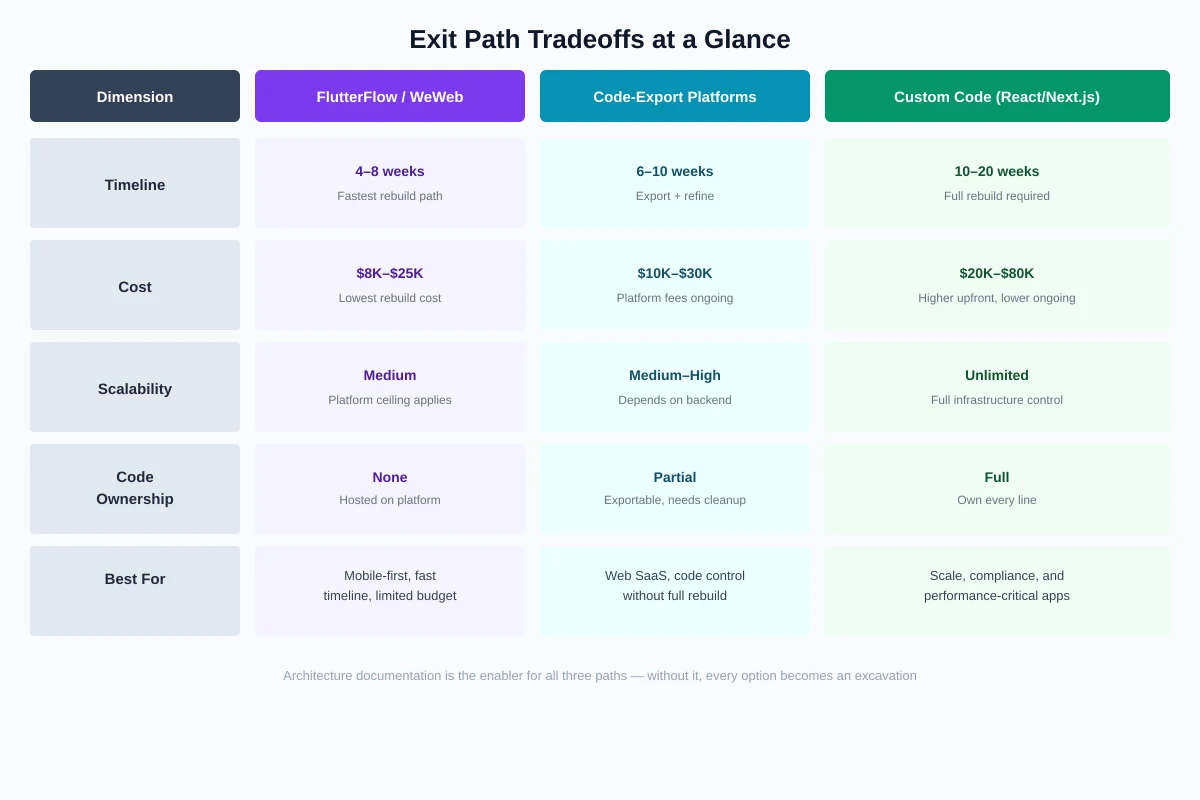
| Factor | Custom Code | FlutterFlow/WeWeb | Another No-Code |
|---|---|---|---|
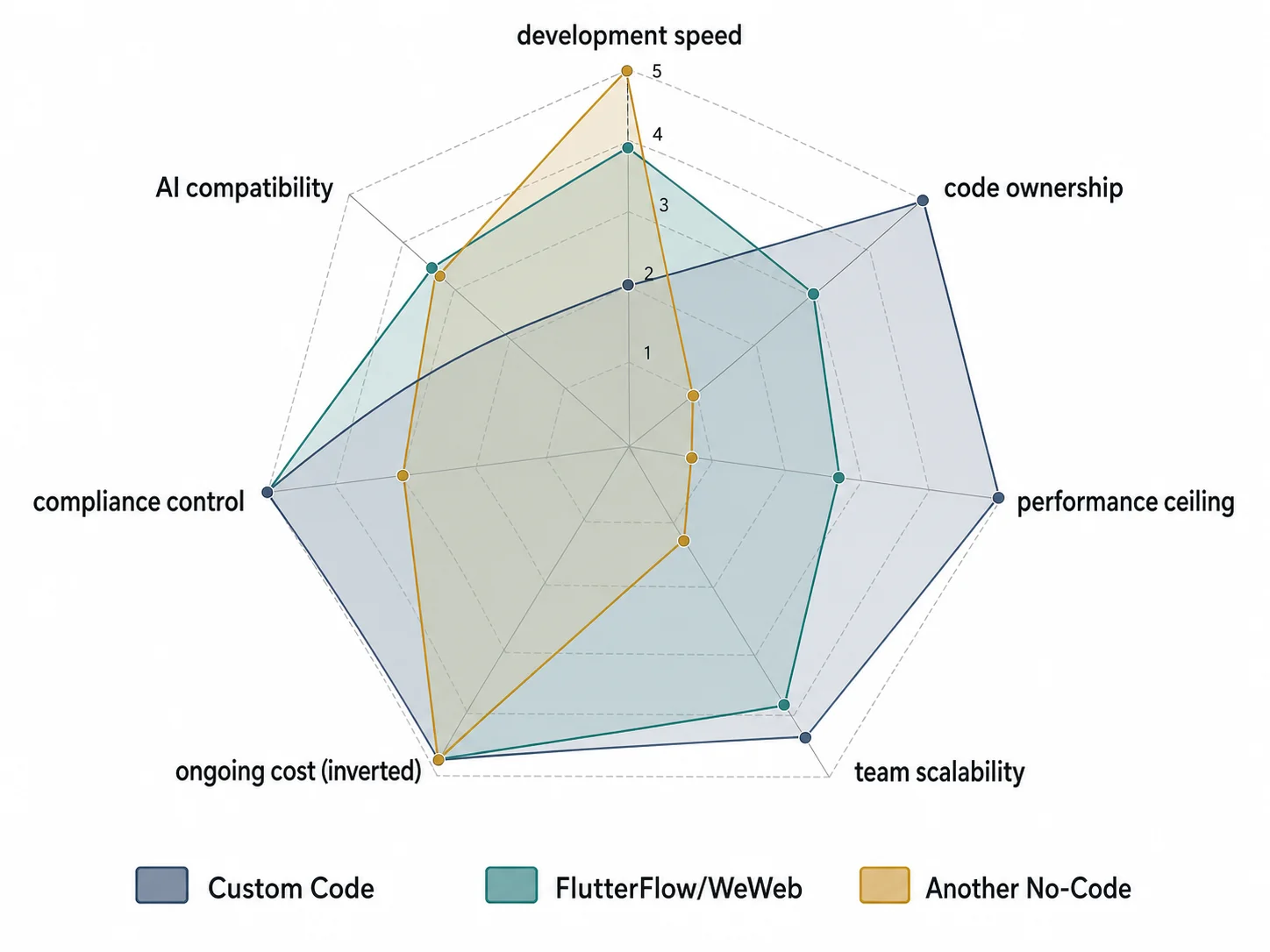
| Development speed | Slowest (8–16 weeks) | Medium (4–10 weeks) | Fastest (3–8 weeks) |
| Code ownership | Full (Git repository) | Exportable (generated code) | None (platform-locked) |
| Performance ceiling | Unlimited | High (Flutter/Vue.js native) | Platform-dependent |
| Team scalability | Global developer pool | Growing Flutter/Vue pool | Platform-specific talent |
| Ongoing cost | Hosting only ($20–$200/mo) | Platform + hosting ($50–$300/mo) | Platform plan ($50–$500/mo) |
| Compliance (SOC 2, HIPAA) | Full control | After code export | Platform-dependent |
| AI code generation compatibility | Excellent | Good (after export) | Limited |
Ongoing-cost ranges above are illustrative. Verify current rates on each vendor's pricing page: FlutterFlow pricing, WeWeb pricing, Xano pricing.
Decision Framework: Which Path Fits Your App
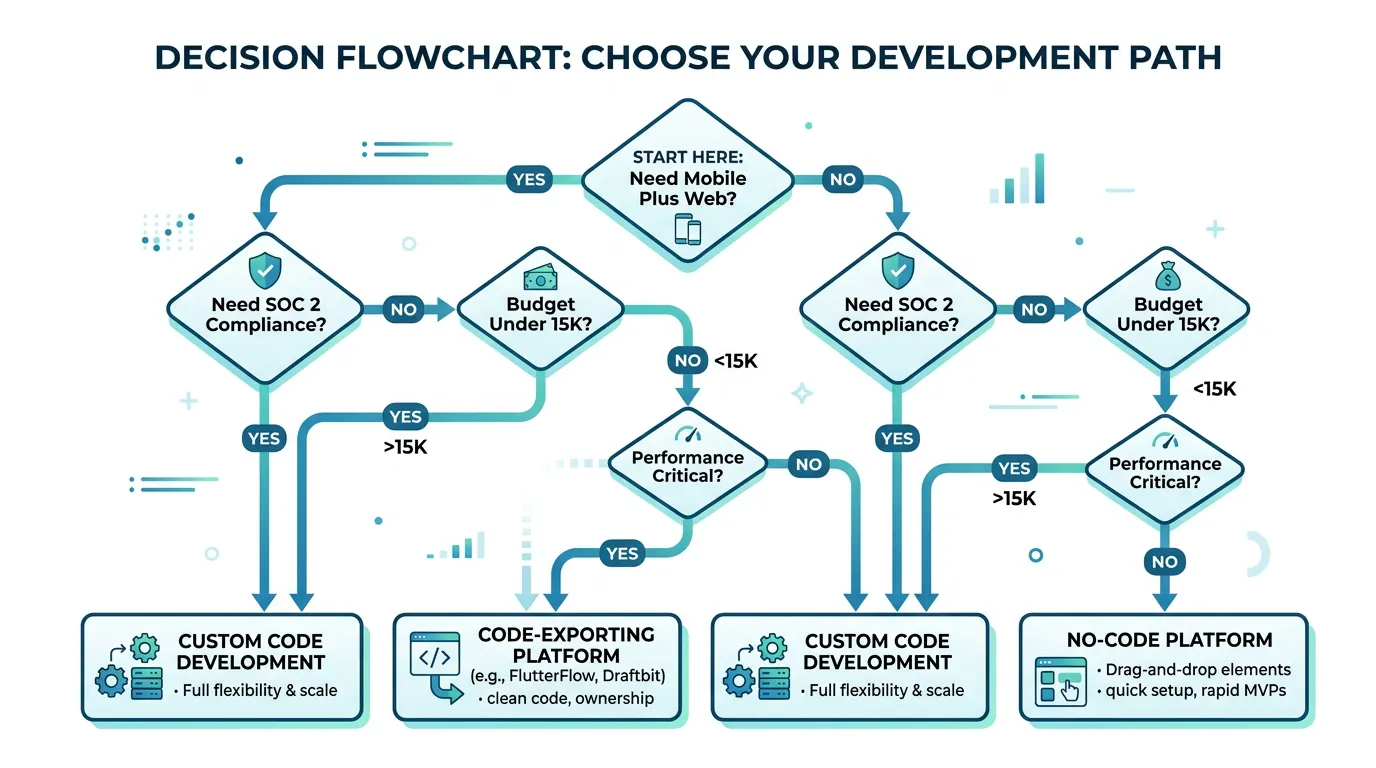
| Your Situation | Best Path | Why |
|---|---|---|
| Need mobile + web from one codebase | FlutterFlow | Cross-platform with code export |
| Web SaaS needing better performance | Custom code (Next.js + Supabase) | Maximum performance, SSR for SEO |
| Backend is the bottleneck, frontend is fine | Xano + WeWeb hybrid | Powerful backend without full rebuild |
| Internal tools or admin panels | Retool or Appsmith | Purpose-built, faster than custom |
| Raising Series B, need code ownership | Custom code | Investor expectations, full audit capability |
| Budget in the sub-$15K range, need fast results | Code-exporting platform | Lower cost, exportable for future flexibility |
Regardless of which exit path you choose, you need to understand your current Bubble architecture first. The data schemas, API specs, backend workflows, and privacy rules that Relis extracts are relevant whether you rebuild in Next.js, FlutterFlow, or Xano. The destination changes. The source documentation does not.
Frequently Asked Questions
Q. Can FlutterFlow handle the same complexity as Bubble?
For frontend logic and UI, yes — FlutterFlow is comparable to Bubble for standard SaaS features. For backend logic, FlutterFlow relies on external services (Firebase, Supabase, custom APIs) rather than built-in backend workflows. If your Bubble app has complex backend workflows, you need a backend service regardless of FlutterFlow vs. custom code.
Q. Is the exported code from FlutterFlow/WeWeb production-quality?
It is functional and deployable but not optimized. Generated code tends to be verbose and less performant than hand-written code. For most SaaS apps, this is acceptable. For performance-critical applications, you may need to refactor the exported code — which still saves time compared to writing everything from scratch.
Q. Can I migrate from Bubble to FlutterFlow automatically?
No. There is no automatic migration path between Bubble and any other platform. You must rebuild the frontend, re-implement the backend logic, and migrate data manually. Architecture documentation reduces the rebuild time by providing complete specifications, but the rebuild itself is manual regardless of the destination.
Q. What about Webflow for marketing sites?
Webflow is excellent for marketing sites and content pages but is not an application platform. If your migration is motivated by SEO (not application performance), moving your marketing pages to Webflow while keeping your app on Bubble is a viable hybrid approach.
Q. Is migrating to another no-code platform just kicking the can?
It depends on why you are leaving. If you are leaving because of Bubble's specific limitations (performance ceiling, pricing model, SEO) and the new platform does not have those limitations, it is a valid move. If you are leaving because of general no-code frustration (wanting more control, code ownership), moving to another no-code platform solves nothing. Diagnose the problem before choosing the solution.
Q. Can I use AI to speed up migration regardless of path?
Yes. AI-assisted development works for all paths — generating Flutter code from specs (FlutterFlow export + AI refinement), generating React components from documentation (custom code path), or configuring Xano endpoints from API specs (no-code backend path). The enabler is always the same: structured architecture documentation.
Choose the Exit That Matches Your Growth Trajectory
- Custom code is not your only option: Code-exporting platforms (FlutterFlow, WeWeb) offer a middle path — visual development speed with code ownership through export. For many SaaS apps, this middle path is the most capital-efficient choice.
- Match the path to the problem: If you need mobile + web, evaluate FlutterFlow. If you need web performance, evaluate custom code. If your backend is the bottleneck, evaluate Xano. If you need internal tools, evaluate Retool. Do not choose a path before diagnosing the problem.
- Code ownership exists on a spectrum: Full ownership (custom code) → exportable (FlutterFlow/WeWeb) → platform-locked (another no-code). Choose the level of ownership your business stage requires — not the maximum possible.
- All paths require architecture documentation: Whether you rebuild in Next.js, FlutterFlow, or Xano, you need to know what your Bubble app does. The same data schemas, API specs, and workflow documentation fuel all three paths.
- Avoid moving sideways: Migrating from one locked platform to another locked platform only makes sense if the new platform specifically solves the problem that is driving your migration. Otherwise, you pay migration cost without migration benefit.
The best exit path is the one that solves your specific problem at the lowest cost and risk — not the one with the most engineering prestige. Understand your bottleneck, map your options, and choose the path that matches where your business is going.
Document Your Architecture for Any Exit Path
Relis extracts your complete Bubble architecture — data schemas, API specs, backend workflows, privacy rules — into documentation that fuels any migration path. Whether you are going to Next.js, FlutterFlow, or Xano, start with the same blueprint.
Scan My App — FreeReady to Plan Your Migration?
Get a complete architecture blueprint — ERD, DDL, API docs, workflow specs — everything your developers need to start rebuilding.
Ready to Plan Your Migration?
Get a complete architecture blueprint — ERD, DDL, API docs, workflow specs — everything your developers need to start rebuilding.